
Ever since iOS 7, Apple has provided a Text Message Forwarding service that can push SMS messages received through your iPhone's cellular network to your other Apple devices.

Using the same network, the forwarding service also allows you to send messages from your iPad or Mac to other phone numbers, even if they don't support Apple's iMessages platform (dumbphones and Android devices, for example).
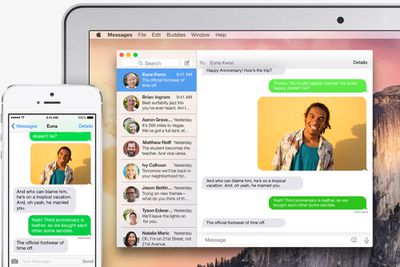
how to text message forwarding
For whatever reason, the Text Message Forwarding feature may not be enabled on your iPhone, so if you tend to miss standard text messages coming through to your phone when you're engaged with something on your Mac or iPad, it's definitely worth enabling.

Once activated, those messages will show up on all your devices in the Messages app as green chat bubbles, allowing you to distinguish them from regular blue iMessages. Keep reading to learn how to activate the feature in iOS 11.

How to Activate Text Message Forwarding in iOS 11

  1. Launch the Settings app on your iPhone.
  2. Tap Messages.
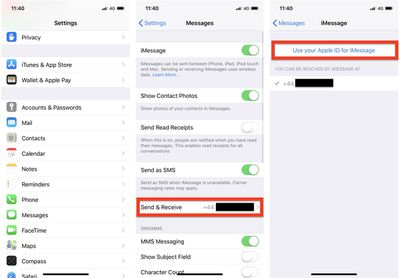
  3. Tap Send & Receive.
  4. Tap Use your Apple ID for iMessage.
    how to text message forwarding 1

  5. Tap Sign in to use your Apple ID for iMessage, or tap Select Other Apple ID and then enter the login credentials for the account you want to use.
  6. Wait for a moment while iMessage activates. Click OK in any dialog boxes that confirm your Apple ID is now being used for iMessage on your other devices.
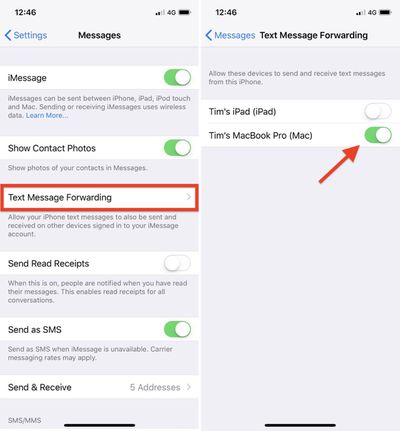
  7. Tap back to Settings -> Messages, and tap the new Text Message Forwarding option in the menu.
    how to text message forwarding 2

  8. Use the toggle buttons next to the devices in the list to include or exclude them from the Text Message Forwarding service. Note that only devices logged into the same iCloud account and connected to the same Wi-Fi network will appear in the list.
  9. A security code may appear on the devices that you enable – make sure to type the code into your iPhone to activate them for the service.
If you followed the steps above but the Text Message Forwarding option doesn't appear in your iPhone's settings app, check that your device is connected to Wi-Fi and the internet connection is good.

Another solution is to turn off and then restart iMessages via Settings -> Messages -> iMessage. You can also try signing out of iMessage and signing in again: Select Settings -> Messages -> Send & Receive, tap your Apple ID at the top, and then tap Sign Out.

Related Forum: iOS 11

Top Rated Comments

diego Avatar
98 months ago
I've used sms forwarding ever since it was introduced, but you'd be surprised how many people are not even aware of the feature, plus it's a bit convoluted to activate for someone without a lot of tech skills.
Score: 4 Votes (Like | Disagree)

Popular Stories

maxresdefault

Apple Shows Off a Key Reason to Upgrade to the iPhone 17

Saturday February 7, 2026 9:26 am PST by
Apple today shared an ad that shows how the upgraded Center Stage front camera on the latest iPhones improves the process of taking a group selfie. "Watch how the new front facing camera on iPhone 17 Pro takes group selfies that automatically expand and rotate as more people come into frame," says Apple. While the ad is focused on the iPhone 17 Pro and iPhone 17 Pro Max, the regular iPhone...
Finder Siri Feature

Why Apple's iOS 26.4 Siri Upgrade Will Be Bigger Than Originally Promised

Friday February 6, 2026 3:06 pm PST by
In the iOS 26.4 update that's coming this spring, Apple will introduce a new version of Siri that's going to overhaul how we interact with the personal assistant and what it's able to do. The iOS 26.4 version of Siri won't work like ChatGPT or Claude, but it will rely on large language models (LLMs) and has been updated from the ground up. Upgraded Architecture The next-generation...
wwdc sans text feature

Apple Rumored to Announce New Product on February 19

Thursday February 5, 2026 12:22 pm PST by
Apple plans to announce the iPhone 17e on Thursday, February 19, according to Macwelt, the German equivalent of Macworld. The report, citing industry sources, is available in English on Macworld. Apple announced the iPhone 16e on Wednesday, February 19 last year, so the iPhone 17e would be unveiled exactly one year later if this rumor is accurate. It is quite uncommon for Apple to unveil...
apple wallet drivers license feature iPhone 15 pro

Apple Says These 7 U.S. States Plan to Offer iPhone Driver's Licenses

Monday February 9, 2026 6:24 am PST by
In select U.S. states, residents can add their driver's license or state ID to the Apple Wallet app on the iPhone and Apple Watch, and then use it to display proof of identity or age at select airports and businesses, and in select apps. The feature is currently available in 13 U.S. states and Puerto Rico, and it is expected to launch in at least seven more in the future. To set up the...
14 inch MacBook Pro Keyboard

New MacBook Pros Could Now Arrive in March

Sunday February 8, 2026 6:02 am PST by
New MacBook Pro models with the M5 Pro and M5 Max chips could arrive as soon as Monday, March 2, according to Bloomberg's Mark Gurman. In today's "Power On" newsletter, Gurman said that the release of new MacBook Pro models is tied to the release of macOS Tahoe 26.3. The launch is said to be slated for as early as the week of March 2. He added that the M4 Pro and M4 Max models on sale today...















