Using a login password on your Mac is a simple way of ensuring your macOS user account stays private, and using FileVault to encrypt your startup disk means only users who can log in to your Mac can read the disk's data. However, neither security method will prevent someone from booting your machine from an external hard drive.
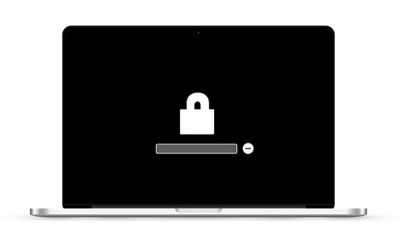
One way to eliminate this vulnerability is by setting a firmware password on your Mac, which will prevent it from working with any other bootable volume than the one you've designated. However before you follow through with the procedure, there's a potential drawback you should definitely consider.
The password is held in a special area of persistent memory on your Mac's mainboard, so it's not something you can reset easily like other passwords. In fact, if you forget the firmware password, the only way to get it reset is to schedule an in-person service appointment with an Apple Store or an Apple Authorized Service Provider. With that caveat in mind, here are the steps you can take to set up a firmware password on your Mac.
How to Set a Firmware Password on Your Mac
- Power off your Mac if it's already running.
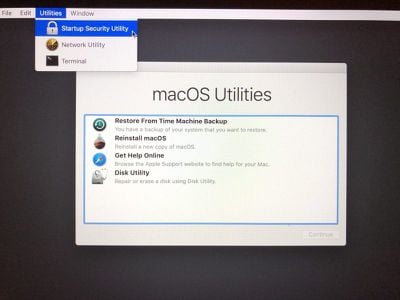
- Turn on your Mac and then immediately press and hold down the Command (⌘) and R keys to activate Recovery Mode.

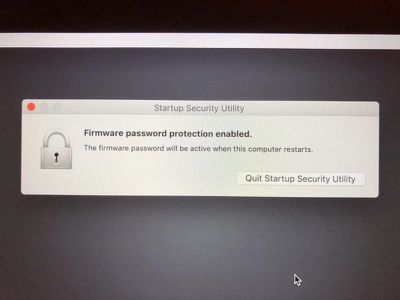
- Wait for the OS X Utilities screen to appear, then select Utilities -> Startup Security Utility from the menu bar.
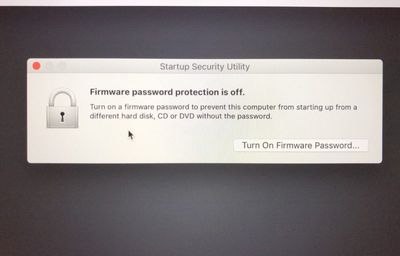
- Click Turn On Firmware Password....
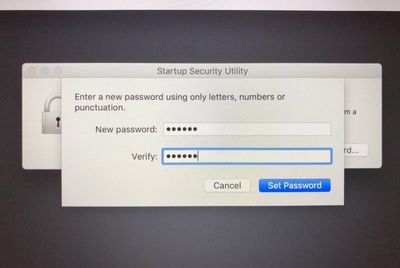
- Enter the same firmware password in both fields provided, then click Set Password.
- Click Quit Firmware Password Utility.
- Click the Apple () menu and select Restart.

That's all there is to it. With the firmware password set, no one will be able to access your Mac's data by using an external hard drive. If you want to turn off a firmware password on your Mac that you've set up, the process is basically the same as above, except at step 4 you click Turn Off Firmware Password.