

 In iOS 13.3, Apple added new Communication Limits to its Screen Time options, which let parents control who their children are able to contact.
If you're not familiar with Apple's Screen Time functions, they enable users to keep track of their device usage and place self-imposed limits on the time they spend using their iPhone or iPad. Screen Time also serves as a parental control system for parents.
The latest feature addition, Communication Limits, lets parents manage who their children are able to contact through FaceTime, Phone, Messages, and iCloud Contacts.
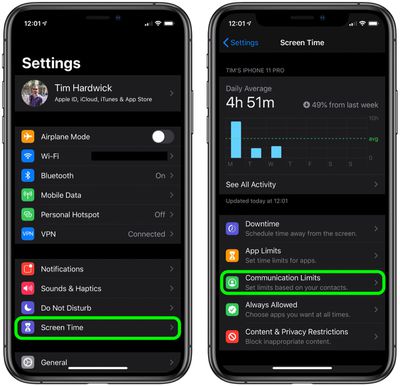
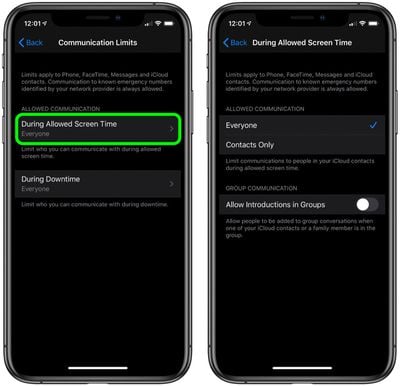
The new options allow contacts only or everyone to be contacted during a child's allotted Screen Time, and there's a toggle that either allows or prevents people from being added to a group chat when a contact or family member is in the group.
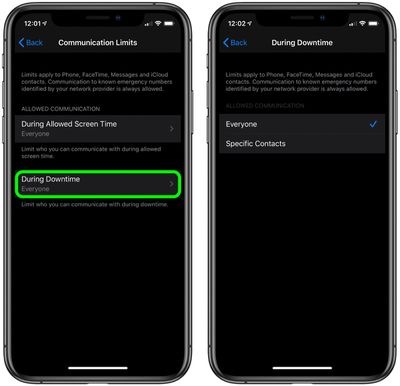
There's also a separate setting for communication limits during downtime, which can be set to allow everyone or just specific contacts. Follow the steps below to set your preferences for your child's Screen Time and Downtime.
How to Set Communication Limits During Allowed Screen Time in iOS
- Launch the Settings app on your iPhone or iPad.
- Tap Screen Time.
- Tap Communication Limits.

- Tap During Allowed Screen Time.
- Under Allowed Communication, select Everyone or Contacts Only.
- To allow people to be added to group conversations when an iCloud contact or a family member is in the same group, tap the toggle next to Allow Introductions in Groups so that it's in the green ON position.
How to Set Communication Limits During Downtime in iOS
- Launch the Settings app on your iPhone or iPad.
- Tap Screen Time.
- Tap Communication Limits.
- Tap During Downtime.
- Tap Specific Contacts.
- Tap Choose From My Contacts and select the people that can be contacted during downtime, then tap Done. If the person you want to allow to be contacted isn't in your contacts, tap Add New Contact and enter their details in a new contact card, then tap Done.
Note that calls to emergency numbers are always allowed and when placed, will turn off communication limits for 24 hours to make sure children are safe and not prevented from communicating with people in the event of an emergency.
























![Apple Pulls Keynote, Pages and Numbers From App Store [Update: Back]](https://images.macrumors.com/t/Okb7kitB_gNr6qe5Pex9nQIysD8=/112x112/article-new/2026/01/Apple-Creator-Studio-iWork-suite.jpg)






















Top Rated Comments
I'd just like to see 2 things from screen time to get it closer to perfect - LONGER parental lock codes and a single button "kill switch" that would put a device into downtime with one touch.