How to Set Up Cardio Fitness Levels in watchOS 7.2 and iOS 14.3 - MacRumors
Skip to Content

How to Set Up Cardio Fitness Levels in watchOS 7.2 and iOS 14.3

by

Apple in watchOS 7 and iOS 14.3 added a new cardio fitness feature that lets Apple Watch owners keep track of their cardio fitness levels through VO2 max measurements. VO2 max is the maximum amount of oxygen that the body can use during exercise, and it can be improved through physical activity.
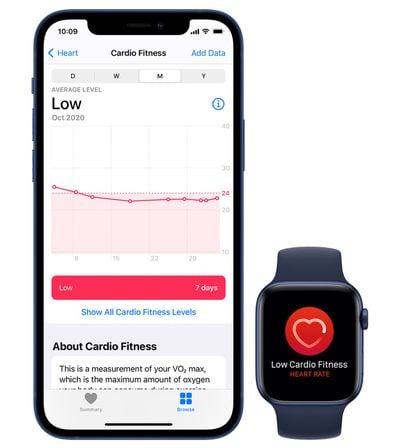
watchos 7 cardio fitness 1
Prior to watchOS 7.2, the Apple Watch was only able to estimate higher levels of VO2 max with outdoor walks, runs, or hikes, but now it can also take cardio fitness measurements as users walk throughout the day, allowing those who don't engage in vigorous exercise to see their cardio fitness levels.

Apple measures cardio fitness levels as high, above average, below average, or low relative to people in your same age group and of the same sex, and it needs to be set up in the Health app on iPhone. Here's how:

  1. Open the Health app.
  2. Tap the Browse tab at the bottom.
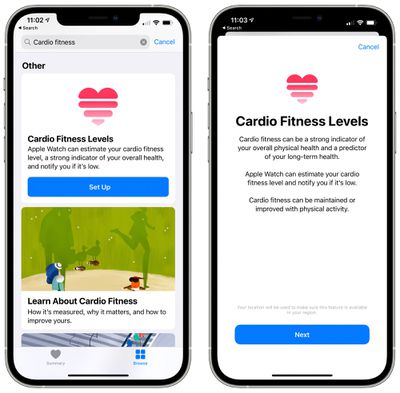
  3. Search for Cardio Fitness. cardio fitness levels setup
  4. Scroll down to Cardio Fitness Levels.
  5. Tap on "Set Up."
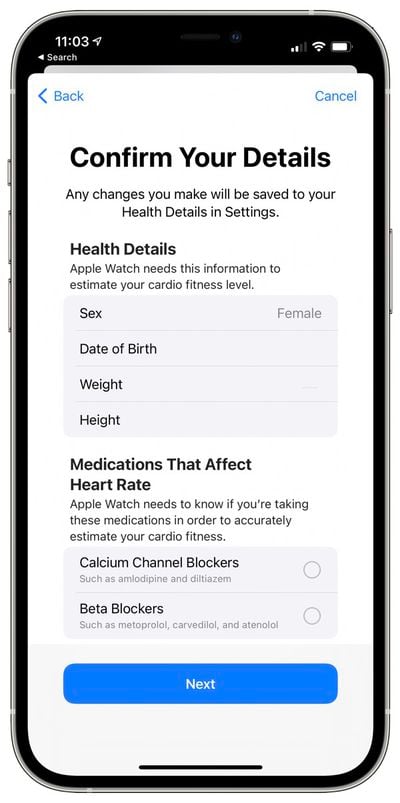
  6. Confirm your health details and enter medications you take that might affect heart rate like beta blockers. cardio fitness level confirm detail
  7. Tap through to learn about Cardio Fitness.
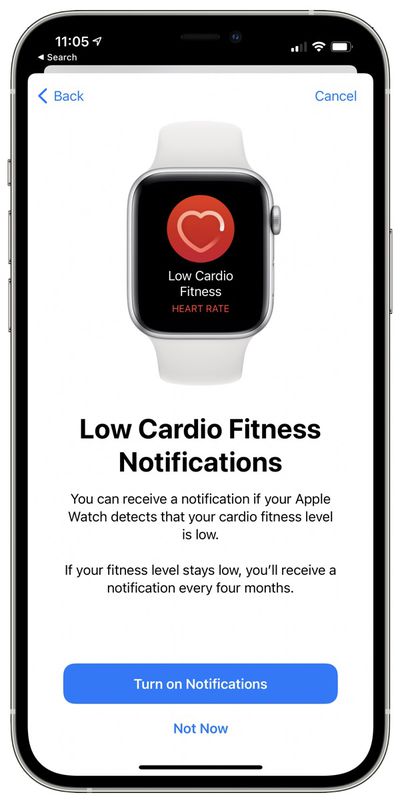
  8. Tap "Turn on Notifications" if you want to receive notifications when your cardio fitness level is low. Otherwise, tap "Not Now." cardio fitnessl level notification
  9. Tap "Done."

That's all there is to it. From there, the Apple Watch will take cardio fitness measurements during outdoor runs or walks, with the info then aggregated inside the Health app. If cardio fitness levels fall too low and notifications are enabled, the Apple Watch will send notifications with suggestions on how to improve it.
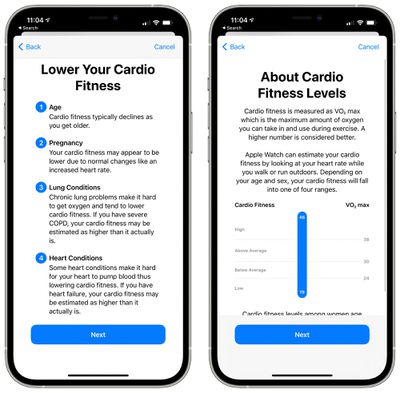
cardio fitness level details
Apple says that there are multiple factors that can lower cardio fitness levels including age, pregnancy, chronic lung conditions, heart conditions, medications, and illness or injury, which is something to be aware of.

Aerobic exercise that causes the heart rate to rise and makes you breathe hard will give you the biggest boost to cardio fitness. Apple recommends running, cycling, or high-intensity interval training, but says even just adding a few hills to a daily walk helps.


Related Roundups: watchOS 26, watchOS 27
Related Forums: iOS 14, Apple Watch

Top Rated Comments

john991 Avatar
76 months ago

What’s your cardio level? Post your age also!
VO₂: 41.5 – age: 58
Score: 2 Votes (Like | Disagree)
76 months ago

Have you keyed in your personal details as well (age, weight etc)?

Any workouts you’ve done so far (I think) were indoors, so they didn’t count. Since the update, other activity will now be included in the VO2 max calculation, assuming you’ve followed the every step in the original post. How long this takes really depends on what activity you do.
Yes, I’ve inputed all of my personal details already. As well as enabled notifications for cardio fitness. I’ve done strength training and cardio/HIIT workouts all indoors today. Still no luck with getting any data for cardio fitness. I will try a short walk outdoors and see if that activates the cardio fitness/ VO2 readings.
Score: 1 Votes (Like | Disagree)
Moakesy Avatar
76 months ago

Does this cardio fitness only work with outdoor walks and runs? I only do home workouts and have already set up the cardio fitness in the health app but so far there is no data being displayed? When I check my health app under the tab “cardio fitness” it is blank. Even though I do daily home workouts.
It was mentioned in the main post:

"Prior to watchOS 7.2, the Apple Watch was only able to estimate higher levels of VO2 max with outdoor walks, runs, or hikes, but now it can also take cardio fitness measurements as users walk throughout the day, allowing those who don't engage in vigorous exercise to see their cardio fitness levels."

From now on you should be able to see your VO2 max.
Score: 1 Votes (Like | Disagree)
76 months ago

On your phone, go to the Watch app, Health, Health Details, Edit. It’s near the bottom.
Thanks so much. I was actually just found it and was doing it as you replied. I appreciate the assist!!
Score: 1 Votes (Like | Disagree)
chucker23n1 Avatar
76 months ago

I accidentally missed the part where you add the medications in. I take a beta blocker. Does anyone know if you can go through the process again and add them in?
On your phone, go to the Watch app, Health, Health Details, Edit. It’s near the bottom.
Score: 1 Votes (Like | Disagree)
76 months ago

AW takes your pulse throughout the day. Not sure if it’s continuous, but it’s close to that.

I have the HR min/max chart as one of my complications on my watch face. Like this one..


May I ask how you managed to set heart rate up to show like this? For me it looks like this:


EDIT: Nevermind, I found it. It's Infographic Modular.

Attachment Image
Score: 1 Votes (Like | Disagree)

Popular Stories

watchos 27

Apple Releases watchOS 27.0.1 for Additional Models

Monday September 28, 2026 2:08 pm PDT by
After releasing watchOS 27.0.1 for the Apple Watch Series 12 and Apple Watch Ultra 4 last week to address a bug that was causing devices to restart unexpectedly, Apple has now released the update for all eligible watches, which includes Series 9 and later. Apple's release notes say only that the update "provides bug fixes for your Apple Watch" and the company does not list any security fixes,...
watchos 27

Apple Releases watchOS 27.0.1 With Fix for Restart Bug

Wednesday September 23, 2026 12:44 pm PDT by
Apple today released watchOS 27.0.1, a minor update to the watchOS 27 operating system that came out last week. The update is limited to the Apple Watch Series 12 and Apple Watch Ultra 4. watchOS 27.0.1 can be downloaded through the Settings app on the watch or the Apple Watch app on a connected iPhone. Software can only be installed when the Apple Watch is on the charger and has over 50...
General visionOS watchOS and tvOS Betas Feature Redux

Apple Releases Third watchOS 27.2, tvOS 27.2 and visionOS 27.2 Betas

Monday October 5, 2026 11:20 am PDT by
Alongside new betas of iOS 27.2, iPadOS 27.2, and macOS Golden Gate 27.2, Apple has released the third betas of watchOS 27.2, tvOS 27.2, and visionOS 27.2. The betas come two weeks after Apple released the second betas. Registered developers can download the betas through the Settings app on each device. With iOS 27.2 and watchOS 27.2, Apple is testing the new Health app that it showed...
Latest Stories
iPhone Duo Demand Reportedly Exceeds Apple's Expectations
1 hour ago
iPhone Duo Launch Begins as First Orders Reach Customers
8 hours ago
1Password for Agents Keeps Your Passwords Hidden From AI
8 hours ago
iPhone Duo 24 Hours Later: Your Questions Answered
9 hours ago
Apple's iWork Apps Get 'Intelligent Assistant' and iPhone Duo Support
10 hours ago
Apple is Apparently Considering a Slightly Larger iPhone Duo
10 hours ago
Giant iPhone Duo Displays Coming to Four Apple Stores
11 hours ago
Apple Pulls Keynote, Pages and Numbers From App Store [Update: Back]
12 hours ago
Apple Updates More Apps With iPhone Duo Support
12 hours ago
Apple Will Label Apps 'Made for iPhone Duo' in App Store
15 hours ago
Amazon Takes $49 Off iPad With Prices Starting at $399.99
16 hours ago
F1 on Apple TV Now Available in Dolby Atmos
16 hours ago
Apple Reveals More Than 50 Apps That Will Be Updated for iPhone Duo
17 hours ago
Apple Blocks Certificates That Could Help Attackers Fake Websites
18 hours ago
Giant iPhone Duo Installations Spotted at Apple Fifth Avenue
19 hours ago
iPhone Duo 2 Prototypes Include Under-Display Face ID
19 hours ago
Tesla App Gains iPad and iPhone Duo Support
23 hours ago
Apple Reportedly Boosts iPhone Duo Orders by 44%
23 hours ago
Fortnite Returning to Australian App Store After Court Ruling
1 day ago
Apple Ordered to Open iPhone to Rival App Stores in Australia
1 day ago
Apple Suppliers Face Hurdles Cutting Circuit Board Emissions
1 day ago
Things Updated for iPhone Duo With Adaptive Layout
1 day ago
Simplicity and Siri AI Are HomeView's Killer Features, Apple Says
1 day ago
iPhone Duo Reviewers Really Miss Face ID
1 day ago
Does the iPhone Duo Run Hot? Here's What Reviews Found
1 day ago
Apple Music's New Look is Now Live on Apple's Website
1 day ago
Anthropic Launches Claude Duet, a Proactive AI Agent
1 day ago
What 32,000 Folds Did to the iPhone Duo's Hinge
1 day ago
iPhone Duo's Hidden FaceTime Camera Takes 'Trash' Photos
1 day ago
iPhone Duo Has 'Edge Light' Feature That Debuted on Macs Last Year
2 days ago