How to Set Up Express Transit With Apple Pay on iPhone and Apple Watch - GeekWebGuides
Skip to Content

How to Set Up Express Transit With Apple Pay on iPhone and Apple Watch

by

Express Transit is an Apple Pay feature that lets you make a payment without unlocking your Apple Watch using Face ID or Touch ID. Thanks to Express Transit, you can now make a transaction at a transit gate just by tapping your iPhone or Apple Watch. But first you have to set it up. This article shows you how.

omny

Where Can I Use Express Transit?

Apple has a web page that it updates with the countries and regions that support the feature. As of writing, Express Transit works in the following places:

  • In mainland China with Beijing Transit cards and Shanghai Transit cards.
  • In Japan with all forms of transit that accept Suica.
  • In London with Transport for London (TfL).
  • In New York City with Metropolitan Transportation Authority (MTA) terminals at select stations.
  • In the San Francisco Bay Area with the Clipper card.
  • In Chicago with the Ventra card.
  • In Portland, Oregon, with all forms of transit that accept Hop Fastpass.

How to Set Up Express Transit on iPhone

To set up Express Transit, you need to be using an iPhone 6s or later with iOS 12.3 or later installed. You can check what software version your device is running by going to Settings -> General -> Software Update.

Obviously, you also need to have a registered at least one debit or credit card with ‌Apple Pay‌. That said, it's worth mentioning that not all banks support Express Transit, but you can find out if your bank does by following these steps.

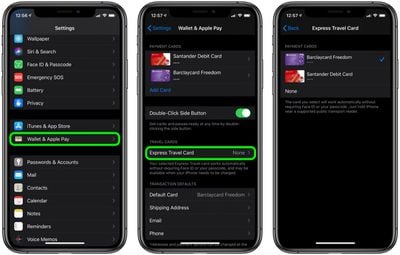
  1. Launch the Settings app on your iPhone.
  2. Tap Wallet & Apple Pay.
  3. Tap Express Travel Card.
  4. Tap one of your cards in the list to use it with Express Transit. A tick will appear next to the card you select. The default option is None.
  5. Authenticate your device using ‌Touch ID‌ or ‌Face ID‌.

settings
If your bank card doesn't support Express Transit, you'll get an error message telling you that the card is incompatible. If no error message appears, you're good to tap-and-go.

How to Set Up Express Transit on Apple Watch

You can also set up Express Transit to work on your watch, so long as it's running watchOS 5.2.1 or later. You can check what version you're running by going to General -> Software Update in the Watch app on your iPhone.

  1. Launch the Watch app on your iPhone.
  2. Tap Wallet & Apple Pay.
  3. Tap Express Travel Card.
  4. Tap one of your cards in the list to use it with Express Transit. A tick will appear next to the card you select. The default option is None.
  5. Authenticate by entering your passcode on your Apple Watch.
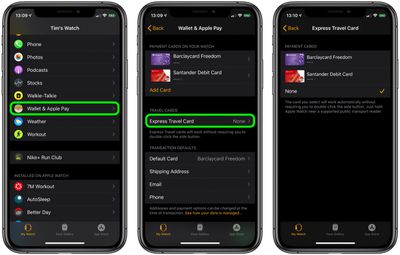
watch settings
If your bank card doesn't support Express Transit, you'll get an error message telling you that the card is incompatible. If no message appears, you're all set.
Related Roundup: Apple Pay

Popular Stories

apple pay feature dynamic island

Banks and Credit Unions to Team Up Against Apple Pay Fees

Friday September 25, 2026 12:22 pm PDT by
An antitrust lawsuit accusing Apple of blocking tap-to-pay competition is moving forward and will see banks and credit unions able to band together to sue Apple. U.S. District Judge Jeffrey White this week certified a class in the lawsuit. It will include any U.S. entities that issued any payment card enabled for Apple Pay and paid Apple a fee for Apple Pay transactions on that payment card. ...
Apple Pay India

Apple Pay Now Available in India With Axis Bank Cards

Tuesday September 29, 2026 5:01 pm PDT by
Apple Pay is now available in India, which means customers with an eligible card can add it to the Wallet app on iPhone and Apple Watch for contactless and online payments. To use Apple Pay in India, users will need an Axis Bank credit card on the Visa or Mastercard network. Earlier today, TechCrunch reported that merchants and payment terminals will need to add Apple Pay support, so the...
Apple Pay India

Apple Pay Reportedly Launching in India Today

Tuesday September 29, 2026 12:52 pm PDT by
Apple Pay is set to launch in India later today (Wednesday local time), starting with Axis Bank credit cards on the Visa and Mastercard networks, according to TechCrunch. India already has a popular Unified Payments Interface (UPI) system for digital payments, so the initial rollout of Apple Pay in the country is expected to be limited. HDFC Bank, ICICI Bank, and SBI Bank/SBI Card are not...
Latest Stories
iPhone Duo Launch Begins as First Orders Reach Customers
2 hours ago
1Password for Agents Keeps Your Passwords Hidden From AI
3 hours ago
iPhone Duo 24 Hours Later: Your Questions Answered
3 hours ago
Apple's iWork Apps Get 'Intelligent Assistant' and iPhone Duo Support
4 hours ago
Apple is Apparently Considering a Slightly Larger iPhone Duo
4 hours ago
Giant iPhone Duo Displays Coming to Four Apple Stores
5 hours ago
Apple Pulls Keynote, Pages and Numbers From App Store [Update: Back]
6 hours ago
Apple Updates More Apps With iPhone Duo Support
6 hours ago
Apple Will Label Apps 'Made for iPhone Duo' in App Store
9 hours ago
Amazon Takes $49 Off iPad With Prices Starting at $399.99
10 hours ago
F1 on Apple TV Now Available in Dolby Atmos
10 hours ago
Apple Reveals More Than 50 Apps That Will Be Updated for iPhone Duo
11 hours ago
Apple Blocks Certificates That Could Help Attackers Fake Websites
12 hours ago
Giant iPhone Duo Installations Spotted at Apple Fifth Avenue
13 hours ago
iPhone Duo 2 Prototypes Include Under-Display Face ID
13 hours ago
Tesla App Gains iPad and iPhone Duo Support
17 hours ago
Apple Reportedly Boosts iPhone Duo Orders by 44%
18 hours ago
Fortnite Returning to Australian App Store After Court Ruling
18 hours ago
Apple Ordered to Open iPhone to Rival App Stores in Australia
18 hours ago
Apple Suppliers Face Hurdles Cutting Circuit Board Emissions
19 hours ago
Things Updated for iPhone Duo With Adaptive Layout
19 hours ago
Simplicity and Siri AI Are HomeView's Killer Features, Apple Says
20 hours ago
iPhone Duo Reviewers Really Miss Face ID
1 day ago
Does the iPhone Duo Run Hot? Here's What Reviews Found
1 day ago
Apple Music's New Look is Now Live on Apple's Website
1 day ago
Anthropic Launches Claude Duet, a Proactive AI Agent
1 day ago
What 32,000 Folds Did to the iPhone Duo's Hinge
1 day ago
iPhone Duo's Hidden FaceTime Camera Takes 'Trash' Photos
1 day ago
iPhone Duo Has 'Edge Light' Feature That Debuted on Macs Last Year
1 day ago
Apple Support App Updated for iPhone Duo's Larger Display
1 day ago