AirPods, introduced last December, are Apple's completely wire-free earphones that have a W1 chip inside for simple pairing between devices.

AirPods work like magic, and while they're easy to set up, the process may not be intuitive to all users who received AirPods this Christmas, so we thought we'd share some quick, easy to digest instructions.
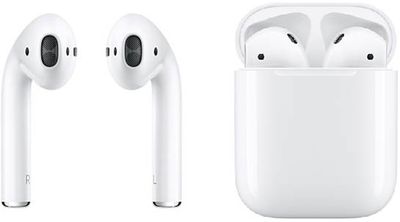
AirPods duo

  1. Remove the AirPods from the packaging.
  2. Leave the AirPods in AirPods case.
  3. Power on your iPhone or iPad, unlock it, and go to the Home screen (aka the main app screen).
  4. Open up the lid to your AirPods case.
  5. Hold the AirPods case with open lid next to your ‌iPhone‌ or ‌iPad‌.
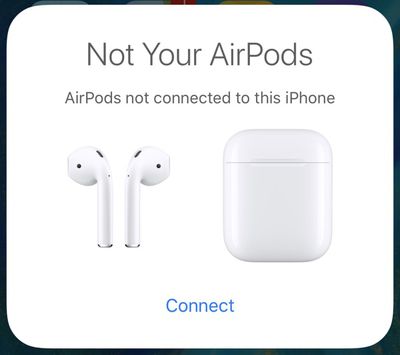
  6. Your iOS device will recognize the AirPods and you'll see a popup to connect your AirPods.airpodsnotconnected
  7. Tap "Connect."
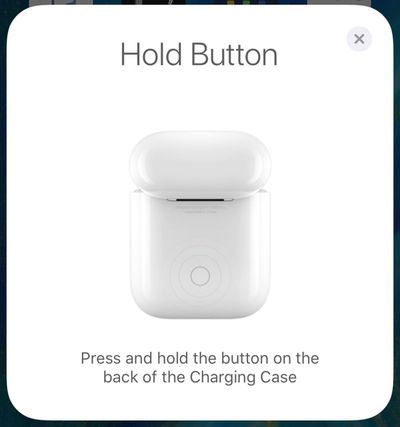
  8. You'll be instructed to press and hold on the back button of the AirPods case.airpodsholdbutton
  9. Press it for a few seconds, and the popup on your ‌iPhone‌ will change to "Connecting."
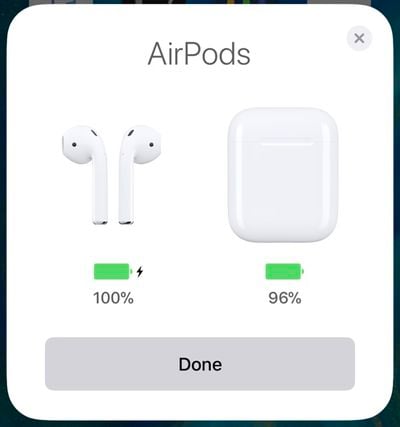
  10. When the connection is complete, the popup will display the battery life for both the AirPods and the case.airpodsconnected

That's all there is to it. Once this setup process has been completed, your AirPods will re-pair to your iOS device whenever you open up the case lid. This re-pairing process takes just a few seconds, so your AirPods are essentially ready to go whenever you pull them out.

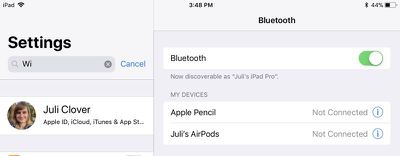
Your AirPods are linked to your iCloud account, so once you pair them with one device, your other devices know they exist. You can switch connections between your devices through the standard Bluetooth settings options, where AirPods will be listed on any device that you're signed into with your ‌iCloud‌ account.

airpodsbluetoothmenu
On iOS devices, go to Settings --> Bluetooth and tap "AirPods." On a Mac, click on the Bluetooth icon in the status bar, choose AirPods, and then select "Connect." On Apple TV, open up the Settings app, choose "Video and Audio," scroll down to "Audio," select "Audio Output" and choose AirPods.

On iOS devices, you can also use the Now Playing widget in Control Center to select AirPods, and on ‌Apple TV‌, you can hold down the Home button on the main ‌Apple TV‌ screen to bring up a shortcut to audio options.

Update: As some MacRumors forum members have pointed out, when pairing with an iOS device signed into your ‌iCloud‌ account, the step involving a button press may not be necessary. In this situation, the AirPods should be ready to pair after opening the case near an ‌iPhone‌ or ‌iPad‌.

Top Rated Comments

macpanzer Avatar
106 months ago
Do you actually need to hold the button on the AirPods case to connect them initially? I can’t remember I had to press it the first time I connected them with my iPhone. Ever since I performed a reset, I had to press it.
No, it is not needed. The button is there for connecting to non-Apple devices.
The author should read the manual for AirPods first, then write a guide.
Score: 17 Votes (Like | Disagree)
Pezboy Avatar
106 months ago
Why the hell do we need a set up guide?? This whole article should be, open airpods. Aaaaaannnnd done
Score: 12 Votes (Like | Disagree)
firewire9000 Avatar
106 months ago
I appreciate the article but the information shown here is incorrect. You don’t need to press the button. In fact, these steps are for when the AirPods are previously connected to other devices.
Score: 8 Votes (Like | Disagree)
Creepitor Avatar
106 months ago
.
Score: 7 Votes (Like | Disagree)
TMRJIJ Avatar
106 months ago
Eek... will not buy
Never make a purchase decision based on some random guy on a tech forum.
Score: 6 Votes (Like | Disagree)
lazyrighteye Avatar
106 months ago
Tough crowd.

Or... Thanks for spending your xmas morn posting these articles, MR. :D
Score: 5 Votes (Like | Disagree)

Popular Stories

Apple Logo Zoomed

Tim Cook Teases Plans for Apple's Upcoming 50th Anniversary

Thursday February 5, 2026 12:54 pm PST by
Apple turns 50 this year, and its CEO Tim Cook has promised to celebrate the milestone. The big day falls on April 1, 2026. "I've been unusually reflective lately about Apple because we have been working on what do we do to mark this moment," Cook told employees today, according to Bloomberg's Mark Gurman. "When you really stop and pause and think about the last 50 years, it makes your heart ...
wwdc sans text feature

Apple Rumored to Announce New Product on February 19

Thursday February 5, 2026 12:22 pm PST by
Apple plans to announce the iPhone 17e on Thursday, February 19, according to Macwelt, the German equivalent of Macworld. The report, citing industry sources, is available in English on Macworld. Apple announced the iPhone 16e on Wednesday, February 19 last year, so the iPhone 17e would be unveiled exactly one year later if this rumor is accurate. It is quite uncommon for Apple to unveil...
Finder Siri Feature

Why Apple's iOS 26.4 Siri Upgrade Will Be Bigger Than Originally Promised

Friday February 6, 2026 3:06 pm PST by
In the iOS 26.4 update that's coming this spring, Apple will introduce a new version of Siri that's going to overhaul how we interact with the personal assistant and what it's able to do. The iOS 26.4 version of Siri won't work like ChatGPT or Claude, but it will rely on large language models (LLMs) and has been updated from the ground up. Upgraded Architecture The next-generation...
iOS 26

iOS 26.3 and iOS 26.4 Will Add These New Features to Your iPhone

Tuesday February 3, 2026 7:47 am PST by
While the iOS 26.3 Release Candidate is now available ahead of a public release, the first iOS 26.4 beta is likely still at least a week away. Following beta testing, iOS 26.4 will likely be released to the general public in March or April. Below, we have recapped known or rumored iOS 26.3 and iOS 26.4 features so far. iOS 26.3 iPhone to Android Transfer Tool iOS 26.3 makes it easier...
maxresdefault

Apple Shows Off a Key Reason to Upgrade to the iPhone 17

Saturday February 7, 2026 9:26 am PST by
Apple today shared an ad that shows how the upgraded Center Stage front camera on the latest iPhones improves the process of taking a group selfie. "Watch how the new front facing camera on iPhone 17 Pro takes group selfies that automatically expand and rotate as more people come into frame," says Apple. While the ad is focused on the iPhone 17 Pro and iPhone 17 Pro Max, the regular iPhone...