

Apple in April 2019 debuted its completely wireless Powerbeats Pro headphones, featuring multiple improvements over the original Beats-branded wired Powerbeats 3.
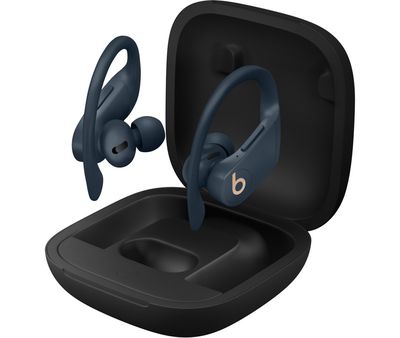
If you've purchased a pair of Apple's fitness-focused earbuds, you'll be eager to use them to listen to music, take phone calls, use Siri, and more. Keep reading to learn how to set up and connect them to your devices.
Update Your Software
As mentioned, Apple's second-generation AirPods include new features not seen in the Powerbeats line of headphones, but to use them you'll need to make sure your devices are running the latest software.
On iOS devices:
If you want to use your new AirPods with an iPhone, iPad, or iPod touch, make sure you're running iOS 12.2 or later.
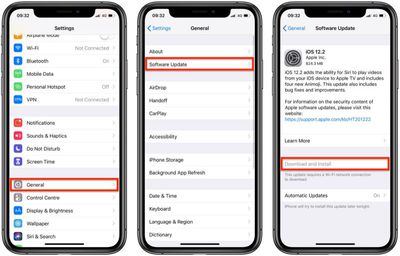
To check that your device's software is up to date, launch the Settings app and then select General -> Software Update, and download any available updates if necessary.
On Mac:
To use your new AirPods with your Mac, it needs to be running macOS 10.14.4 or later. To check that your machine is up to date with the latest software, select System Preferences... from the Apple () menu in the top-left corner of the screen, and then click Software Update in the preferences window.
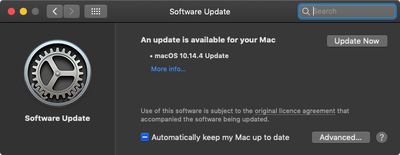
If your Mac finds an update is available, click the Update Now button to download the software and allow the software to install when prompted.
Set Up Powerbeats Pro on iPhone, iPad, and iPod touch
Before you can begin using your New Powerbeats Pro with your iOS devices, there are a few quick steps you need to perform.
- Unlock your iPhone, iPad, or iPod touch. If your device is already unlocked, navigate to the Home screen.
- Bring the Powerbeats Pro case – with the earbuds inside – close to your device and open the case lid.
- Wait for the setup animation to appear on your device's screen.
- Tap Connect, then tap Done.

- If you haven't set up "Hey Siri" already on your device, you'll be guided through the setup.
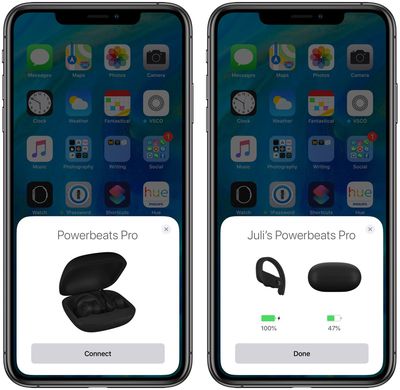
That's all there is to it. Your Powerbeats Pro should now pair seamlessly with your device whenever you go to use them. Note that if you're signed in to iCloud, your Powerbeats Pro will be set up automatically with any of your supported devices that are signed in to iCloud with the same Apple ID.
Connect Powerbeats Pro to Your Mac
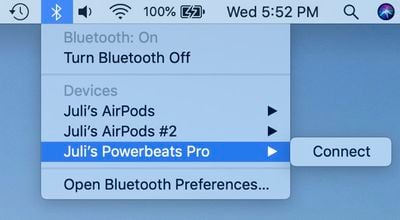
If you've set up Powerbeats Pro with your iPhone, iPad, or iPod touch and your Mac is signed in to iCloud with the same Apple ID, then the earbuds should be ready to use with your Mac. In that case, all you you need to do is put them in your ears, click the Bluetooth icon in your Mac's menu bar, select Powerbeats Pro from the dropdown list, and click Connect.
Connect Powerbeats Pro to Android Devices
You can use Powerbeats Pro with Android smartphones and other devices. You won't be able to use "Hey Siri" but you can use them to listen and talk. Check out our special guide to learn how to use Powerbeats Pro on Android, as well as the benefits, the downsides, and how well Powerbeats Pro work on non-Apple devices.

























![Apple Pulls Keynote, Pages and Numbers From App Store [Update: Back]](https://images.macrumors.com/t/Okb7kitB_gNr6qe5Pex9nQIysD8=/112x112/article-new/2026/01/Apple-Creator-Studio-iWork-suite.jpg)



















