In late January 2023, Apple released a HomePod 16.3 software update that adds humidity and temperature sensing to the second-generation HomePod and all HomePod mini models. This article explains how the features work and what you can do with them.
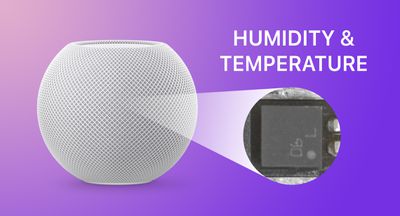
HomePod mini humiditytemperature feature
Apple's new second-generation ‌HomePod‌ features temperature and humidity sensors that can be used to measure the indoor climate. But that's not all. The new 16.3 ‌HomePod‌ software allows you to run automations based on these measurements.

What's more, the existing ‌HomePod mini‌ has a dormant temperature and humidity sensor that Apple activated with the 16.3 update, allowing the same temperature and humidity settings to be used for home automation and device activation purposes. (Sadly, that is not the case for the first-generation ‌HomePod‌.)

Below, we show you how the temperature and humidity sensor information appears in the Home app, and how you can add automations. In our example, after having installed the 16.3 software on a ‌HomePod mini‌, we run through the steps needed to activate a thermostat to heat a room whenever it falls below 66.2 degrees Fahrenheit (19 degrees Celsius).

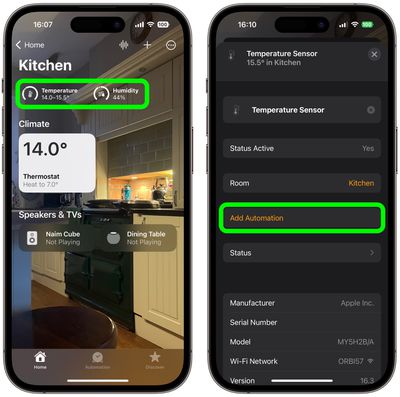
  1. Open the Home app and select the room where the ‌HomePod mini‌ or second-generation ‌HomePod‌ is located.
  2. After a short calibration phase on first use, the readouts at the top of the room menu provide live climate measurements. We're going to tap the Temperature readout.
  3. Tap the Temperature Sensor button in the pop-up menu to access the settings card.
  4. Tap Add Automation.
    home

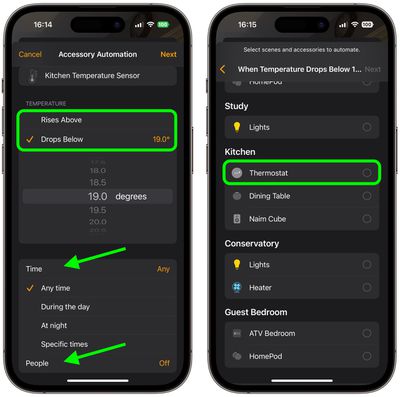
  5. Using the dial, choose a temperature level that activates the automation using the Rises Above and Drops Below options.
  6. Use the Time setting to choose from Any time, During the day, At night, or Specific times.
  7. Use the People setting to choose whether this automation should run based on When I am home or When I am not home. You can also turn this setting off.
  8. Tap Next, then select the accessory that you want to use with this automation. Here we're selecting Thermostat.
    home

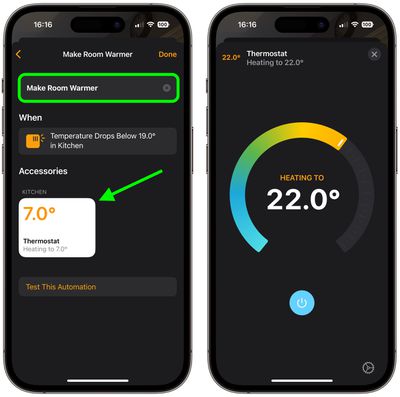
  9. Tap Next, then give your automation a name at the top of the menu and set your accessory to perform an action. Here, we're setting the thermostat to heat the kitchen to 71.6 degrees Fahrenheit, or 22 degrees Celsius.
  10. Tap Done, then tap the X to close the Temperature Sensor settings card.
    home

Our automation is now ready to activate the thermostat to heat the room whenever the temperature drops below the specified measurement. To complement the automation, we could create an additional one that turns off the thermostat when the room reaches a certain temperature.

This is just one example of some of the new features available with the ‌HomePod‌ 16.3 software update. The update also brings users the ability to add remastered ambient sounds to scenes, automations, and alarms, as well as the ability to use Siri to set recurring automations and find people who are in your Find My contacts.


Related Roundups: HomePod, HomePod mini

Top Rated Comments

Cheesehead Dave Avatar
40 months ago

They have a temperature sensor right next to a CPU?
It actually at the base, well away from the CPU: https://www.techhive.com/article/579285/the-homepod-mini-reportedly-has-a-secret-temperature-sensor.html
Score: 8 Votes (Like | Disagree)
foobarbaz Avatar
40 months ago

eh, just use a smart thermostat.
Or a dumb thermostat. Setting a target temperature is literally what they do.

There's no need to set it when the temperature drops. Just set the minimum temperature and it'll activate when needed. If it's warmer, it will turn off on its own.

So what's the benefit of this complicated automation?
I mean, how often will it even activate? Only once, I guess. Because once the thermostat is set to 22°, it will stay that warm permanently, and it will never trigger again.
Score: 7 Votes (Like | Disagree)
Will Co Avatar
40 months ago
You should also know that the HomeKit protocol, and in particular the conditional rules that are supported, is actually far richer and expansive than the functionality surfaced within the native Home app. For example, within the Home app, you cannot configure a rule that says "At Sunrise, turn on this water feature, but only if the temperature of my garden sensor is > 3 degC". There are similar looking things that come close, which you can create, but not one with that specific conditional structure. If you look at some of the third party apps available there is a heck of a lot more you can do with your HomeKit accessories. For example, using some of the tools you can configure more complex rules, such as the one above, and weirdly they will be displayed correctly by the Home app, although you cannot edit them. You would have thought that Apple, having defined the entire HomeKit protocol, would have created a UI that surfaces all of it. Seems that the UI team are still playing catch up with the rest of the HomeKit system.
Score: 6 Votes (Like | Disagree)
6787872 Avatar
40 months ago

Or a dumb thermostat. Setting a target temperature is literally what they do.

There's no need to set it when the temperature drops. Just set the minimum temperature and it'll activate when needed. If it's warmer, it will turn off on its own.

So what's the benefit of this complicated automation?
I mean, how often will it even activate? Only once, I guess. Because once the thermostat is set to 22°, it will stay that warm permanently, and it will never trigger again.
the 'target' temperature is not always fixed. scheduling? different temps time of day? temps based on weather?

it's really not that complicated.
Score: 6 Votes (Like | Disagree)
iStorm Avatar
40 months ago

So what's the benefit of this complicated automation?
I mean, how often will it even activate? Only once, I guess. Because once the thermostat is set to 22°, it will stay that warm permanently, and it will never trigger again.
Presumably would have another one to turn it down once it hits a certain point, but yeah...could just use a regular thermostat. But... most people's thermostat is only one central location. They could put the HomePod in a room that gets colder quicker and use it to call for heat.

Also, let's not limit ourselves to thermostats. This could be used to shut the blinds when it starts getting warm, or to turn on some fans to move the air around.
Score: 5 Votes (Like | Disagree)
Justin39 Avatar
40 months ago
Very nice addition!
Score: 5 Votes (Like | Disagree)

Popular Stories

Apple Logo Zoomed

Tim Cook Teases Plans for Apple's Upcoming 50th Anniversary

Thursday February 5, 2026 12:54 pm PST by
Apple turns 50 this year, and its CEO Tim Cook has promised to celebrate the milestone. The big day falls on April 1, 2026. "I've been unusually reflective lately about Apple because we have been working on what do we do to mark this moment," Cook told employees today, according to Bloomberg's Mark Gurman. "When you really stop and pause and think about the last 50 years, it makes your heart ...
wwdc sans text feature

Apple Rumored to Announce New Product on February 19

Thursday February 5, 2026 12:22 pm PST by
Apple plans to announce the iPhone 17e on Thursday, February 19, according to Macwelt, the German equivalent of Macworld. The report, citing industry sources, is available in English on Macworld. Apple announced the iPhone 16e on Wednesday, February 19 last year, so the iPhone 17e would be unveiled exactly one year later if this rumor is accurate. It is quite uncommon for Apple to unveil...
Finder Siri Feature

Why Apple's iOS 26.4 Siri Upgrade Will Be Bigger Than Originally Promised

Friday February 6, 2026 3:06 pm PST by
In the iOS 26.4 update that's coming this spring, Apple will introduce a new version of Siri that's going to overhaul how we interact with the personal assistant and what it's able to do. The iOS 26.4 version of Siri won't work like ChatGPT or Claude, but it will rely on large language models (LLMs) and has been updated from the ground up. Upgraded Architecture The next-generation...
iOS 26

iOS 26.3 and iOS 26.4 Will Add These New Features to Your iPhone

Tuesday February 3, 2026 7:47 am PST by
While the iOS 26.3 Release Candidate is now available ahead of a public release, the first iOS 26.4 beta is likely still at least a week away. Following beta testing, iOS 26.4 will likely be released to the general public in March or April. Below, we have recapped known or rumored iOS 26.3 and iOS 26.4 features so far. iOS 26.3 iPhone to Android Transfer Tool iOS 26.3 makes it easier...
iphone 17 pro dark blue 1

iPhone 18 Pro Max Rumored to Deliver Next-Level Battery Life

Friday February 6, 2026 5:14 am PST by
The iPhone 18 Pro Max will feature a bigger battery for continued best-in-class battery life, according to a known Weibo leaker. Citing supply chain information, the Weibo user known as "Digital Chat Station" said that the iPhone 18 Pro Max will have a battery capacity of 5,100 to 5,200 mAh. Combined with the efficiency improvements of the A20 Pro chip, made with TSMC's 2nm process, the...