How to Set Up Temperature and Humidity Automations on HomePod - MacRumors
Skip to Content

How to Set Up Temperature and Humidity Automations on HomePod

by

In late January 2023, Apple released a HomePod 16.3 software update that adds humidity and temperature sensing to the second-generation HomePod and all ‌HomePod‌ mini models. This article explains how the features work and what you can do with them.
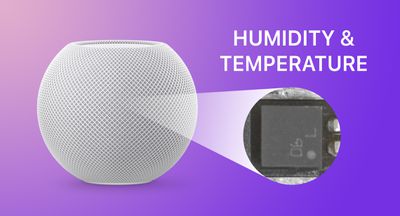
HomePod mini humiditytemperature feature
Apple's new second-generation ‌HomePod‌ features temperature and humidity sensors that can be used to measure the indoor climate. But that's not all. The new 16.3 ‌HomePod‌ software allows you to run automations based on these measurements.

What's more, the existing ‌HomePod‌ mini has a dormant temperature and humidity sensor that Apple activated with the 16.3 update, allowing the same temperature and humidity settings to be used for home automation and device activation purposes. (Sadly, that is not the case for the first-generation ‌HomePod‌.)

Below, we show you how the temperature and humidity sensor information appears in the Home app, and how you can add automations. In our example, after having installed the 16.3 software on a ‌HomePod‌ mini, we run through the steps needed to activate a thermostat to heat a room whenever it falls below 66.2 degrees Fahrenheit (19 degrees Celsius).

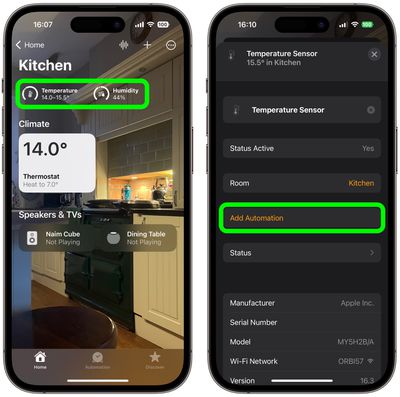
  1. Open the Home app and select the room where the ‌HomePod‌ mini or second-generation ‌HomePod‌ is located.
  2. After a short calibration phase on first use, the readouts at the top of the room menu provide live climate measurements. We're going to tap the Temperature readout.
  3. Tap the Temperature Sensor button in the pop-up menu to access the settings card.
  4. Tap Add Automation.
    home

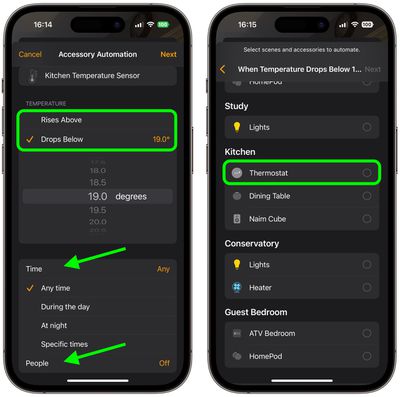
  5. Using the dial, choose a temperature level that activates the automation using the Rises Above and Drops Below options.
  6. Use the Time setting to choose from Any time, During the day, At night, or Specific times.
  7. Use the People setting to choose whether this automation should run based on When I am home or When I am not home. You can also turn this setting off.
  8. Tap Next, then select the accessory that you want to use with this automation. Here we're selecting Thermostat.
    home

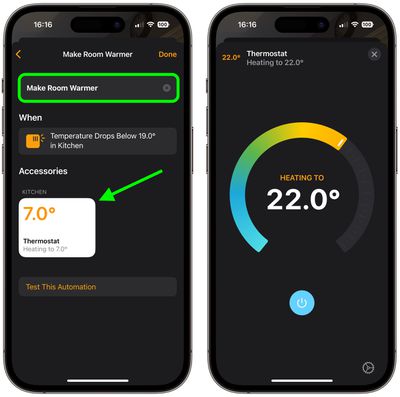
  9. Tap Next, then give your automation a name at the top of the menu and set your accessory to perform an action. Here, we're setting the thermostat to heat the kitchen to 71.6 degrees Fahrenheit, or 22 degrees Celsius.
  10. Tap Done, then tap the X to close the Temperature Sensor settings card.
    home

Our automation is now ready to activate the thermostat to heat the room whenever the temperature drops below the specified measurement. To complement the automation, we could create an additional one that turns off the thermostat when the room reaches a certain temperature.

This is just one example of some of the new features available with the ‌HomePod‌ 16.3 software update. The update also brings users the ability to add remastered ambient sounds to scenes, automations, and alarms, as well as the ability to use Siri to set recurring automations and find people who are in your Find My contacts.


Related Roundups: HomePod, HomePod mini 2

Top Rated Comments

49 months ago

They have a temperature sensor right next to a CPU?
It actually at the base, well away from the CPU: https://www.techhive.com/article/579285/the-homepod-mini-reportedly-has-a-secret-temperature-sensor.html
Score: 8 Votes (Like | Disagree)
49 months ago

eh, just use a smart thermostat.
Or a dumb thermostat. Setting a target temperature is literally what they do.

There's no need to set it when the temperature drops. Just set the minimum temperature and it'll activate when needed. If it's warmer, it will turn off on its own.

So what's the benefit of this complicated automation?
I mean, how often will it even activate? Only once, I guess. Because once the thermostat is set to 22°, it will stay that warm permanently, and it will never trigger again.
Score: 7 Votes (Like | Disagree)
49 months ago

Or a dumb thermostat. Setting a target temperature is literally what they do.

There's no need to set it when the temperature drops. Just set the minimum temperature and it'll activate when needed. If it's warmer, it will turn off on its own.

So what's the benefit of this complicated automation?
I mean, how often will it even activate? Only once, I guess. Because once the thermostat is set to 22°, it will stay that warm permanently, and it will never trigger again.
the 'target' temperature is not always fixed. scheduling? different temps time of day? temps based on weather?

it's really not that complicated.
Score: 6 Votes (Like | Disagree)
Will Co Avatar
49 months ago
You should also know that the HomeKit protocol, and in particular the conditional rules that are supported, is actually far richer and expansive than the functionality surfaced within the native Home app. For example, within the Home app, you cannot configure a rule that says "At Sunrise, turn on this water feature, but only if the temperature of my garden sensor is > 3 degC". There are similar looking things that come close, which you can create, but not one with that specific conditional structure. If you look at some of the third party apps available there is a heck of a lot more you can do with your HomeKit accessories. For example, using some of the tools you can configure more complex rules, such as the one above, and weirdly they will be displayed correctly by the Home app, although you cannot edit them. You would have thought that Apple, having defined the entire HomeKit protocol, would have created a UI that surfaces all of it. Seems that the UI team are still playing catch up with the rest of the HomeKit system.
Score: 6 Votes (Like | Disagree)
49 months ago

So what's the benefit of this complicated automation?
I mean, how often will it even activate? Only once, I guess. Because once the thermostat is set to 22°, it will stay that warm permanently, and it will never trigger again.
Presumably would have another one to turn it down once it hits a certain point, but yeah...could just use a regular thermostat. But... most people's thermostat is only one central location. They could put the HomePod in a room that gets colder quicker and use it to call for heat.

Also, let's not limit ourselves to thermostats. This could be used to shut the blinds when it starts getting warm, or to turn on some fans to move the air around.
Score: 5 Votes (Like | Disagree)
MrRom92 Avatar
49 months ago
This is awesome. One of my HomePod minis is in the bathroom, and I already have the exhaust fan hooked up to HomeKit. I often just ask siri to turn it on or off. But now I’ll probably be able to run automations to run the fan whenever the humidity in the room rises above a certain level and turn it off once the humidity in the room has dropped.
Score: 5 Votes (Like | Disagree)

Popular Stories

Apple TV 4K HomeView HomePod Mini tweaked

New Apple TV 4K, HomeView, and HomePod Mini: 16 Details Just Leaked

Sunday October 11, 2026 12:56 pm PDT by
Just two days before Apple's "Welcome home" experience in New York, Bloomberg's Mark Gurman has leaked several details about the new products set to be unveiled, including an all-new smart home hub, a HomePod mini 2, and a new Apple TV 4K. Here is an all-in-one summary of the details shared by Gurman:Apple's home hub with a touch-enabled display will be named HomeView, seemingly confirming a ...
HomePod minis Apple TV and iPad mini Leak Feature

iPad Mini With A20 Pro, New HomePod Mini Colors, and New Apple TV 4K All Just Leaked

Friday September 25, 2026 8:18 am PDT by
The next iPad mini, HomePod mini, and Apple TV 4K models have all leaked, just a few weeks before the devices are expected to be announced. Specifically, MacRumors contributor Aaron Perris discovered a few of Apple's official images of the devices, confirming their existence and some new features that are planned. The most notable iPad mini details revealed in today's leak include an A20 Pro ...
HomePod minis on gradient feature 1 1

Exclusive: First Look at HomePod Mini 2 in Three New Colors

Friday September 25, 2026 8:17 am PDT by
Apple's new HomePod mini will share the same design as the original model and come in five colors, MacRumors has found. The information originates from Apple's own code (spotted by MacRumors contributor Aaron Perris) and shows clear product images of the new models in all of their colors. The above image contains Apple's own icons, which specifically refer to a "HomePod mini 2." The new...
Latest Stories
iPhone Duo Demand Reportedly Exceeds Apple's Expectations
1 hour ago
iPhone Duo Launch Begins as First Orders Reach Customers
7 hours ago
1Password for Agents Keeps Your Passwords Hidden From AI
8 hours ago
iPhone Duo 24 Hours Later: Your Questions Answered
9 hours ago
Apple's iWork Apps Get 'Intelligent Assistant' and iPhone Duo Support
10 hours ago
Apple is Apparently Considering a Slightly Larger iPhone Duo
10 hours ago
Giant iPhone Duo Displays Coming to Four Apple Stores
11 hours ago
Apple Pulls Keynote, Pages and Numbers From App Store [Update: Back]
12 hours ago
Apple Updates More Apps With iPhone Duo Support
12 hours ago
Apple Will Label Apps 'Made for iPhone Duo' in App Store
15 hours ago
Amazon Takes $49 Off iPad With Prices Starting at $399.99
16 hours ago
F1 on Apple TV Now Available in Dolby Atmos
16 hours ago
Apple Reveals More Than 50 Apps That Will Be Updated for iPhone Duo
17 hours ago
Apple Blocks Certificates That Could Help Attackers Fake Websites
18 hours ago
Giant iPhone Duo Installations Spotted at Apple Fifth Avenue
19 hours ago
iPhone Duo 2 Prototypes Include Under-Display Face ID
19 hours ago
Tesla App Gains iPad and iPhone Duo Support
23 hours ago
Apple Reportedly Boosts iPhone Duo Orders by 44%
23 hours ago
Fortnite Returning to Australian App Store After Court Ruling
1 day ago
Apple Ordered to Open iPhone to Rival App Stores in Australia
1 day ago
Apple Suppliers Face Hurdles Cutting Circuit Board Emissions
1 day ago
Things Updated for iPhone Duo With Adaptive Layout
1 day ago
Simplicity and Siri AI Are HomeView's Killer Features, Apple Says
1 day ago
iPhone Duo Reviewers Really Miss Face ID
1 day ago
Does the iPhone Duo Run Hot? Here's What Reviews Found
1 day ago
Apple Music's New Look is Now Live on Apple's Website
1 day ago
Anthropic Launches Claude Duet, a Proactive AI Agent
1 day ago
What 32,000 Folds Did to the iPhone Duo's Hinge
1 day ago
iPhone Duo's Hidden FaceTime Camera Takes 'Trash' Photos
1 day ago
iPhone Duo Has 'Edge Light' Feature That Debuted on Macs Last Year
2 days ago