How to Share an iCloud Photo Link in iOS 12 - MacRumors
Skip to Content

How to Share an iCloud Photo Link in iOS 12

by

photos iconIn iOS 12, Apple has added the ability to share pictures or video in your Photo Library using an iCloud.com link that lasts for 30 days.

Not only is sharing a link quicker and less burdensome on your data allowance than sending several images or gigabytes of video, you can also share the same link as many times as you want within the expiry limit.

For the new photo link option to appear, you'll need to ensure iCloud Photos is enabled on your iOS device. To do so, launch the Settings app, tap your Apple ID at the top, select iCloud -> Photos, and make sure the toggle next to iCloud Photos is on.

How to Share an iCloud Photo Link in iOS 12

  1. Launch the Photos app on your iPhone or iPad
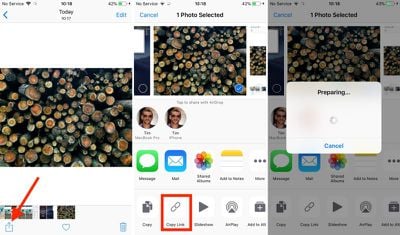
  2. Tap the photo you want to link to. If you want to share a link to several photos, tap Select in the upper right corner of the screen and tap the photos you want to include.
  3. Next, tap the Share Sheet button at the lower left corner of the screen.
    how to share an icloud photo link in ios 12 01

  4. Tap the Copy Link button in the third row of the Share Sheet.
  5. Wait a moment while iCloud prepares your link.
  6. Launch the app or service you want to use to share the link. We're using Messages in our example.
    how to share an icloud photo link in ios 12 02

  7. In the message text field, tap and hold your finger.
  8. Tap Paste.
  9. Send the message to share the link.

If you share the link over Messages and the recipient is using an iOS device, they'll see a tappable thumbnail of the shared photo(s). If they're on an Android device, they'll just see the URL.

how to share an icloud photo link in ios 12 04
Tapping the thumbnail/URL link will take them to an iCloud.com web page similar to the one above, with a preview image, the author's name, the photo's title, an expiry date, and an option to download the photo or add it to an existing Apple ‌Photos‌ library. If several photos have been shared, the recipient can select which ones they'd like to add or download.

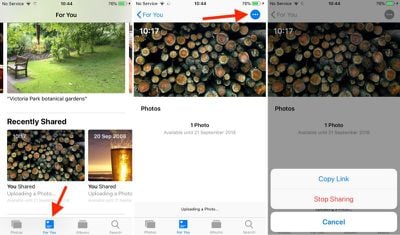
To share the same link again within the 30-day time limit, or simply stop sharing the photo altogether, launch the ‌Photos‌ app and navigate to the For You tab, where you'll find a Recently Shared section.
how to share an icloud photo link in ios 12 03
Tap the photo you shared and then tap the blue dotted button in the upper right corner of the screen, and you should see two options: Copy Link and Stop Sharing.


Top Rated Comments

107 months ago
Does anyone know if this can be done with multiple selected photos? Ie share 5 photos at once from a single link?
Yes, you can share a group of photos the same way.
Score: 3 Votes (Like | Disagree)
Mac 128 Avatar
107 months ago
How many years has it been since we could share links via Mobile Me?

I wish this didn't attach my real name to photos I share. I sometimes share photos to communities (like this one!) where I don't share my real info, and that pretty much makes this feature useless for that.
Agreed, this is pretty much useless to me. Not sure how this is going to work in message forums where a link is entered into an image box.

Has the expiring link always been a part of this? I thought that, in the past, iCloud albums had a persistent link I could share. Is that not (or no longer) the case? Is it different for albums than for a (or a handful of) picture(s)?
I like that the link can be set to expire, and easily managed, but the 30 day expiration is a problem. My biggest pet peeve is searching for an old thread on a forum, and finding all the picture images I would have greatly benefitted from have broken links from photo services that are defunct.
Score: 2 Votes (Like | Disagree)
RightMACatU Avatar
107 months ago
This is useful and almost seamless, though it is easy to accidentally upload a temporary copy. It would be useful to see all currently shared photos, with an option to “Stop Sharing” all.
+1
I think it's all part of a grand scheme to free users from an ability to know where their stuff is and who has access. What individual files and photos have I shared? with who? is there an easy way to know? where are my files, local or Cloud or Dropbox? etc. And I won't go there as this implies trust in every parts of the ecosystem that you use.
Score: 2 Votes (Like | Disagree)
NotSafeForWork Avatar
105 months ago
I found a way to work around this. Instead of using the Photo button in iMessage go directly to the Photos app and select and Copy the images from there from the share sheet. It then pastes them in the old way and doesn’t do the iCloud link.
Score: 1 Votes (Like | Disagree)
105 months ago
The biggest problem I find with this otherwise excellent new feature is that the recipients appear to have to download the photos and videos in order to see anything more than an thumbnail.
What do you mean? If you tap on a photo or video, it downloads it to your device temporarily just like it would for your own iCloud Photo Library items... just like it would if it were an image on a web page.
Score: 1 Votes (Like | Disagree)
NotSafeForWork Avatar
105 months ago
This has enabled itself automatically when I want to send more than three images at once via iMessage. But I don’t want this, I just want to send them via iMessage directly. Can’t find out how to disable this function.
Score: 1 Votes (Like | Disagree)

Popular Stories

iphone duo colors

Apple Shares Photos Shot on iPhone Duo

Thursday October 1, 2026 1:37 pm PDT by
Apple on Instagram today shared a curated gallery of six photos shot on the iPhone Duo. The photos were shot by American photographers Jake Michaels and Jason Nocito, as part of a project commissioned by Apple. iPhone Duo is equipped with four cameras:A rear 48-megapixel Fusion Main camera A rear 48-megapixel Ultra Wide camera A front 12-megapixel Center Stage camera in the outer display A...
General iCloud App Feature

Apple Quietly Boosts Email Feature for iCloud+ Subscribers

Tuesday October 6, 2026 3:27 am PDT by
Yesterday we reported that Apple tripled the number of iCloud Mail aliases users can create, from three to nine. But it turns out that's not the only email-related limit Apple has raised. The company has also bumped the number of email addresses you can use per iCloud Custom Domain, from three to 10. If you subscribe to iCloud+, you can use a domain name you already own for your iCloud Mail...
General iCloud App Feature

Apple Quietly Triples iCloud Mail Alias Limit to Nine

Monday October 5, 2026 5:15 am PDT by
Apple appears to have quietly tripled the number of iCloud Mail aliases users can create, increasing the limit from three to nine. The increase was first noticed last week by a Reddit user, and picked up shortly after by a member of the MacRumors forums. MacRumors can confirm the change is live at iCloud.com. The increased limit has not been mentioned by Apple, so it could conceivably be a...
Latest Stories
iPhone Duo Launch Begins as First Orders Reach Customers
6 hours ago
1Password for Agents Keeps Your Passwords Hidden From AI
7 hours ago
iPhone Duo 24 Hours Later: Your Questions Answered
7 hours ago
Apple's iWork Apps Get 'Intelligent Assistant' and iPhone Duo Support
8 hours ago
Apple is Apparently Considering a Slightly Larger iPhone Duo
8 hours ago
Giant iPhone Duo Displays Coming to Four Apple Stores
9 hours ago
Apple Pulls Keynote, Pages and Numbers From App Store [Update: Back]
10 hours ago
Apple Updates More Apps With iPhone Duo Support
11 hours ago
Apple Will Label Apps 'Made for iPhone Duo' in App Store
13 hours ago
Amazon Takes $49 Off iPad With Prices Starting at $399.99
14 hours ago
F1 on Apple TV Now Available in Dolby Atmos
14 hours ago
Apple Reveals More Than 50 Apps That Will Be Updated for iPhone Duo
15 hours ago
Apple Blocks Certificates That Could Help Attackers Fake Websites
16 hours ago
Giant iPhone Duo Installations Spotted at Apple Fifth Avenue
17 hours ago
iPhone Duo 2 Prototypes Include Under-Display Face ID
17 hours ago
Tesla App Gains iPad and iPhone Duo Support
21 hours ago
Apple Reportedly Boosts iPhone Duo Orders by 44%
22 hours ago
Fortnite Returning to Australian App Store After Court Ruling
22 hours ago
Apple Ordered to Open iPhone to Rival App Stores in Australia
22 hours ago
Apple Suppliers Face Hurdles Cutting Circuit Board Emissions
23 hours ago
Things Updated for iPhone Duo With Adaptive Layout
23 hours ago
Simplicity and Siri AI Are HomeView's Killer Features, Apple Says
1 day ago
iPhone Duo Reviewers Really Miss Face ID
1 day ago
Does the iPhone Duo Run Hot? Here's What Reviews Found
1 day ago
Apple Music's New Look is Now Live on Apple's Website
1 day ago
Anthropic Launches Claude Duet, a Proactive AI Agent
1 day ago
What 32,000 Folds Did to the iPhone Duo's Hinge
1 day ago
iPhone Duo's Hidden FaceTime Camera Takes 'Trash' Photos
1 day ago
iPhone Duo Has 'Edge Light' Feature That Debuted on Macs Last Year
1 day ago
Apple Support App Updated for iPhone Duo's Larger Display
1 day ago