How to Share Files Stored in Your iCloud Drive - MacRumors
Skip to Content

How to Share Files Stored in Your iCloud Drive

by

iCloud AltYou can share files you've synced to iCloud with friends and colleagues who have an Apple ID using the step-by-step guide below. Whether you're sharing from a Mac or an iPhone, you'll be able to give people one-way access to the file, or allow them to modify the document if you're collaborating on a piece of work.

The sharing options you choose automatically sync across your devices, so you could, for example, share a file on Mac and change access permissions on your iPhone or on iCloud.com at a later time. The following steps assume Mac users are running macOS High Sierra or later and that iPhone or iPad owners are on iOS 11 or later.

How to Share iCloud Files From Your Mac

  1. Open a Finder window and locate the file in iCloud that you want to share. It could be in iCloud Drive or another folder that you sync to iCloud, such as Desktop or Documents.
  2. Click the file to highlight it.
  3. Click the Share button and select Add People from the dropdown menu. Alternatively, right-click (or Ctrl-click) the file and select Share -> Add People.
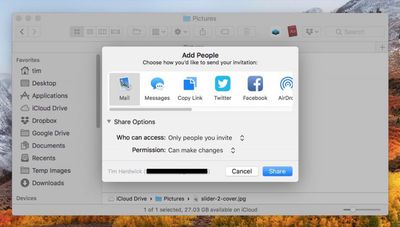
    how to share icloud files on mac01

  4. Choose how you'd like to send your invitation to access the file. In our example, we're sharing a link via email. You can also click the chevron next to Share Options to control who can access the file (Only people you invite / Anyone with the link) and their permissions (Can make changes / View only).

  5. Click Share.
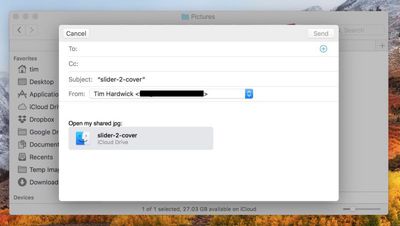
    how to share icloud files on mac02

  6. Depending on how you chose to share the invitation, the relevant app will open containing a link to access the file. In our example, an email compose window appears, ready to add recipients and click Send.
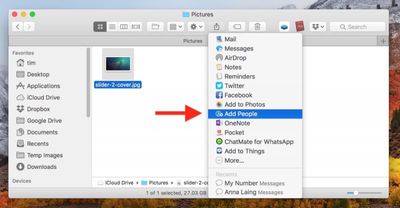
    how to share icloud files on mac03

How to Share iCloud files on iPhone and iPad

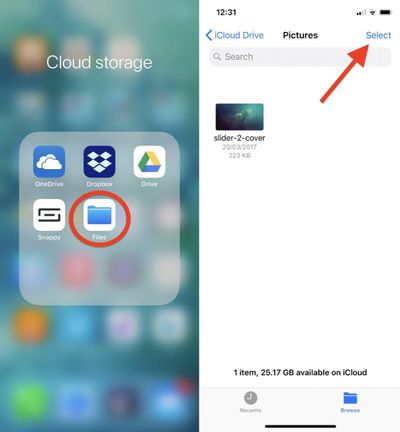
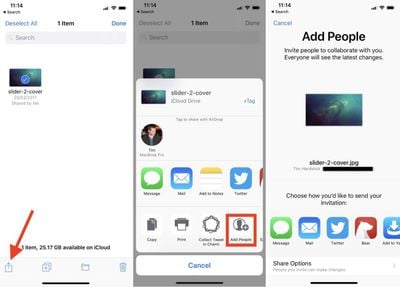
  1. Launch the Files app on your iPhone or iPad.
  2. Locate the file in iCloud Drive that you want to share.
    how to share icloud files ios 01

  3. Tap Select in the upper right of the screen.
  4. Tap the file to check it in the selection.
  5. Tap the Share icon in the lower left of the screen.
    how to share icloud files ios

  6. Tap Add People in the second row of the Share Sheet.
  7. Tap the method you'd like to use to send your invitation. You can also optionally tap Share Options to control who can access the file (Only people you invite / Anyone with the link) and their permissions (Can make changes / View only).
  8. Depending on how you chose to share the invitation, the relevant app will open containing a link to access the file, ready for you to share.
How to Change Access Rights to a Shared iCloud File

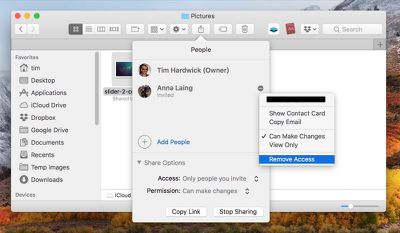
Changing file sharing permissions via Mac or iOS is easy. Once you've shared an iCloud file, the Add People option you used in the above steps is replaced with a Show People option. Selecting this will display who has access to the file, including an option to Stop Sharing the file completely.
how to share icloud files on mac05
If you're on Mac, click the dotted icon next to a person's name to reveal options to change their permissions or Remove Access. If you're on iPhone or iPad, simply tap a person in the People list to access the same options.


Top Rated Comments

mail4asim Avatar
107 months ago
I tried this when I bought a small business last year but the whole thing about sharing one file at a time wasn't good enough for me. I wanted Folders shared with multiple people, which OneDrive and Google Drive were able to do with a couple of clicks.
On top of this, Apple did not offer personalized email hosting, domain services etc like Google and Microsoft do. Needless to say, I ended up choosing Google. Apple still doesn't offer solutions for small businesses.
Score: 6 Votes (Like | Disagree)
B60boy Avatar
107 months ago
Besides a Folder share option iCloud Drive needs a "selective sync" option that the user controls like Dropbox, Google Drive and OneDrive. I can't believe that Apple does not let the user control what is sync'd to iCloud.
Score: 3 Votes (Like | Disagree)
Onexy Avatar
107 months ago
I still always go back to Dropbox and just right click whatever to simply copy a public link.
Score: 3 Votes (Like | Disagree)
timmyh Avatar
107 months ago
Could I do this on a folder and avoid multiplying this step for evvvvvvery file I want to share?
Crazy as it sounds, no, you can't. The method described above currently only works for individual files.

If you still want to use iCloud, you could try sharing a compressed zip containing several files, or creating a sparseimage file using Disk Utility and put files in that for sharing over icloud. If that doesn't work for you, I'd recommend another service.
Score: 3 Votes (Like | Disagree)
106 months ago
I'm a huge Mac geek and own my own two small businesses, both of which use Macs. BUT, because Apple still is eons behind building an up-to-date small business support (which I personally think we will never truly see), things like iCloud Drive is only in place for me to back up my Mac's desktops and some files. As far as file-sharing, my teams us Sync (sync.com) which is very much like Dropbox, but without the high price tag, plus zero-knowledge and end-to-end encryption. As a Mac guy, I have to highly recommend Sync over Google and Dropbox.
Score: 2 Votes (Like | Disagree)
Westside guy Avatar
107 months ago
I can’t believe the Apple still doesn’t let you share folders with other people...
Score: 2 Votes (Like | Disagree)

Popular Stories

General iCloud App Feature

Apple Quietly Boosts Email Feature for iCloud+ Subscribers

Tuesday October 6, 2026 3:27 am PDT by
Yesterday we reported that Apple tripled the number of iCloud Mail aliases users can create, from three to nine. But it turns out that's not the only email-related limit Apple has raised. The company has also bumped the number of email addresses you can use per iCloud Custom Domain, from three to 10. If you subscribe to iCloud+, you can use a domain name you already own for your iCloud Mail...
General iCloud App Feature

Apple Quietly Triples iCloud Mail Alias Limit to Nine

Monday October 5, 2026 5:15 am PDT by
Apple appears to have quietly tripled the number of iCloud Mail aliases users can create, increasing the limit from three to nine. The increase was first noticed last week by a Reddit user, and picked up shortly after by a member of the MacRumors forums. MacRumors can confirm the change is live at iCloud.com. The increased limit has not been mentioned by Apple, so it could conceivably be a...
iPhone Duo Trio

Here's What Apple's Apps Look Like on the iPhone Duo

Tuesday October 20, 2026 11:12 am PDT by
With just three days to go until the iPhone Duo is released, Apple is getting ready for the launch. Behind the scenes, the App Store now has screenshots of Apple's built-in apps running on the Duo. We've seen some apps in marketing materials, but images of the ones we haven't seen give us an idea of what it will be like using the iPhone Duo day to day. Many apps are shown in landscape...
Latest Stories
iPhone Duo Launch Begins as First Orders Reach Customers
4 hours ago
1Password for Agents Keeps Your Passwords Hidden From AI
4 hours ago
iPhone Duo 24 Hours Later: Your Questions Answered
5 hours ago
Apple's iWork Apps Get 'Intelligent Assistant' and iPhone Duo Support
6 hours ago
Apple is Apparently Considering a Slightly Larger iPhone Duo
6 hours ago
Giant iPhone Duo Displays Coming to Four Apple Stores
7 hours ago
Apple Pulls Keynote, Pages and Numbers From App Store [Update: Back]
8 hours ago
Apple Updates More Apps With iPhone Duo Support
8 hours ago
Apple Will Label Apps 'Made for iPhone Duo' in App Store
11 hours ago
Amazon Takes $49 Off iPad With Prices Starting at $399.99
12 hours ago
F1 on Apple TV Now Available in Dolby Atmos
12 hours ago
Apple Reveals More Than 50 Apps That Will Be Updated for iPhone Duo
13 hours ago
Apple Blocks Certificates That Could Help Attackers Fake Websites
14 hours ago
Giant iPhone Duo Installations Spotted at Apple Fifth Avenue
15 hours ago
iPhone Duo 2 Prototypes Include Under-Display Face ID
15 hours ago
Tesla App Gains iPad and iPhone Duo Support
19 hours ago
Apple Reportedly Boosts iPhone Duo Orders by 44%
20 hours ago
Fortnite Returning to Australian App Store After Court Ruling
20 hours ago
Apple Ordered to Open iPhone to Rival App Stores in Australia
20 hours ago
Apple Suppliers Face Hurdles Cutting Circuit Board Emissions
21 hours ago
Things Updated for iPhone Duo With Adaptive Layout
21 hours ago
Simplicity and Siri AI Are HomeView's Killer Features, Apple Says
21 hours ago
iPhone Duo Reviewers Really Miss Face ID
1 day ago
Does the iPhone Duo Run Hot? Here's What Reviews Found
1 day ago
Apple Music's New Look is Now Live on Apple's Website
1 day ago
Anthropic Launches Claude Duet, a Proactive AI Agent
1 day ago
What 32,000 Folds Did to the iPhone Duo's Hinge
1 day ago
iPhone Duo's Hidden FaceTime Camera Takes 'Trash' Photos
1 day ago
iPhone Duo Has 'Edge Light' Feature That Debuted on Macs Last Year
1 day ago
Apple Support App Updated for iPhone Duo's Larger Display
1 day ago