

 On Macs running macOS Catalina and later, Apple has fleshed out the features of the stock Notes app, enhanced the viewing and search functions, and made it easier than ever to generate, share, find, organize your notes.
In earlier versions of macOS, for example, users were limited to sharing individual notes in Apple's stock app, which could be frustrating for heavy note-takers.
Fortunately, there are new options to share entire folders of notes with friends or colleagues, including the ability to share your notes in a read-only capacity. Keep reading to learn how it's done.
- Launch the Notes app on your Mac.
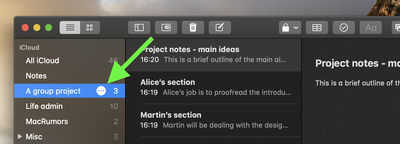
- Hover your cursor over the folder of notes you wish to share and click the circle of three dots that appears.

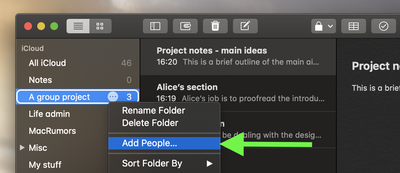
- Select Add People… from the contextual menu.
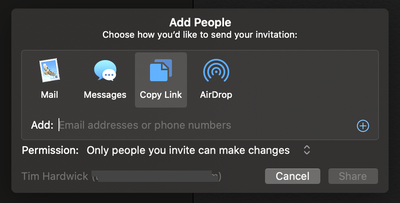
- In the Add People dialog that appears, check that the Permission dropdown is set the way you want (allow invited people to either make changes to notes or view them only).
- Now choose how you’d like to invite people to share the folder. If you want to email or message them a link, click Share and another window will open with your share link ready – simply add the recipients you’d like to share it with, then click Send. If you’d rather copy the link to paste elsewhere or you want to AirDrop it to someone, you can add the recipients’ email addresses directly into the initial Add People dialog. Use the plus (+) button to add multiple recipients, then click Share to send the invite.
If you use an iPhone or iPad running iOS 13 and it’s signed into the same iCloud account, the sharing status of your folders and your chosen permissions will be automatically synced across your devices.


















