
How to Split a Bill and Tip on Apple Watch - MacRumors
Skip to Content

How to Split a Bill and Tip on Apple Watch

by

All Apple Watch models include a stock Calculator app that offers a couple of handy features for working out how much you should tip when eating out and how much each person in a group owes if you're splitting the bill.

split bill tip apple watch
The two functions can be used together, but if it's just yourself dining out then you can just leave the People field set to 1. The steps below show you how it works.

Note: If you see a standard percentage (%) button where the TIP button should be, you can change the calculator layout to replace it. Simply go to Settings ➝ Calculator and select Tip Function instead of Percent.

How to Use the Split Bill and Tip Calculator Functions on Apple Watch

  1. Launch the Calculator app on your Apple Watch.
  2. Enter the total amount of the bill.
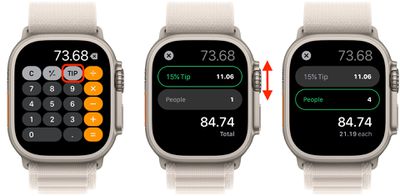
  3. Tap the TIP button in the top-right corner, just left of the divide button.
  4. With the Tip field highlighted in green, turn your watch's Digital Crown to change the percentage.
  5. To split the bill between a group of people, tap People and then use the Digital Crown to change the number (the maximum is 50).
calculator

You'll see the total amount below the two fields change to reflect your tip adjustments, and the amount below that will change depending on how many people are paying.


Top Rated Comments

cjsuk Avatar
11 months ago

I prefer that everybody pays for what he actually consumed. They can still pay together.
Yeah as the thin guy who has a lot of fat friends, I agree with this.
Score: 10 Votes (Like | Disagree)
cjsuk Avatar
11 months ago
Never knew this.

Then again I live in a country where we don't tip. And they take separate payments from each person based on what they ordered.
Score: 9 Votes (Like | Disagree)
11 months ago
I prefer that everybody pays for what he actually consumed. They can still pay together.
Score: 7 Votes (Like | Disagree)
Attirex Avatar
11 months ago
Only on MR would a tipping calculator article spark immediate outrage and disgust. 😆
Score: 6 Votes (Like | Disagree)
turbineseaplane Avatar
11 months ago
You could also "use your brain"
Score: 6 Votes (Like | Disagree)
11 months ago
OR- you could just multiply the total times 0.2, round to the nearest dollar....
Score: 6 Votes (Like | Disagree)

Popular Stories

imac video apple feature

Apple Released Yet Another New Product Today

Friday March 20, 2026 2:39 pm PDT by
Apple has unveiled a whopping nine new products so far this March, including an iPhone 17e, iPad Air models with the M4 chip, MacBook Air models with the M5 chip, MacBook Pro models with M5 Pro and M5 Max chips, the all-new MacBook Neo, an updated Studio Display, a higher-end Studio Display XDR, AirPods Max 2, and now the Nike Powerbeats Pro 2. iPhone 17e features the same overall design as...
iOS 26

iOS 26.4 Adds Two New Features to CarPlay

Tuesday March 24, 2026 1:55 pm PDT by
iOS 26.4 was released today, and it includes a couple of new features for CarPlay: an Ambient Music widget and support for voice-based chatbot apps. To update your iPhone 11 or newer to iOS 26.4, open the Settings app and tap on General → Software Update. CarPlay will automatically offer the new features so long as the iPhone connected to your vehicle is running iOS 26.4 or later....
HomePod mini and Apple TV Sage

New Apple TV and HomePod Mini Remain 'Ready' to Launch

Sunday March 22, 2026 6:33 am PDT by
Apple has unveiled nine new products this month, but the wait continues for the next-generation Apple TV 4K and HomePod mini models. In his Power On newsletter today, Bloomberg's Mark Gurman said new versions of the Apple TV and HomePod mini have been "ready" since last year, but he reiterated that Apple has held off on releasing them until the more personalized version of Siri and other...















