Most Apple Watch owners will recognize the "Now Playing" app – it automatically launches by default whenever you play audio through the Music or Podcasts app on your iPhone. A similar screen shows when you play audio through any third-party iPhone app that also has an Apple Watch extension, like Overcast, for example.

The Now Playing app provides quick access to playback controls on your wrist, as well as track options like Love/Dislike and Delete From Library. You can also turn the Crown on your Apple Watch to adjust volume, which is handy when you're listening on AirPods or other headphones that don't have built-in volume controls.
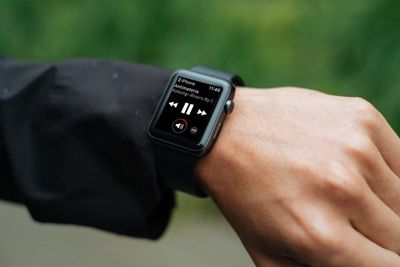
apple watch now playing screen
You might not like the way the Now Playing app automatically appears when you play audio on your iPhone. If you just want to see your watch face when you raise your wrist during audio playback, you can turn off the default behavior by following the first set of steps below.

You can still make it easy to access the Now Playing app without it automatically taking over the screen whenever you play audio. One solution is to add the Now Playing app to your Apple Watch's Dock, accessed with a press of the Side button. Another option is to enable the Now Playing watch face complication. Click the links to find out how.

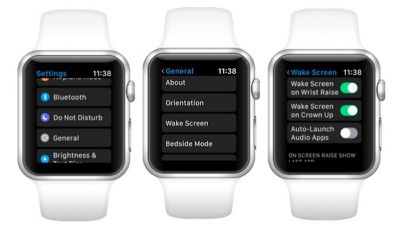
How to Disable Auto-Launch Audio Apps on Apple Watch

  1. Press the Crown on your Apple Watch to invoke the app launcher.

  2. Launch the Settings app.
    apple watch auto launch audio apps

  3. Tap General.

  4. Tap Wake Screen.

  5. Toggle off Auto-Launch Audio Apps.

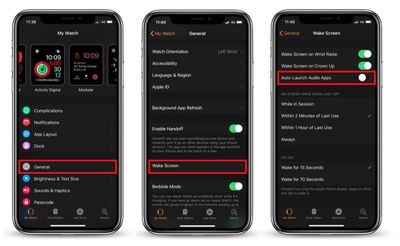
How to Disable Auto-Launch Audio Apps via iPhone

  1. Launch the Watch app on your iPhone.

  2. Tap General.
    auto launch audio watch app

  3. Scroll down and tap Wake Screen.

  4. Toggle off Auto-Launch Audio Apps.

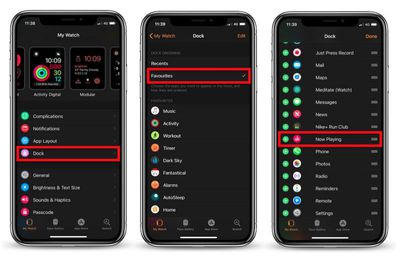
How to Add 'Now Playing' to Your Apple Watch's Dock

  1. Launch the Watch app on your iPhone.

  2. Tap Dock.

  3. Tap Favorites in the Dock Ordering section if it isn't already selected.
    apple watch now playing add to dock

  4. Tap Edit in the upper right corner of the screen.

  5. Scroll down to the Do Not Include section and tap the plus (+) symbol next to Now Playing to add it to the list of docked apps. Alternatively, drag the app into the Favorites list via the three-line button at the far right of the entry. (Note you can also use these buttons to control the arrangement of apps in the Dock.)

  6. Tap Done in the upper right of the screen.
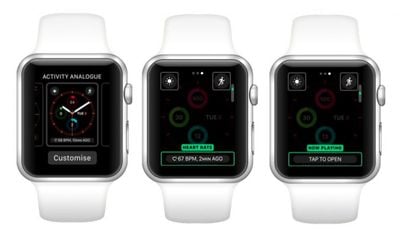
How to Enable the 'Now Playing' Complication

Before following these steps, make sure you're using a watch face that accepts text-based complications (Modular and Activity Digital are two such examples.)

  1. Hard press the watch face on your Apple Watch.

  2. Tap Customize.
    apple watch now playing complication

  3. Swipe left until the large text-based complication space is highlighted.

  4. Turn the Crown to scroll through the options until you get to the Now Playing complication (also shown as 'Tap to Open' in the text space).

  5. Press the Crown twice to set the complication and exit Customize mode.
Related Roundups: AirPods 4, Apple Watch 11
Related Forum: AirPods

Top Rated Comments

Fradley Avatar
101 months ago
Awesome thanks!

Now. How do I stop the ‘keep it up today’ activity notification I get every morning without disabling all activity notifications...
Watch app, Activity, turn off ‘Daily Coaching’
Score: 4 Votes (Like | Disagree)
341328 Avatar
101 months ago
Thank you, thank you, thank you! I might actually like my Apple Watch again. Whoever thought this was a good idea is clueless.
I love this feature.
Score: 4 Votes (Like | Disagree)
Ted13 Avatar
101 months ago
Thank you, thank you, thank you! I might actually like my Apple Watch again. Whoever thought this was a good idea is clueless.
Well it is my favorite app on the Apple Watch, I am immensely grateful it works the way it does by default. I listen to podcasts via Overcast every morning on the long dog walk with Air Pods, and the ability to instantly adjust volume via the crown, skip back/forward 30 secs, pause or play is things I do constantly - talking to people, load street noise, etc. etc. My phone never comes out of my pocket. Far and away the most useful feature on the Apple Watch
Score: 4 Votes (Like | Disagree)
steve217 Avatar
101 months ago
It would be nice to be able to enable 'Now Playing' based upon the paired device. For example, when the phone is streaming to the car, I don't need 'Now Playing' from the watch - I can use the car controls.

When the phone is streaming to my AirPods, then auto-'Now Playing' would be my preference.
Score: 4 Votes (Like | Disagree)
Wanted797 Avatar
101 months ago
Awesome thanks!

Now. How do I stop the ‘keep it up today’ activity notification I get every morning without disabling all activity notifications...
Score: 3 Votes (Like | Disagree)
Bryan Bowler Avatar
101 months ago
I love this feature.
I love the daily coaching too. Different strokes for different folks...that’s why I’m glad we have options!
Score: 1 Votes (Like | Disagree)

Popular Stories

wwdc sans text feature

Apple Rumored to Announce New Product on February 19

Thursday February 5, 2026 12:22 pm PST by
Apple plans to announce the iPhone 17e on Thursday, February 19, according to Macwelt, the German equivalent of Macworld. The report, citing industry sources, is available in English on Macworld. Apple announced the iPhone 16e on Wednesday, February 19 last year, so the iPhone 17e would be unveiled exactly one year later if this rumor is accurate. It is quite uncommon for Apple to unveil...
Apple Logo Zoomed

Tim Cook Teases Plans for Apple's Upcoming 50th Anniversary

Thursday February 5, 2026 12:54 pm PST by
Apple turns 50 this year, and its CEO Tim Cook has promised to celebrate the milestone. The big day falls on April 1, 2026. "I've been unusually reflective lately about Apple because we have been working on what do we do to mark this moment," Cook told employees today, according to Bloomberg's Mark Gurman. "When you really stop and pause and think about the last 50 years, it makes your heart ...
Finder Siri Feature

Why Apple's iOS 26.4 Siri Upgrade Will Be Bigger Than Originally Promised

Friday February 6, 2026 3:06 pm PST by
In the iOS 26.4 update that's coming this spring, Apple will introduce a new version of Siri that's going to overhaul how we interact with the personal assistant and what it's able to do. The iOS 26.4 version of Siri won't work like ChatGPT or Claude, but it will rely on large language models (LLMs) and has been updated from the ground up. Upgraded Architecture The next-generation...
maxresdefault

Apple Shows Off a Key Reason to Upgrade to the iPhone 17

Saturday February 7, 2026 9:26 am PST by
Apple today shared an ad that shows how the upgraded Center Stage front camera on the latest iPhones improves the process of taking a group selfie. "Watch how the new front facing camera on iPhone 17 Pro takes group selfies that automatically expand and rotate as more people come into frame," says Apple. While the ad is focused on the iPhone 17 Pro and iPhone 17 Pro Max, the regular iPhone...
iOS 26

iOS 26.3 and iOS 26.4 Will Add These New Features to Your iPhone

Tuesday February 3, 2026 7:47 am PST by
While the iOS 26.3 Release Candidate is now available ahead of a public release, the first iOS 26.4 beta is likely still at least a week away. Following beta testing, iOS 26.4 will likely be released to the general public in March or April. Below, we have recapped known or rumored iOS 26.3 and iOS 26.4 features so far. iOS 26.3 iPhone to Android Transfer Tool iOS 26.3 makes it easier...