
With the recent update to watchOS 2, Apple added a new feature called Time Travel, which lets you turn back (or forward) time to display certain information from a different date and time.

It works with complications on the watch face, like weather, calendar events, sunrise and sunset, stocks, and more. Depending on what you have displayed on your watch face, you'll see different information.

Understanding Time Travel can be a bit confusing for some, so we'll explain it more in detail, with some highlights on what different watch faces can do.
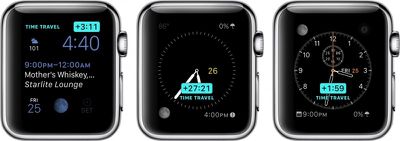
Apple Watch Time Travel Main
Before using Time Travel, be sure to set your complications the way you want them. Now that Apple allows third-party complications, the options are even better.

This feature works best with such watch faces as Utility, Modular, Simple, Color, and Chronograph because those faces have the most customizable complication options.

Once you've set up your watch face with the complications you like, all you have to do to activate Time Travel is rotate the digital crown. Scrolling up will move time forward, and scrolling down will move time backward. When you are done, simply tap the screen to return to the current time.
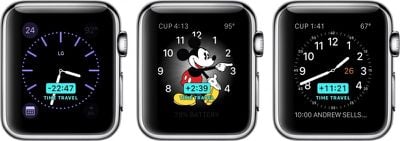
Apple Watch Time Travel 2
An example of moving forward in Time Travel mode with the Modular watch face might look something like this:

Move time forward three hours. Your calendar changes to show you an event that takes place three hours from now and shows the temperature is predicted to have increased five degrees. Move time forward 10 hours. The temperature drops by 15 degrees. The date changes, and the time of sunrise and sunset changes to reflect the new day.

It's all rather useful, relative to information that is important to you. For example, if you want to know whether it will rain tomorrow at 3:00 p.m. when you have a meeting at a coffee shop downtown, you can scroll forward in time to see what the weather predictions look like.

With Time Travel, you can generally look forward through the remainder of the current day and all of the following day. Looking backward into the past with most watch faces, you can view events and data from earlier in the current day and from all of the previous day, giving a total of a 72-hour window to scroll through. You can exit Time Travel mode and return to the current time at any point by simply pressing the Digital Crown.

Some complications like weather only function when looking forward in time, while others like stocks (unfortunately) only work when looking backward.

Third-party app developers in general seem to still be figuring out the best ways to use complications, although some popular developers have already updated their apps to support complications and in some cases Time Travel. Popular categories include weather apps like Dark Sky and The Weather Channel, health apps like Lifesum, and travel time prediction apps like ETA. You can manage which third-party apps with complications are available to use through the Complications section settings in the Watch app on your iPhone.

Watch Faces Not Compatible With Time Travel

A few of the watch faces don't work with Time Travel. So, if you are using one of the below-listed faces, you wont be able to see the feature.

  • Motion
  • XX-Large
  • Timelapse
  • Photo Album
  • Photo
  • Live Photo

Special Watch Face Features

Some watch faces have additional Time Travel features that provide interesting and unique visual changes.

Astronomy
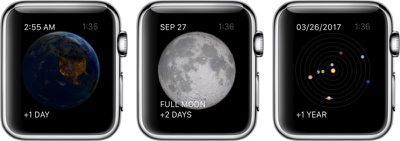
Apple Watch Time Travel 3
In the Astronomy watch face, you can switch between views of earth, the moon, and the solar system. With Time Travel, you can move through time, watching the sun rise and set above the Earth. You can also see the phases of the moon, and even find out the next time it will be full. With the solar system displayed, you can watch the planets rotate day-by-day for years in the future or past.

Solar
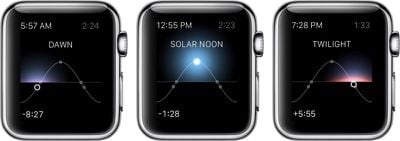
Apple Watch Time Travel 4
The Solar watch face provides a graph of the sun's position in the sky, limited to the current day. Based on your current location, as well as the time of day, the sun moves along a curve. With Time Travel, you can visually identify dawn, dusk, twilight, and the day's zenith at any time before or after your current.

With Time Travel mode on Apple Watch, you can quickly see what the day has in store for you without even having to open up an app or ask Siri for guidance.


Related Roundup: Apple Watch 11
Buyer's Guide: Apple Watch (Neutral)

Top Rated Comments

RandomIan Avatar
135 months ago
All this aside, whatever person thought it a good idea to call a feature a "Complication" was an idiot. I don't want to use any kind of mobile device and have the word "Complication" ANYWHERE in the user interface. I'm not 50 or 60, I'm a 23 year old with a strong background in computer science and I don't want that word on my device.
You do realize that the term "Complication" in the watch world is anything else on the timepiece that displays something other then the time. This term has been around for quite awhile and wasn't a feature that Apple decided to name.

Chances are you have been staring at complications on your watch for quite some time.
Score: 8 Votes (Like | Disagree)
oneMadRssn Avatar
135 months ago
ONE POINT TWENTY ONE JIGGAWATTS!

WHAT'S A JIGGAWATT?


EDIT: This article would have been really well-timed if posted on October 21, 2015. The actual future day.
Score: 3 Votes (Like | Disagree)
Dayv Avatar
135 months ago
You do realize that the term "Complication" in the watch world is anything else on the timepiece that displays something other then the time. This term has been around for quite awhile and wasn't a feature that Apple decided to name.

Chances are you have been staring at complications on your watch for quite some time.
It's like these people don't care about horology at all!
Score: 2 Votes (Like | Disagree)
iPhysicist Avatar
135 months ago
All this aside, whatever person thought it a good idea to call a feature a "Complication" was an idiot. I don't want to use any kind of mobile device and have the word "Complication" ANYWHERE in the user interface. I'm not 50 or 60, I'm a 23 year old with a strong background in computer science and I don't want that word on my device.
The word complication and its origin can be looked up on Wikipedia. You've got more to learn young Padawan.
Score: 1 Votes (Like | Disagree)
BSben Avatar
135 months ago
These watches are still a total waste of time until Apple adds GPS and a sim card.
If that was your best comedy attempt, I will not book tickets for your stand up comedy shows.
Score: 1 Votes (Like | Disagree)

Popular Stories

wwdc sans text feature

Apple Rumored to Announce New Product on February 19

Thursday February 5, 2026 12:22 pm PST by
Apple plans to announce the iPhone 17e on Thursday, February 19, according to Macwelt, the German equivalent of Macworld. The report, citing industry sources, is available in English on Macworld. Apple announced the iPhone 16e on Wednesday, February 19 last year, so the iPhone 17e would be unveiled exactly one year later if this rumor is accurate. It is quite uncommon for Apple to unveil...
Apple Logo Zoomed

Tim Cook Teases Plans for Apple's Upcoming 50th Anniversary

Thursday February 5, 2026 12:54 pm PST by
Apple turns 50 this year, and its CEO Tim Cook has promised to celebrate the milestone. The big day falls on April 1, 2026. "I've been unusually reflective lately about Apple because we have been working on what do we do to mark this moment," Cook told employees today, according to Bloomberg's Mark Gurman. "When you really stop and pause and think about the last 50 years, it makes your heart ...
Finder Siri Feature

Why Apple's iOS 26.4 Siri Upgrade Will Be Bigger Than Originally Promised

Friday February 6, 2026 3:06 pm PST by
In the iOS 26.4 update that's coming this spring, Apple will introduce a new version of Siri that's going to overhaul how we interact with the personal assistant and what it's able to do. The iOS 26.4 version of Siri won't work like ChatGPT or Claude, but it will rely on large language models (LLMs) and has been updated from the ground up. Upgraded Architecture The next-generation...
maxresdefault

Apple Shows Off a Key Reason to Upgrade to the iPhone 17

Saturday February 7, 2026 9:26 am PST by
Apple today shared an ad that shows how the upgraded Center Stage front camera on the latest iPhones improves the process of taking a group selfie. "Watch how the new front facing camera on iPhone 17 Pro takes group selfies that automatically expand and rotate as more people come into frame," says Apple. While the ad is focused on the iPhone 17 Pro and iPhone 17 Pro Max, the regular iPhone...
iOS 26

iOS 26.3 and iOS 26.4 Will Add These New Features to Your iPhone

Tuesday February 3, 2026 7:47 am PST by
While the iOS 26.3 Release Candidate is now available ahead of a public release, the first iOS 26.4 beta is likely still at least a week away. Following beta testing, iOS 26.4 will likely be released to the general public in March or April. Below, we have recapped known or rumored iOS 26.3 and iOS 26.4 features so far. iOS 26.3 iPhone to Android Transfer Tool iOS 26.3 makes it easier...














