
How to Use Time Travel on Apple Watch in watchOS 2 - MacRumors
Skip to Content

How to Use Time Travel on Apple Watch in watchOS 2

by

With the recent update to watchOS 2, Apple added a new feature called Time Travel, which lets you turn back (or forward) time to display certain information from a different date and time.

It works with complications on the watch face, like weather, calendar events, sunrise and sunset, stocks, and more. Depending on what you have displayed on your watch face, you'll see different information.

Understanding Time Travel can be a bit confusing for some, so we'll explain it more in detail, with some highlights on what different watch faces can do.
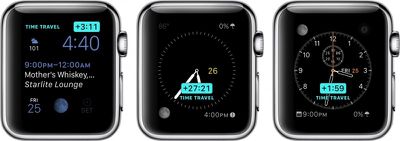
Apple Watch Time Travel Main
Before using Time Travel, be sure to set your complications the way you want them. Now that Apple allows third-party complications, the options are even better.

This feature works best with such watch faces as Utility, Modular, Simple, Color, and Chronograph because those faces have the most customizable complication options.

Once you've set up your watch face with the complications you like, all you have to do to activate Time Travel is rotate the digital crown. Scrolling up will move time forward, and scrolling down will move time backward. When you are done, simply tap the screen to return to the current time.
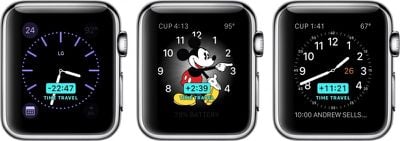
Apple Watch Time Travel 2
An example of moving forward in Time Travel mode with the Modular watch face might look something like this:

Move time forward three hours. Your calendar changes to show you an event that takes place three hours from now and shows the temperature is predicted to have increased five degrees. Move time forward 10 hours. The temperature drops by 15 degrees. The date changes, and the time of sunrise and sunset changes to reflect the new day.

It's all rather useful, relative to information that is important to you. For example, if you want to know whether it will rain tomorrow at 3:00 p.m. when you have a meeting at a coffee shop downtown, you can scroll forward in time to see what the weather predictions look like.

With Time Travel, you can generally look forward through the remainder of the current day and all of the following day. Looking backward into the past with most watch faces, you can view events and data from earlier in the current day and from all of the previous day, giving a total of a 72-hour window to scroll through. You can exit Time Travel mode and return to the current time at any point by simply pressing the Digital Crown.

Some complications like weather only function when looking forward in time, while others like stocks (unfortunately) only work when looking backward.

Third-party app developers in general seem to still be figuring out the best ways to use complications, although some popular developers have already updated their apps to support complications and in some cases Time Travel. Popular categories include weather apps like Dark Sky and The Weather Channel, health apps like Lifesum, and travel time prediction apps like ETA. You can manage which third-party apps with complications are available to use through the Complications section settings in the Watch app on your iPhone.

Watch Faces Not Compatible With Time Travel

A few of the watch faces don't work with Time Travel. So, if you are using one of the below-listed faces, you wont be able to see the feature.

  • Motion
  • XX-Large
  • Timelapse
  • Photo Album
  • Photo
  • Live Photo

Special Watch Face Features

Some watch faces have additional Time Travel features that provide interesting and unique visual changes.

Astronomy
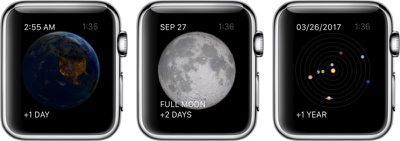
Apple Watch Time Travel 3
In the Astronomy watch face, you can switch between views of earth, the moon, and the solar system. With Time Travel, you can move through time, watching the sun rise and set above the Earth. You can also see the phases of the moon, and even find out the next time it will be full. With the solar system displayed, you can watch the planets rotate day-by-day for years in the future or past.

Solar
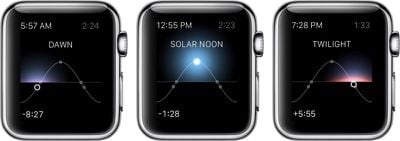
Apple Watch Time Travel 4
The Solar watch face provides a graph of the sun's position in the sky, limited to the current day. Based on your current location, as well as the time of day, the sun moves along a curve. With Time Travel, you can visually identify dawn, dusk, twilight, and the day's zenith at any time before or after your current.

With Time Travel mode on Apple Watch, you can quickly see what the day has in store for you without even having to open up an app or ask Siri for guidance.


Related Roundup: Apple Watch 12
Buyer's Guide: Apple Watch (Buy Now)
Related Forum: Apple Watch

Top Rated Comments

144 months ago
All this aside, whatever person thought it a good idea to call a feature a "Complication" was an idiot. I don't want to use any kind of mobile device and have the word "Complication" ANYWHERE in the user interface. I'm not 50 or 60, I'm a 23 year old with a strong background in computer science and I don't want that word on my device.
You do realize that the term "Complication" in the watch world is anything else on the timepiece that displays something other then the time. This term has been around for quite awhile and wasn't a feature that Apple decided to name.

Chances are you have been staring at complications on your watch for quite some time.
Score: 8 Votes (Like | Disagree)
oneMadRssn Avatar
144 months ago
ONE POINT TWENTY ONE JIGGAWATTS!

WHAT'S A JIGGAWATT?


EDIT: This article would have been really well-timed if posted on October 21, 2015. The actual future day.
Score: 3 Votes (Like | Disagree)
144 months ago
You do realize that the term "Complication" in the watch world is anything else on the timepiece that displays something other then the time. This term has been around for quite awhile and wasn't a feature that Apple decided to name.

Chances are you have been staring at complications on your watch for quite some time.
It's like these people don't care about horology at all!
Score: 2 Votes (Like | Disagree)
iPhysicist Avatar
144 months ago
All this aside, whatever person thought it a good idea to call a feature a "Complication" was an idiot. I don't want to use any kind of mobile device and have the word "Complication" ANYWHERE in the user interface. I'm not 50 or 60, I'm a 23 year old with a strong background in computer science and I don't want that word on my device.
The word complication and its origin can be looked up on Wikipedia. You've got more to learn young Padawan.
Score: 1 Votes (Like | Disagree)
144 months ago
These watches are still a total waste of time until Apple adds GPS and a sim card.
If that was your best comedy attempt, I will not book tickets for your stand up comedy shows.
Score: 1 Votes (Like | Disagree)

Popular Stories

apple watch s12 ultra 4

Apple Watch Series 12, Ultra 4 Owners Report Skin Irritation

Wednesday October 7, 2026 12:02 pm PDT by
Some Apple Watch Series 12 and Ultra 4 owners have experienced unexpected skin irritation with the new models, according to reports on the MacRumors forums and Reddit. Affected users complain of a burning sensation and redness under the sensor area. The Apple Watch Series 12 and Ultra 4 measure heart rate every five seconds, and some people have wondered if that's the cause of the skin...
southern straps 3 1

MacRumors Giveaway: Win an Apple Watch Series 12 and a Nylon Band From Southern Straps

Friday October 9, 2026 10:20 am PDT by
For this week's giveaway, we've teamed up with Southern Straps to offer MacRumors readers a chance to win an Apple Watch Series 12 and a nylon band from Southern Straps to go along with it. Southern Straps is a California-based company that has been making high-quality bands for the Apple Watch since the device first launched in 2015, and the company's selection of bands offer a an...
apple watch series 6 blood oxygen monitoring 1

Apple's $634 Million Apple Watch Patent Bill Just Got Even Bigger

Tuesday October 6, 2026 6:09 am PDT by
Apple's $634 million patent loss to medical technology company Masimo has just gotten even bigger, after a federal judge ordered Apple to pay an additional $184 million in interest on what it owes (via Bloomberg Law). The ruling takes Apple's bill to around $818 million, but that doesn't include any post-judgment interest continuing to accrue until the judgment is paid. Judge James Selna ...
Latest Stories
iPhone Duo Demand Reportedly Exceeds Apple's Expectations
23 minutes ago
iPhone Duo Launch Begins as First Orders Reach Customers
7 hours ago
1Password for Agents Keeps Your Passwords Hidden From AI
7 hours ago
iPhone Duo 24 Hours Later: Your Questions Answered
8 hours ago
Apple's iWork Apps Get 'Intelligent Assistant' and iPhone Duo Support
9 hours ago
Apple is Apparently Considering a Slightly Larger iPhone Duo
9 hours ago
Giant iPhone Duo Displays Coming to Four Apple Stores
10 hours ago
Apple Pulls Keynote, Pages and Numbers From App Store [Update: Back]
11 hours ago
Apple Updates More Apps With iPhone Duo Support
11 hours ago
Apple Will Label Apps 'Made for iPhone Duo' in App Store
14 hours ago
Amazon Takes $49 Off iPad With Prices Starting at $399.99
15 hours ago
F1 on Apple TV Now Available in Dolby Atmos
15 hours ago
Apple Reveals More Than 50 Apps That Will Be Updated for iPhone Duo
16 hours ago
Apple Blocks Certificates That Could Help Attackers Fake Websites
17 hours ago
Giant iPhone Duo Installations Spotted at Apple Fifth Avenue
18 hours ago
iPhone Duo 2 Prototypes Include Under-Display Face ID
18 hours ago
Tesla App Gains iPad and iPhone Duo Support
22 hours ago
Apple Reportedly Boosts iPhone Duo Orders by 44%
22 hours ago
Fortnite Returning to Australian App Store After Court Ruling
23 hours ago
Apple Ordered to Open iPhone to Rival App Stores in Australia
23 hours ago
Apple Suppliers Face Hurdles Cutting Circuit Board Emissions
1 day ago
Things Updated for iPhone Duo With Adaptive Layout
1 day ago
Simplicity and Siri AI Are HomeView's Killer Features, Apple Says
1 day ago
iPhone Duo Reviewers Really Miss Face ID
1 day ago
Does the iPhone Duo Run Hot? Here's What Reviews Found
1 day ago
Apple Music's New Look is Now Live on Apple's Website
1 day ago
Anthropic Launches Claude Duet, a Proactive AI Agent
1 day ago
What 32,000 Folds Did to the iPhone Duo's Hinge
1 day ago
iPhone Duo's Hidden FaceTime Camera Takes 'Trash' Photos
1 day ago
iPhone Duo Has 'Edge Light' Feature That Debuted on Macs Last Year
1 day ago








































