
Flight tracker apps are a popular way to keep tabs on planes in the sky, because when you're preparing to fly or when someone you know is on board a flight, you can use them to check that things are still on schedule. But if you have an iPhone, you don't need to download and install a third-party app to track a flight – it's a handy built-in feature of the operating system.
checking flight iphone
The ability to track flights in iOS is thanks to the data detectors that Apple has integrated into the system for quite a few years now. Data detectors recognize things like times, dates and addresses, and in the right context, turns these into tappable links. Here's how it works.

Track Flights in Messages

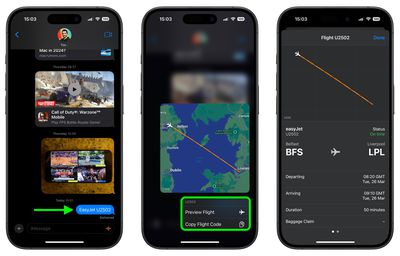
If someone sends you a flight number (U2502, say) in Messages, you can press and hold the underlined number to get a real-time view of the flight's progress plotted on a map.
messages
You also get the option to learn more by tapping Preview Flight, which will give you information like departure and arrival times, delays, and for some airports, baggage claim details. You'll find links to the airline website and Apple Maps at the bottom of the information card.

To increase the chances that iOS detects the flight number, it's best to include the full airline name along with the number (EasyJet U2502, for example).

Track Flights in Spotlight Search

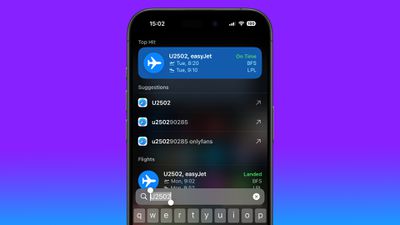
On iPhone and iPad, you can also track flights in Search.
search
Swipe down from the middle of the Home screen and simply input the flight number into the search field to get departure and arrival information. Tap the information card to get the additional details mentioned above.

Tracking Flights on a Mac

spotlight
Apple has included the same data detectors into macOS, meaning you can track flights on your Mac, too. Simply invoke Spotlight with the Command-Spacebar key combination and type the flight number into the input field.

spotlight
Select the flight data in the results, and you'll see the same information card that appears in iOS, complete with the flight's live trajectory shown on a map and other details.


Top Rated Comments

DJCobol Avatar
7 weeks ago
1. Flighty is the best and well worth the cost.
2. Chuckling at the OnlyFans suggestion in the iOS screenshot.
Score: 18 Votes (Like | Disagree)
stevealdrich Avatar
7 weeks ago
We prefer FlightAware. Easy-to-use interface in a free iOS app and website provides everything we want for tracking flights - without all the subscribe for Pro requirements with Flighty.
Score: 7 Votes (Like | Disagree)
eXoenDo Avatar
7 weeks ago
I love this feature. I enjoy the built in flight tracking functionality for tracking friends when they send me a flight number - but nothing will ever come close to the power inside of the Flighty app, which is what I use for my own travels.
Score: 5 Votes (Like | Disagree)
mclaren1444 Avatar
7 weeks ago
Just use Flighty
Score: 4 Votes (Like | Disagree)
blaureiter Avatar
7 weeks ago
Indeed remember when Siri had greater capabilities early in its "life" as an assistant?
You could ask Siri "what planes are overhead" and it brought up flight information about the aircraft that you might be looking at and perhaps another out of sight. That disappeared (homeland security, per chance)? Back in those old days Siri also had a sense of humor that Apple bled out of the assistant. For example, you could also ask "Hey Siri, beam me up" and it would have a cheeky response from that Star Trek command. It was also aware of 2001 A Space Oddysey. Just try opening those pod bay doors.

While new technology is welcome, it is now fairly generic. Of course, you can also get and AI system to give you some inaccurate information, just for fun!
Score: 3 Votes (Like | Disagree)
WarmWinterHat Avatar
7 weeks ago

Can we track Elon's flights, too? I hear that he loves that. ?
You sure can!

https://bsky.app/profile/did:plc:62cuohm6c6nefpnw4uujepty
Score: 3 Votes (Like | Disagree)

Popular Stories

Apple Logo Zoomed

Tim Cook Teases Plans for Apple's Upcoming 50th Anniversary

Thursday February 5, 2026 12:54 pm PST by
Apple turns 50 this year, and its CEO Tim Cook has promised to celebrate the milestone. The big day falls on April 1, 2026. "I've been unusually reflective lately about Apple because we have been working on what do we do to mark this moment," Cook told employees today, according to Bloomberg's Mark Gurman. "When you really stop and pause and think about the last 50 years, it makes your heart ...
iOS 26

iOS 26.3 and iOS 26.4 Will Add These New Features to Your iPhone

Tuesday February 3, 2026 7:47 am PST by
While the iOS 26.3 Release Candidate is now available ahead of a public release, the first iOS 26.4 beta is likely still at least a week away. Following beta testing, iOS 26.4 will likely be released to the general public in March or April. Below, we have recapped known or rumored iOS 26.3 and iOS 26.4 features so far. iOS 26.3 iPhone to Android Transfer Tool iOS 26.3 makes it easier...
imac video apple feature

Apple Makes Its Second-Biggest Acquisition Ever

Tuesday February 3, 2026 12:45 pm PST by
Apple recently acquired Israeli startup Q.ai for close to $2 billion, according to Financial Times sources. That would make this Apple's second-biggest acquisition ever, after it paid $3 billion for the popular headphone maker Beats in 2014. This is also the largest known Apple acquisition since the company purchased Intel's smartphone modem business and patents for $1 billion in 2019....
wwdc sans text feature

Apple Rumored to Announce New Product on February 19

Thursday February 5, 2026 12:22 pm PST by
Apple plans to announce the iPhone 17e on Thursday, February 19, according to Macwelt, the German equivalent of Macworld. The report, citing industry sources, is available in English on Macworld. Apple announced the iPhone 16e on Wednesday, February 19 last year, so the iPhone 17e would be unveiled exactly one year later if this rumor is accurate. It is quite uncommon for Apple to unveil...
Finder Siri Feature

Why Apple's iOS 26.4 Siri Upgrade Will Be Bigger Than Originally Promised

Friday February 6, 2026 3:06 pm PST by
In the iOS 26.4 update that's coming this spring, Apple will introduce a new version of Siri that's going to overhaul how we interact with the personal assistant and what it's able to do. The iOS 26.4 version of Siri won't work like ChatGPT or Claude, but it will rely on large language models (LLMs) and has been updated from the ground up. Upgraded Architecture The next-generation...















