How to Transfer Your WhatsApp Chat History From Android to iPhone - MacRumors
Skip to Content

How to Transfer Your WhatsApp Chat History From Android to iPhone

by

After a long wait, Meta this week announced the ability to transfer WhatsApp chat history, photos, videos, and voice messages from Android to iPhone while maintaining end-to-end encryption. The system uses Apple's Move to iOS app for Android phones, and can be initiated during the setup process for a new (or factory reset) iPhone.

Whatsapp Feature
This article runs through the steps involved in transferring your WhatsApp chat history from an Android phone to an iPhone. The much-requested migration feature transfers everything in your WhatsApp history including texts, voice notes, and media files to a new iPhone.
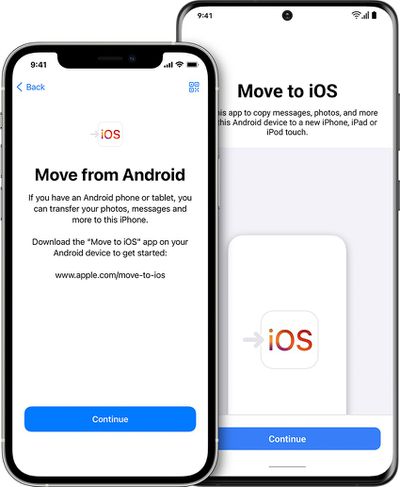
ios15 4 iphone12 pro move from android hero
Note that WhatsApp chat history migration is only supported on Android devices running Android 5.0 or later and iPhones running iOS 15.5 or later. Also, both the Android phone and the iPhone need to be connected to the same Wi-Fi network when the migration takes place. The following steps guide you through the process.

Transfer WhatsApp Chats From Android to iPhone

  1. On your Android phone, download the Move to iOS app from the Google Play Store.
  2. Start the iPhone setup process of your new (or factory reset) iPhone.
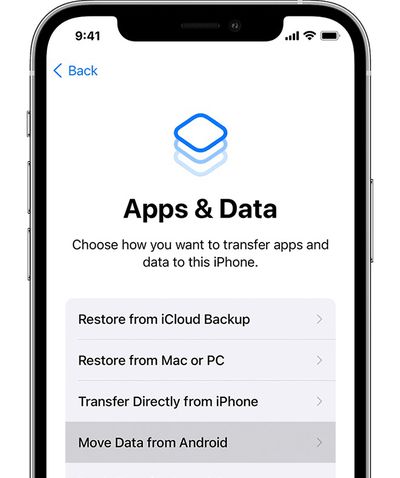
  3. When the Apps & Data setup screen appears, select Move data from Android.
    ios15 iphone12 pro setup apps data move data from android ontap

  4. On your Android phone, open the Move to iOS app and follow the onscreen instructions.
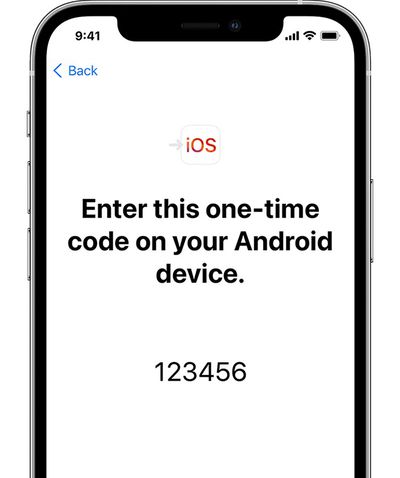
  5. On your iPhone, tap Continue when you see the Move from Android screen, then wait for a ten-digit or six-digit code to appear.
    ios15 iphone12 pro move from android setup iphone code

  6. Enter the code on your Android phone, select WhatsApp on the Transfer Data screen, then tap Start.
  7. Wait for your WhatsApp history and data to be prepared for migration. Once the process is complete, you will be signed out of WhatsApp on your Android device.
  8. Once your iPhone is fully setup, download WhatsApp from the App Store and sign into the service using the same phone number.
After following these steps, the WhatsApp chat history from your Android phone should appear on your new iPhone.


Top Rated Comments

contacos Avatar
49 months ago

wow finally, i got buddies who are stuck on android cause of their whatsapp history. too many "personal photos" 😂
I don’t understand these people. I automatically save everything to the camera roll, sort them into folders and delete the crap I don’t need and wipe all the chat attachments on WhatsApp itself on a weekly base. My mother is one of those people with like a 7 GB WhatsApp and she’s like „I don’t want to delete anything because I am not sure what I already / didn’t already save!“ and then complains about her iPhone being full and asks me what she could do 😖 /rant over haha
Score: 5 Votes (Like | Disagree)
49 months ago
I refuse to use WhatsApp since Meta owns them. I wish I could get more of my friends to use Signal.
Score: 4 Votes (Like | Disagree)
49 months ago
I don't use WhatsApp, but what a PITA. There isn't a way to just have your history stored in the cloud and synced automatically when you install the app on another device? My FB/IG message history is available on every device - iOS or Android...why is WhatsApp any different? They're owned by the same company.
Score: 4 Votes (Like | Disagree)
dabi Avatar
49 months ago
Sheesh, I'm glad I only use Discord and Messenger and don't have such problems. Literally just log in on any platform I want and the history shows up just like that. This sounds so complicated in comparison.
Score: 2 Votes (Like | Disagree)
fede777 Avatar
49 months ago

I don't use WhatsApp, but what a PITA. There isn't a way to just have your history stored in the cloud and synced automatically when you install the app on another device? My FB/IG message history is available on every device - iOS or Android...why is WhatsApp any different? They're owned by the same company.
WhatsApp always used iCloud / Google Drive to store their backups, that's why they are not easily interchangeable. It would be way better if it had their own solution like Facebook Messenger.
Score: 2 Votes (Like | Disagree)
49 months ago
Too bad that it can be used only during iPhone setup. But still having an option is good.
Score: 1 Votes (Like | Disagree)

Popular Stories

imac video apple feature

Apple Released Yet Another New Product Today

Friday March 20, 2026 2:39 pm PDT by
Apple has unveiled a whopping nine new products so far this March, including an iPhone 17e, iPad Air models with the M4 chip, MacBook Air models with the M5 chip, MacBook Pro models with M5 Pro and M5 Max chips, the all-new MacBook Neo, an updated Studio Display, a higher-end Studio Display XDR, AirPods Max 2, and now the Nike Powerbeats Pro 2. iPhone 17e features the same overall design as...
HomePod mini and Apple TV Sage

New Apple TV and HomePod Mini Remain 'Ready' to Launch

Sunday March 22, 2026 6:33 am PDT by
Apple has unveiled nine new products this month, but the wait continues for the next-generation Apple TV 4K and HomePod mini models. In his Power On newsletter today, Bloomberg's Mark Gurman said new versions of the Apple TV and HomePod mini have been "ready" since last year, but he reiterated that Apple has held off on releasing them until the more personalized version of Siri and other...
iOS 26

iOS 26.4 Adds Two New Features to CarPlay

Tuesday March 24, 2026 1:55 pm PDT by
iOS 26.4 was released today, and it includes a couple of new features for CarPlay: an Ambient Music widget and support for voice-based chatbot apps. To update your iPhone 11 or newer to iOS 26.4, open the Settings app and tap on General → Software Update. CarPlay will automatically offer the new features so long as the iPhone connected to your vehicle is running iOS 26.4 or later....