
Translate Speech With iPhone's Action Button - GeekWebGuides
Skip to Content

Translate Speech With iPhone's Action Button

by

Overcome communication barriers with the new custom Translation option for the iPhone's Action button. Keep reading to learn how to use it.
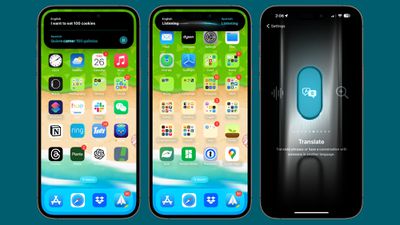
ios 17 translate
If you have an iPhone with an Action button (iPhone 15 Pro, iPhone 16 series, iPhone 17 series) Apple has a translation option for the button that allows you to translate live conversations into multiple languages.

According to Apple, the translation is not just accurate but also context-aware, ensuring that nuances and colloquialisms are captured effectively. The feature should be a boon for travelers, students, and anyone learning a language.

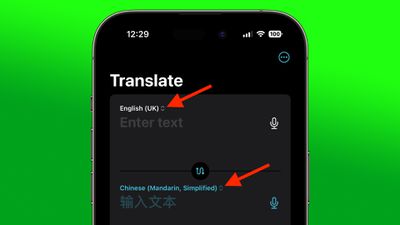
Before you use the Translate function, it's important to choose which language you want to translate. You can do this via Apple's built-in Translate app. On the app's main screen, use the chevrons next to the languages to make your selection.
translate choose language

Assign Translate to Action Button

Once you have chosen your languages, you are ready to select the Translate option for the Action button.

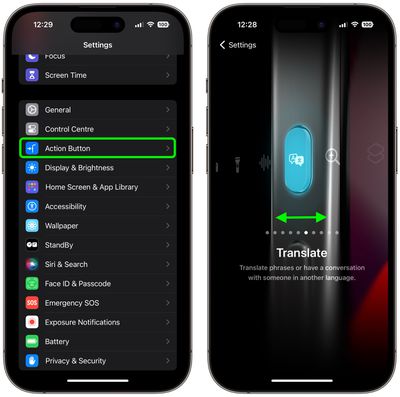
  1. Open the Settings app on your iPhone.
  2. Tap Action Button.
  3. Swipe to the Translate option to enable it.
settings

Using the Translate Function

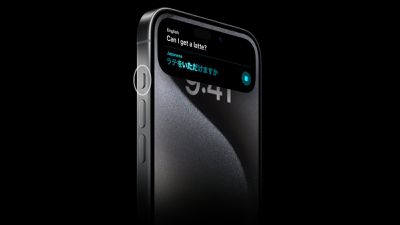
To Translate your speech to your chosen language, simply press and hold the Action button on your iPhone and begin speaking. Keep holding down the button for as long as you want to capture speech.
iPhone 15 Pro Action Button Translate
Your iPhone will transcribe what you said and display it in the Dynamic Island, and it will also provide a translation in the chosen language just beneath the transcription. Your iPhone will automatically read aloud the translation, and you can replay it by pressing the play button to the right of it.


Top Rated Comments

Attirex Avatar
37 months ago
Ah, yes, now obnoxious US tourists can shove their phones in locals' faces the world over!

"I SAID DO YOU HAVE COFFEE??? MY PHONE JUST SAID IT IN YOUR LANGUAGE. ARE YOU DEAF AND ALSO STUPID???"
Score: 6 Votes (Like | Disagree)
CausticSoda Avatar
37 months ago
This is woefully inadequate. As an expat and a frequent traveller, I was really looking forward to it. However:
[LIST=1]
* It only translates one way and does not listen for a reply.
* You cannot even press it again to reverse the translation direction. You have to enter the app.
* About 1/3 of the time it simply fails to work (it "listens" but does not respond). That is not due to the internet because I have the languages downloaded as well.
* The autoplay of the translation to sound never works the first time. After it "plays" it automatically, you then have to press repeat play manually, and only then you can hear it.
* There is no locked screen override, so if you press it on a locked screen it turns itself off after a few seconds, so you have to unlock the screen before use which is ridiculous.
* If you want to speak again after the first translation you have to enter the app or long press it off and then long press it back on again.

I am astounded this is the best they can do... If you devote an actual button to it, it should have more functionality and simply work better. I cannot believe whoever was responsible for this thinks it is good enough. Was it actually tested by people who have experience of needing/using translation aids in real life rather than a quick test be someone clueless in Cupertino? If they could make it work properly it would be great and an example of a really good use of the button. If you are in a stressful situation with live conversation, you don't want to be finding and opening the app. You want to be "on it" immediately. Doing it all from one button would be superb. Come on Apple - sort it out please!
Score: 4 Votes (Like | Disagree)
Dirty Mac Avatar
37 months ago

Ah, yes, now obnoxious US tourists can shove their phones in locals' faces the world over!

"I SAID DO YOU HAVE COFFEE??? MY PHONE JUST SAID IT IN YOUR LANGUAGE. ARE YOU DEAF AND ALSO STUPID???"
Maybe Apple will also add a "shouting mode" to the speech output for Americans? ;-)
Score: 3 Votes (Like | Disagree)
AppleFan91 Avatar
37 months ago
But most importantly…. Can I get that wallpaper lol
Score: 2 Votes (Like | Disagree)
CausticSoda Avatar
37 months ago

I was a bit confused by this when I first started playing with it too. However, it’s linked to whether you’re in silent mode or not: with silent mode turned off it’ll speak the translation the first time, without you needing to hit the play button.
I actually tried that and it didn't seem to make any difference, but I'll try again. Thanks for the reply.
Score: 1 Votes (Like | Disagree)
ric22 Avatar
37 months ago

This is woefully inadequate. As an expat and a frequent traveller, I was really looking forward to it. However:
[LIST=1]
* It only translates one way and does not listen for a reply.
* You cannot even press it again to reverse the translation direction. You have to enter the app.
* About 1/3 of the time it simply fails to work (it "listens" but does not respond). That is not due to the internet because I have the languages downloaded as well.
* The autoplay of the translation to sound never works the first time. After it "plays" it automatically, you then have to press repeat play manually, and only then you can hear it.
* There is no locked screen override, so if you press it on a locked screen it turns itself off after a few seconds, so you have to unlock the screen before use which is ridiculous.
* If you want to speak again after the first translation you have to enter the app or long press it off and then long press it back on again.

I am astounded this is the best they can do... If you devote an actual button to it, it should have more functionality and simply work better. I cannot believe whoever was responsible for this thinks it is good enough. Was it actually tested by people who have experience of needing/using translation aids in real life rather than a quick test be someone clueless in Cupertino? If they could make it work properly it would be great and an example of a really good use of the button. If you are in a stressful situation with live conversation, you don't want to be finding and opening the app. You want to be "on it" immediately. Doing it all from one button would be superb. Come on Apple - sort it out please!
Wow. Apple translate was poor in comparison to Google translate when I tried that, but recent updates have made Google translator on iOS more of a pain to use too...
Score: 1 Votes (Like | Disagree)

Popular Stories

M5 MacBook Pro

RIP, MacBook Ultra

Monday October 19, 2026 9:37 am PDT by
Apple today sent out invites for an experience in Los Angeles on Wednesday, October 28, and the "Pro and tell" tagline on the invitation likely means that the rumored MacBook models with touch-enabled OLED displays will stick with MacBook Pro branding instead of the once-rumored "MacBook Ultra" name. The long-rumored "iPhone Ultra" ended up being named iPhone Duo, so speculation that Apple...
iPhone Duo Trio

Here's What Apple's Apps Look Like on the iPhone Duo

Tuesday October 20, 2026 11:12 am PDT by
With just three days to go until the iPhone Duo is released, Apple is getting ready for the launch. Behind the scenes, the App Store now has screenshots of Apple's built-in apps running on the Duo. We've seen some apps in marketing materials, but images of the ones we haven't seen give us an idea of what it will be like using the iPhone Duo day to day. Many apps are shown in landscape...
apple pro tell logo

Apple Announcing New Products Next Week: 'Pro and Tell'

Monday October 19, 2026 9:05 am PDT by
Apple's Greg Joswiak today hinted at new product announcements coming next week, sharing a social media post that says "Can't wait to pro and tell next week." Rumors suggest Apple is planning to debut the new MacBook Pro with an OLED touchscreen display, an M6 entry-level MacBook Pro, an M6 iMac, an iPad mini with an OLED display. Can't wait to pro and tell next week....
Latest Stories
Apple's iWork Apps Get 'Intelligent Assistant' and iPhone Duo Support
23 minutes ago
Apple is Apparently Considering a Slightly Larger iPhone Duo
27 minutes ago
Giant iPhone Duo Displays Coming to Four Apple Stores
2 hours ago
Apple Pulls Keynote, Pages and Numbers From App Store [Update: Back]
2 hours ago
Apple Updates More Apps With iPhone Duo Support
3 hours ago
Apple Will Label Apps 'Made for iPhone Duo' in App Store
6 hours ago
Amazon Takes $49 Off iPad With Prices Starting at $399.99
6 hours ago
F1 on Apple TV Now Available in Dolby Atmos
7 hours ago
Apple Reveals More Than 50 Apps That Will Be Updated for iPhone Duo
7 hours ago
Apple Blocks Certificates That Could Help Attackers Fake Websites
9 hours ago
Giant iPhone Duo Installations Spotted at Apple Fifth Avenue
9 hours ago
iPhone Duo 2 Prototypes Include Under-Display Face ID
10 hours ago
Tesla App Gains iPad and iPhone Duo Support
14 hours ago
Apple Reportedly Boosts iPhone Duo Orders by 44%
14 hours ago
Fortnite Returning to Australian App Store After Court Ruling
15 hours ago
Apple Ordered to Open iPhone to Rival App Stores in Australia
15 hours ago
Apple Suppliers Face Hurdles Cutting Circuit Board Emissions
15 hours ago
Things Updated for iPhone Duo With Adaptive Layout
16 hours ago
Simplicity and Siri AI Are HomeView's Killer Features, Apple Says
16 hours ago
iPhone Duo Reviewers Really Miss Face ID
21 hours ago
Does the iPhone Duo Run Hot? Here's What Reviews Found
22 hours ago
Apple Music's New Look is Now Live on Apple's Website
23 hours ago
Anthropic Launches Claude Duet, a Proactive AI Agent
1 day ago
What 32,000 Folds Did to the iPhone Duo's Hinge
1 day ago
iPhone Duo's Hidden FaceTime Camera Takes 'Trash' Photos
1 day ago
iPhone Duo Has 'Edge Light' Feature That Debuted on Macs Last Year
1 day ago
Apple Support App Updated for iPhone Duo's Larger Display
1 day ago
Amazon Sweetens the Deal on Entry-Level 16-Inch MacBook Pro With $570 Off
1 day ago
iPhone Duo Tips Over on MagSafe Stands When Unfolded
1 day ago
Apple Music's New Look Officially Announced
1 day ago









































