How to Turn Off Automatic Ear Detection on Your Powerbeats Pro Earbuds - MacRumors
Skip to Content

How to Turn Off Automatic Ear Detection on Your Powerbeats Pro Earbuds

by

Apple's Beats-branded Powerbeats Pro earbuds include a feature called Automatic Ear Detection that allows the audio routed from a connected device to seamlessly switch to the Powerbeats buds the moment you put them in your ears.
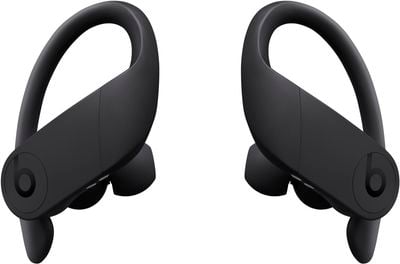
powerbeatsproblack
This means the ‌Powerbeats Pro‌ can automatically pause the audio track when you remove them, and resume playback when you put them back in again, allowing you to jump-start your workout after a quick break.

The feature is enabled by default, but if you want to you can manually disable it once you've connected ‌Powerbeats Pro‌ to an iPhone or iPad.

How to Turn off Automatic Ear Detection

  1. On your iPhone or ‌iPad‌, launch the Setings app.
  2. Tap Bluetooth.
  3. Under the My Devices list, tap the circled "i" icon next to your connected ‌Powerbeats Pro‌ earphones. powerbeatsproautomaticeardetection
  4. Toggle off the switch next to Automatic Ear Detection.
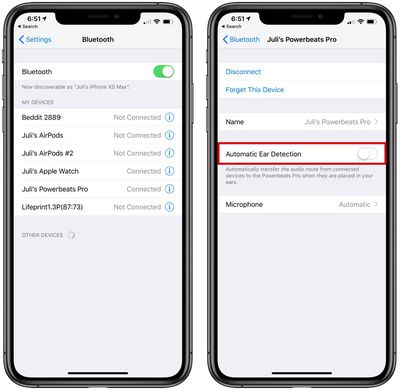
Note that once you've disabled ear detection, you'll have to manually play/pause audio using your audio source device or the ‌Powerbeats Pro‌'s on-bud physical buttons.

Popular Stories

Apple Event Logo

Apple's Next Era Begins September 1

Thursday May 7, 2026 10:36 am PDT by
Apple recently announced that Tim Cook will be stepping down as CEO later this year, after 15 years of leading the company. Effective September 1, Apple's hardware engineering chief John Ternus will become the company's next CEO, while Cook will become executive chairman of Apple's board of directors. In his new role, Apple said Cook will assist with "certain aspects" of the company,...
Four iPhone 18 Pro Colors Mock Feature

iPhone 18 Pro Launching in September With These 10 New Features

Saturday May 9, 2026 6:03 am PDT by
While the iPhone 18 Pro and iPhone 18 Pro Max are not launching until September, there are already plenty of rumors about the devices. It was initially reported that the iPhone 18 Pro models would have fully under-screen Face ID, with only a front camera visible in the top-left corner of the screen. However, the latest rumors indicate that only one Face ID component will be moved under the...
MacBook Pro Low Angle Wide Lens

macOS 27: Two More Changes Leaked Ahead of WWDC Next Month

Sunday May 10, 2026 9:45 am PDT by
macOS 27 will have a "slight redesign" compared to macOS Tahoe, according to the latest word from Bloomberg's Mark Gurman. In his Power On newsletter today, Gurman said the design changes will help to improve the readability of macOS Tahoe's Liquid Glass interface:If you've used Tahoe, you're likely familiar with some of the quirks — particularly the transparency effects and shadows that...