 Find My iPhone (or Find My iPad) is an iOS feature that enables users to locate a lost or missing Apple device. When you sign in to iCloud.com or the Find My iPhone app, you can see your missing device on a map and play a sound to locate it if it's close by. It also has a Lost Mode to lock, track, or remotely erase all of your personal information.
For these reasons, Apple recommends that users keep Find my iPhone enabled, but there are circumstances where you might want to turn it off. If you're selling your iPhone or passing it on, for example, you should disable Find My iPhone beforehand, because the new owner won't be able to disable it (unless they have your Apple ID password), which means they won't be able to restore the device to its factory settings.
Likewise, if you've acquired a second-hand iPhone or iPad and the previous owner hasn't disabled Find My iPhone, you'll want to unlink the device from their Apple ID, but of course you'll only be able to do this if you know their Apple ID password. Whatever the reason, here's how to turn off Find My iPhone in iOS.
How to Turn Off Find my iPhone in iOS
- Launch the Settings app on your iPhone or iPad.
- Tap your name in the Apple ID banner at the top.
- Tap iCloud.

- Scroll down and tap Find My iPhone (or Find My iPad).
- Tap the toggle to switch it to the white OFF position.
- Enter your Apple ID password when prompted.
- Tap Turn Off.
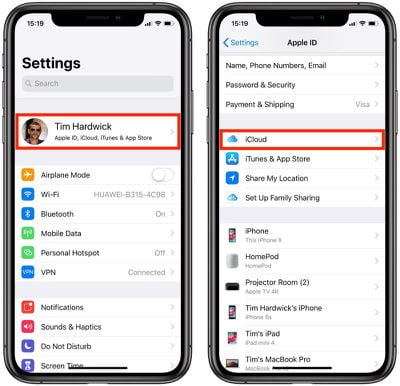
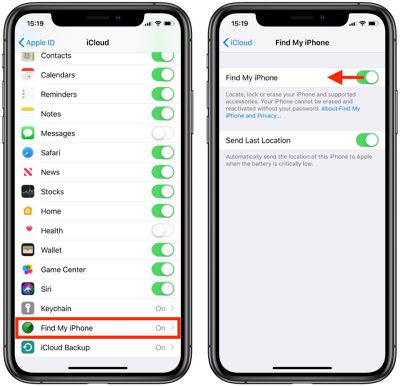
That's all there is to it. To do the same thing on a Mac, check out our separate article on how to turn off Find My Mac. Note that signing out of iCloud on an iPhone or iPad will also disable Find My iPhone as it requires an iCloud account to work.