

 In iOS 13 and iPadOS, Apple has combined its stock Find My Friends and Find My iPhone apps into a single, unified app called "Find My" – a sort of catch-all user interface for finding your friends and devices.
Find My works similarly to the apps it replaces. For example, just like Find My Friends, it gives you access to your location sharing options – including the option to disable location sharing on your Apple device temporarily or indefinitely.
The following steps show you how you can disable location sharing using the Find My app. Note that "Location Not Available" appears below your name in Find My on the devices of people following you, which makes it look as though your device is turned off, in airplane mode, or just offline.
- Launch the Find My app on your iPhone or iPad. (The Find My app is available by default on all new iOS devices, but if you've deleted it, you need to download the free app from the App Store.)
- Tap the Me tab if it's not already selected.

- Tap the toggle switch next to Share My Location to the white OFF position.
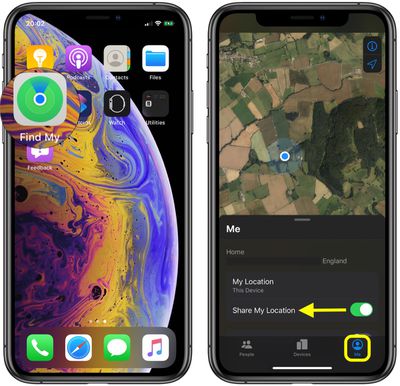
When you turn off Share My Location in Find My, the status is reflected in your iCloud settings, where you can also turn location sharing on/off. Launch the Settings app on your device, tap your Apple ID banner at the top, then tap Find My, and you'll see the Share My Location toggle switch. You can also find the switch in Settings -> Privacy -> Location Services -> Share My Location.



























![Apple Pulls Keynote, Pages and Numbers From App Store [Update: Back]](https://images.macrumors.com/t/Okb7kitB_gNr6qe5Pex9nQIysD8=/112x112/article-new/2026/01/Apple-Creator-Studio-iWork-suite.jpg)

















