

In macOS Big Sur and later, Apple includes an intelligent feature that's designed to learn from your charging habits and improve the lifespan of your battery by reducing the time your Mac notebook spends fully charged.
When the feature is enabled (by default on Macs with an Apple silicon chip or T2 security chip), your Mac attempts to learn your charging routine with the intention of ensuring that your Mac is fully charged when unplugged. Once it's figured out your routine, your Mac will delay charging past 80% in certain situations.
Of course, if you have no set routine, then this feature can become troublesome. For example, you may end up disconnecting your Mac to use away from your desk for a long period of time and then find that it's not fully charged when you need it most.
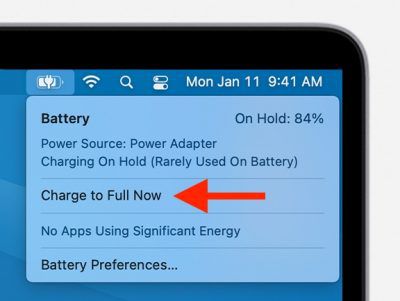 If you know in advance that you'll soon be taking your Mac away, you can always click the battery icon in the menu bar and select Charge to Full Now in the battery status menu.
However, if you need to disconnect your Mac at a moment's notice, this isn't any kind of solution, and you might be better off turning off Optimized Battery Charging entirely. The following steps show you how it's done.
Disable Optimized Battery Charging
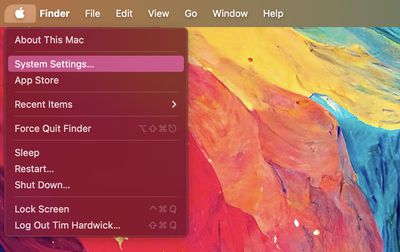
- Click the Apple symbol () in the corner of the menu bar at the top of the screen, then click System Settings....

- Select Battery in the sidebar menu.
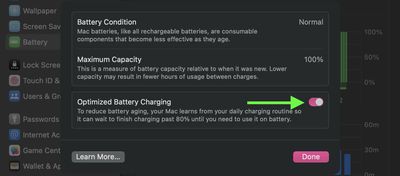
- Click the info (i) button in the Battery Health section.
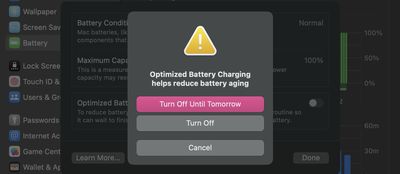
- Click the toggle next to Optimized Battery Charging to turn it off.
- Select Turn Off or Turn Off Until Tomorrow.
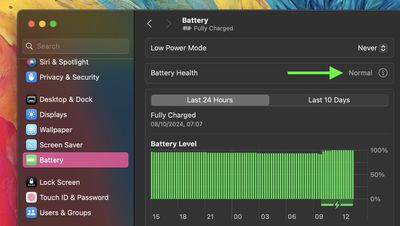
Check the "Battery Condition" result. If it's Normal, then your battery health is fine. This can be the case even if the accompanying Maximum Capacity readout is no longer at 100%. That's because batteries used in Mac notebooks are designed to retain up to 80% of their original capacity at their maximum cycle count when operating under normal conditions.
If your Mac battery's maximum capacity is less than 80%, however, this is an indication that it needs servicing, and you'll likely already be experiencing noticeably degraded battery life.
Every new Mac bought from Apple comes with a one-year warranty that includes service coverage for a defective battery. If your Mac is out of warranty and the battery hasn't aged well, Apple offers battery service for a charge.




















