
Starting with tvOS 26.2, Apple TVs began displaying a user profile selection screen every time you wake the device from sleep. The feature helps households with multiple users maintain separate viewing histories and recommendations, but it can feel like an unnecessary step if you're the sole user.
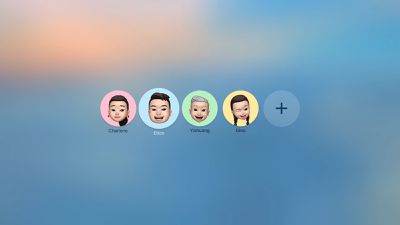
tvOS 26 Profiles
Fortunately, Apple lets you disable this prompt entirely. Here's how to turn off the user profiles screen and go straight to your Home screen.

Disable the User Profile Selection Screen

  1. Open Settings on your Apple TV.
  2. Select Profiles and Accounts.
  3. Toggle off Choose Profile on Wake.

With this setting disabled, your Apple TV will skip the profile selection screen and take you directly to the Home Screen when you wake it.

What Happens When You Disable Profile Switching

Turning off the profile switcher doesn't delete your user profiles or their associated watch history and recommendations. It simply removes the prompt that appears each time you turn on your TV or Apple TV.

If you share your Apple TV with others and want to switch profiles manually, you can still access profile options by going to Settings ➝ Users and Accounts and selecting a different user profile from there.

To learn more about how user profiles can be genuinely useful, check out our dedicated hands-on article.


Top Rated Comments

Mr Todhunter Avatar
7 weeks ago
I needed that. Thank you.
Score: 9 Votes (Like | Disagree)
PilotC150 Avatar
7 weeks ago

This is the most redundant article ever. What kind of self loathing, split-personality narcissist would create multiple AppleID/iCloud accounts, then manually add and configure all those accounts on their AppleTV, even though they are the "sole user" of that AppleTV.
Am I a self loathing, split-personality narcissist because my family has four user accounts, but the Apple TV in my office is only used by me?

The one in the living room is used by the whole family, so the account selector is there, but not every room has multiple users.
Score: 7 Votes (Like | Disagree)
erinsarah Avatar
7 weeks ago
Also a useful tip for families that don’t bother with an ATV profile because all of the apps have their own profile selections (except ATV itself, of course)
Score: 6 Votes (Like | Disagree)
aespana Avatar
7 weeks ago
The first thing I did when the Apple TV auto updated it self was disabling this. My mother asked why there was a new screen of choosing profiles or faces and because that, she couldn't go to YouTube and use the app.
Score: 6 Votes (Like | Disagree)
hagar Avatar
7 weeks ago
Of all my Apple devices the Apple TV is by far the least user-friendly. The remote control is still an issue after all these years.

And the user profiles are so annoying because they don’t sync with the third party streaming apps.
Score: 6 Votes (Like | Disagree)
KanosWRX Avatar
7 weeks ago
If this somehow integrated with all the apps so you wouldn't have to log into each other those then great. but its pointless to only have it on the apple tv home screen.. turned this off right away.
Score: 4 Votes (Like | Disagree)

Popular Stories

Apple Logo Zoomed

Tim Cook Teases Plans for Apple's Upcoming 50th Anniversary

Thursday February 5, 2026 12:54 pm PST by
Apple turns 50 this year, and its CEO Tim Cook has promised to celebrate the milestone. The big day falls on April 1, 2026. "I've been unusually reflective lately about Apple because we have been working on what do we do to mark this moment," Cook told employees today, according to Bloomberg's Mark Gurman. "When you really stop and pause and think about the last 50 years, it makes your heart ...
iOS 26

iOS 26.3 and iOS 26.4 Will Add These New Features to Your iPhone

Tuesday February 3, 2026 7:47 am PST by
While the iOS 26.3 Release Candidate is now available ahead of a public release, the first iOS 26.4 beta is likely still at least a week away. Following beta testing, iOS 26.4 will likely be released to the general public in March or April. Below, we have recapped known or rumored iOS 26.3 and iOS 26.4 features so far. iOS 26.3 iPhone to Android Transfer Tool iOS 26.3 makes it easier...
imac video apple feature

Apple Makes Its Second-Biggest Acquisition Ever

Tuesday February 3, 2026 12:45 pm PST by
Apple recently acquired Israeli startup Q.ai for close to $2 billion, according to Financial Times sources. That would make this Apple's second-biggest acquisition ever, after it paid $3 billion for the popular headphone maker Beats in 2014. This is also the largest known Apple acquisition since the company purchased Intel's smartphone modem business and patents for $1 billion in 2019....
wwdc sans text feature

Apple Rumored to Announce New Product on February 19

Thursday February 5, 2026 12:22 pm PST by
Apple plans to announce the iPhone 17e on Thursday, February 19, according to Macwelt, the German equivalent of Macworld. The report, citing industry sources, is available in English on Macworld. Apple announced the iPhone 16e on Wednesday, February 19 last year, so the iPhone 17e would be unveiled exactly one year later if this rumor is accurate. It is quite uncommon for Apple to unveil...
Finder Siri Feature

Why Apple's iOS 26.4 Siri Upgrade Will Be Bigger Than Originally Promised

Friday February 6, 2026 3:06 pm PST by
In the iOS 26.4 update that's coming this spring, Apple will introduce a new version of Siri that's going to overhaul how we interact with the personal assistant and what it's able to do. The iOS 26.4 version of Siri won't work like ChatGPT or Claude, but it will rely on large language models (LLMs) and has been updated from the ground up. Upgraded Architecture The next-generation...















