Turn Several Live Photos into a Single Video on iPhone - MacRumors
Skip to Content

Turn Several Live Photos into a Single Video on iPhone

by

Did you know it's possible to take multiple Live Photos from your iPhone's photo library and turn them into a single continuous video? Keep reading to learn how it's done.
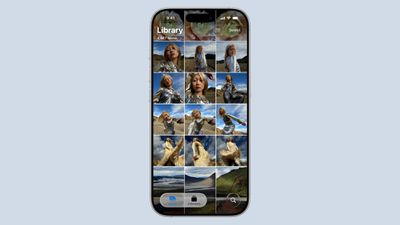
ios 26 photos app
On iPhone and iPad, Live Photos bring your pictures to life by adding a few seconds of video before and after the shot, creating a living memory rather than a static image.

While Live Photos are great on their own, it's also possible to weave several together to create a video montage. This process transforms a collection of moments into a cohesive narrative, and offers an easier way to share and relive your memories.

Whether it's a series of shots from a special event, a day out with friends, or a compilation of everyday moments, the following steps show you how to turn several Live Photos into a video that can encapsulate their essence in a way that a single photo or traditional video might not.

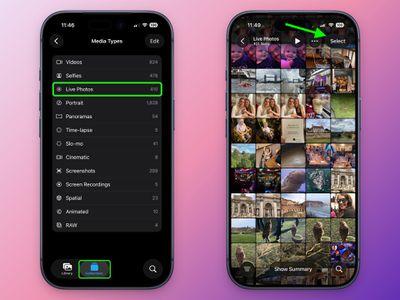
  1. In the Photos app, tap the Collections icon at the bottom of the screen.
  2. Scroll down to "Media Types," and tap Live Photos.
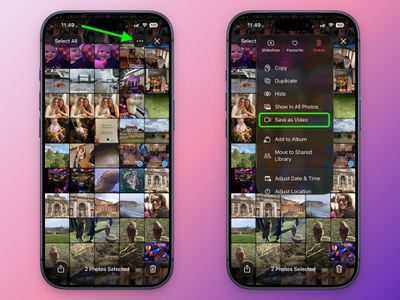
  3. Tap Select in the top-right corner, then tap the Live Photos you want to include in your video so that a little checkmark appears on each one.
    photos

  4. Tap the button with three dots in the top-right corner.
  5. Choose Save as Video in the pop-up menu.
    photos

That's all there is to it. To watch your newly created video, return to the Library view or find it in the Videos category under Media Types.

Note that the video will be dated to when the Live Photos were originally taken, so unless you have the Sort by Recently Added option checked, they may not show as the latest video in your collection.


Top Rated Comments

16 weeks ago
And yet we can’t turn several videos into one video.
Score: 6 Votes (Like | Disagree)
Astuces iOS Avatar
16 weeks ago

And yet we can’t turn several videos into one video.
I introduce you iMovie !
Score: 4 Votes (Like | Disagree)
lazyrighteye Avatar
16 weeks ago

They should include an app on every iPhone that turns several videos into one video. And, it should be a free app, no subscription.
And it should be called Photos.

Seriously, why they haven’t included even basic iMovie-like editing directly in Photos is beyond. I mean, yeah, here is this master collection of billions of photos and movies
I captured. Sitting there. Doing nothing. Why not give us tools to do something with these assets, to create - you know, like you used to. We can still have iMovie. But adding basic editing features directly in Photos isn’t the worst idea.
Score: 3 Votes (Like | Disagree)
16 weeks ago

And it should be called Photos.

Seriously, why they haven’t included even basic iMovie-like editing directly in Photos is beyond. I mean, yeah, here is this master collection of billions of photos and movies
I captured. Sitting there. Doing nothing. Why not give us tools to do something with these assets, to create - you know, like you used to. We can still have iMovie. But adding basic editing features directly in Photos isn’t the worst idea.
Fully agree. And while they're at it, let me reverse play a vid.
Score: 2 Votes (Like | Disagree)
16 weeks ago

They should include an app on every iPhone that turns several videos into one video. And, it should be a free app, no subscription.
They do. It's called iMovie
Score: 2 Votes (Like | Disagree)
15 weeks ago

That’s weird! I just did it, and mine came out the correct order on the video!
figured it out! need to have the live photos collection sorted by oldest first. then it was perfect. kind of odd
Score: 1 Votes (Like | Disagree)

Popular Stories

google photos wardrobe

Google Photos to Get AI 'Wardrobe' Feature

Wednesday April 29, 2026 3:50 pm PDT by
Google Photos is getting a new wardrobe planning feature that will help you decide what to wear. AI will pull in images of clothing from the Google Photos library, organizing clothing items into a digital closet. You will be able to put items together to create outfits, and even virtually try them with a digital avatar on to see how they'll look. The Google Photos app will show all items of...
Dynamic Island iPhone 18 Pro Feature

11 Reasons to Wait for the iPhone 18 Pro

Monday May 11, 2026 9:01 am PDT by
We're only four months out from the launch of Apple's premium next-generation smartphone lineup, and while we're not expecting a sea change in terms of functionality, there are still several enhancements rumored to be coming to the iPhone 18 Pro and iPhone 18 Pro Max. One thing worth noting is that Apple is reportedly planning a major change to its iPhone release cycle this year, adopting a...
iOS 26

iOS 26.5 Features: Everything New in iOS 26.5

Monday May 11, 2026 5:09 pm PDT by
Apple released iOS 26.5 after a few months of beta testing, and while it doesn't have the Siri features we were hoping for since those are being held until iOS 27, there are a handful of useful changes worth knowing about. Subscribe to the MacRumors YouTube channel for more videos. End-to-End Encryption for RCS Support for end-to-end encryption (E2EE) for RCS messages between iPhone and...