

When Apple introduced iOS 14.5 in April, it introduced the ability to unlock your iPhone with Face ID while wearing a mask, so long as you are wearing an Apple Watch.


In the current health climate, many people are wearing masks that cover their faces when going outside, visiting stores, and other tasks, which is why Apple added the "Unlock With Apple Watch" to the Face ID settings in iOS. However, some users have found this function has been inconsistent or even failed to work at all. If that sounds like your experience, try the tips in this article to see if you can get it working again.
But before you do, let's quickly recap how the feature works.
How Unlock With Apple Watch Works
When you look at your locked iPhone and Face ID recognizes that you have a mask on, it checks if you're wearing your Apple Watch, and if so, unlocks your phone. The process is similar to what happens when unlocking a Mac with an Apple Watch. When the unlock occurs, the user receives a haptic buzz and a notification on the Apple Watch informing them that the unlocking procedure has been successful. It's worth noting that you can only use your Apple Watch to unlock your iPhone while wearing a mask – it can't be used for authenticating Apple Pay or App Store purchases.
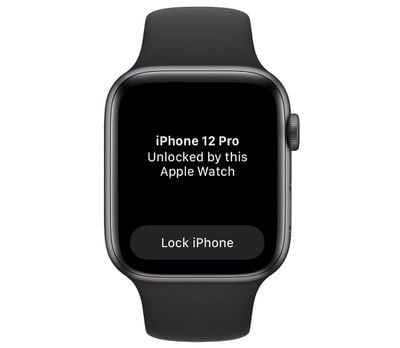
For the feature to be available, you need to make sure that you're running iOS 14.5 or later on your iPhone and watchOS 7.4 or later on your Apple Watch. As far as hardware goes, you need an Apple Watch Series 3 or later, and obviously an iPhone X or later with Face ID.
The "Unlock iPhone With Apple Watch" option can be switched on in Settings -> Face ID & Passcode on your iPhone. To use your Apple Watch to unlock your iPhone, your watch needs to be nearby and on your wrist, and you need to have unlocked it with your passcode.
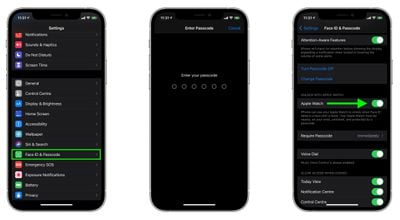
The first time you attempt to unlock your iPhone with Apple Watch when wearing a mask, your iPhone will ask you to enter your passcode. Once you've done that, you should be able to unlock your iPhone when wearing a mask (and you do need a mask on – it won't work without one). Similarly, you'll need to re-enter your passcode if you've since removed your watch and put it back on, or it won't work.
If all those conditions are met and you still can't get Unlock iPhone With Apple Watch to work, the following suggestions might help you get it up and running.
1. Check Apple Watch is Communicating With iPhone
Your Apple Watch might be paired with your iPhone, but is it actively connected? You can easily check on your Apple Watch by swiping up from the bottom of the screen to bring up the Control Center. If there's a green iPhone icon in the top-left corner, your watch is successfully connected to it.
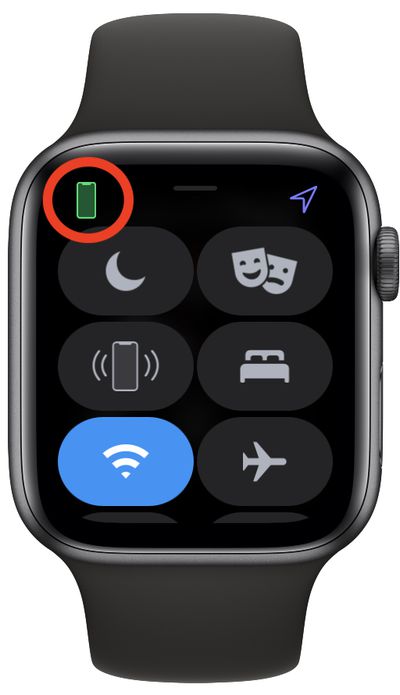
If the green icon isn't showing, it's worth checking that Bluetooth is enabled on your iPhone (Settings -> Bluetooth) and that your Apple Watch is displayed as connected in the "My Devices" list.
2. Turn Off "Unlock With iPhone" on Apple Watch
On Apple Watch, there's an option in watchOS that lets your iPhone unlock your watch as long as the iPhone is unlocked (Settings -> Passcode -> Unlock With iPhone).
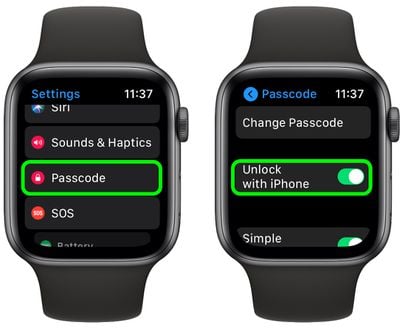
Some users have found that disabling this feature then restarting both devices makes Unlock With Apple Watch work on iPhone. Of course, this is a workaround rather than a fix, because you're turning off one feature to resurrect another, so you'll have to weigh up whether the compromise is worth it in your particular use case.
3. Turn Apple Watch Passcode Off Then Back On Again
Given that enabling an Apple Watch passcode is one of the requirements of Unlock With Apple Watch, it's worth turning this setting on and off again to see if it triggers something.
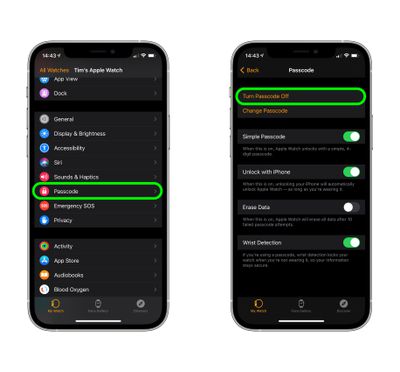
Open the Watch app on your iPhone, and in the Watch tab, select Passcode -> Turn Passcode Off. You'll be asked to enter your current passcode on your Apple Watch to confirm. Once that's done, reboot your Apple Watch and iPhone, then re-enable the passcode setting.
4. Reset Face ID
Unlock With Apple Watch relies on Face ID detecting a mask on your face, so it's worth resetting Face ID just to make sure it's not the crux of your problem.
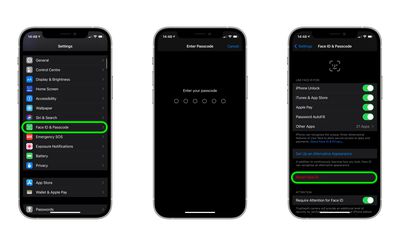
Open the Settings app on your iPhone, select Face ID & Passcode, enter your passcode, then tap Reset Face ID.
5. Make Sure Wrist Detection is Enabled
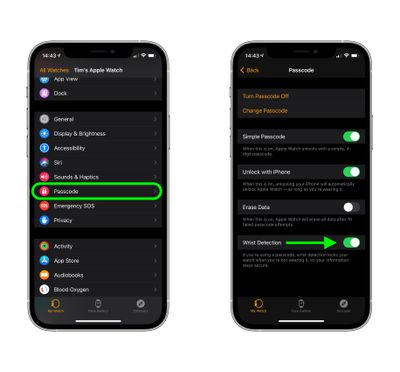
Apple Watch uses Wrist Detection to know if youre wearing it, and if you aren't, it requires you to enter a passcode to access. Wrist Detection has to be enabled for Unlock With Apple Watch to work. So head into the Watch app on your iPhone, and in the Watch tab, select Passcode and ensure the Wrist Detection switch is in the green ON position.
6. Unpair Then Re-pair Your Apple Watch
Unpairing Apple Watch from iPhone has worked for some people suffering from the issue. It takes a bit of time, but if you miss the "Unlock With iPhone" feature on your Apple Watch, then it's probably going to be worth the effort as a last resort.
- Bring your iPhone and Apple Watch close together, then open the Watch app on your iPhone.
- In the My Watch tab, tap All Watches.
- Tap the info (i) button next to the watch that you want to unpair.
- Tap Unpair Apple Watch. (For GPS + Cellular models, choose to keep your cellular plan.)
- Tap again to confirm. You might need to enter your Apple ID password to disable Activation Lock.
Before erasing all content and settings on your Apple Watch, your iPhone creates a new backup of your Apple Watch. You can use the backup to restore a new Apple Watch. After your Apple Watch unpairs, you'll see the Start Pairing message. Then you can pair your watch to your iPhone again in the normal way.
- Press and hold the side button on your Apple Watch until you see the Apple logo.
- Wait for the "Use your iPhone to set up this Apple Watch" message to appear on your iPhone, then tap Continue. If you don't see this message, open the Watch app on your iPhone, tap All Watches, then tap Pair New Watch.
- Follow the on-screen instructions to re-pair your watch.
Final Thoughts
If none of the above suggestions worked for you, it's likely you'll have to wait for Apple to fix whatever's going wrong in a future update. Apple has been working to solve similar unlocking issues between iPhone and Apple Watch in recent versions of iOS, so hopefully we'll see a fix in the next software update to iOS 14 or with the release of iOS 15 in September.
























![Apple Pulls Keynote, Pages and Numbers From App Store [Update: Back]](https://images.macrumors.com/t/Okb7kitB_gNr6qe5Pex9nQIysD8=/112x112/article-new/2026/01/Apple-Creator-Studio-iWork-suite.jpg)





















