
How to Enable and Disable Automatic Workout Detection in watchOS 5 - MacRumors
Skip to Content

How to Enable and Disable Automatic Workout Detection in watchOS 5

by

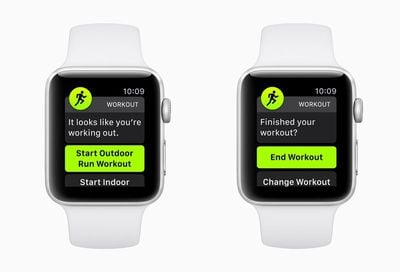
Apple's watchOS 5 update includes a new automatic workout detection feature, which is designed to make sure you never miss out on getting credit for one of your workouts.

Automatic workout detection is a setting that's enabled by default once you upgrade to watchOS 5, but if you don't want the feature, it can be turned off using the Apple Watch app on the iPhone or on the Apple Watch itself.
autodetectworkout

Enabling/Disabling Automatic Workouts on Apple Watch

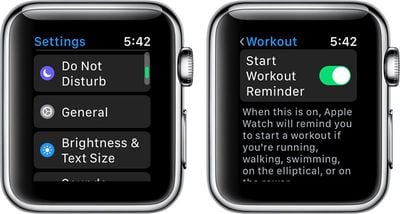
  1. Open the Settings app on Apple Watch.
  2. Choose General.
  3. Select "Workout."
  4. Scroll down to "Start Workout Reminder" and "End Workout Reminder." workoutstartreminder
  5. Set the toggles to your personal preferences.
Enabling/Disabling Automatic Workouts on iPhone

  1. Open up the Watch app on the iPhone.
  2. Choose "Workout" to access the settings for the Workout app.
  3. Scroll down to "Start Workout Reminder" and "End Workout Reminder." automaticworkoutdetection
  4. Set the toggles to your personal preferences.
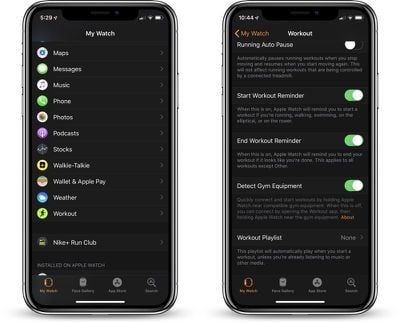
Automatic workout detection for starting a workout and ending a workout are two separate settings, so you can control them individually if so desired.

Start Workout Reminder

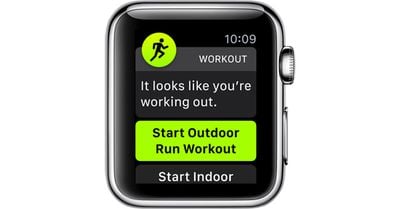
Automatic workout detection is designed to let the Apple Watch remind you to start a workout if you forget to do so, which it will do through a notification that pops up on the Apple Watch asking if you want to begin a workout.
watchos5automaticworkoutdetection
Automatic detection when your workout starts is compatible with running, walking, swimming, elliptical workouts, or rower workouts.

Even if you initially forget to start a workout in watchOS 5, this new workout detection feature will give you credit for the exercise you've already done.

End Workout Reminder

With automatic detection for when a workout ends, which is labeled as "End Workout Reminder" the Apple Watch will remind you to end a workout if it looks like you've finished up. This too works through a notification that directs you to the workout app.

Unlike automatic workout detection for starting a workout, automatic detection for ending one works with all workouts aside from those in the "Other" category.


Related Roundup: Apple Watch 12
Buyer's Guide: Apple Watch (Buy Now)
Related Forum: Apple Watch

Top Rated Comments

105 months ago
My guess? Apple is stuck on their "baby steps" implementing model and those were the only workout types the developers cared about. Next year, if the public seems to like these, they'll add another couple of workout types. Or they'll eliminate the feature completely.
FWIW, I turned this off. I found it turning itself on while I was walking to work, which would be OK, but I generally have at least one hand full of stuff and responding to the alert has an annoyance value that exceeds my interest in recording a walking workout.

Maybe a good feature add would be enabling workouts on a single type basis. For example, yes to running, no for walking.
Score: 3 Votes (Like | Disagree)
105 months ago
I’m so disappointed with this feature. It was probably my most anticipated feature in watchOS 5 but it just doesn’t work well enough. It’s baffeling considering Fitbit has been able to do this with ease for years. Come on, Apple
Score: 2 Votes (Like | Disagree)
inkhorn Avatar
108 months ago
What would be great would be a stop workout on pairing with car Bluetooth / CarPlay, so I don't forget and log vehicle miles onto the route of my workout if I'm driving home.

Especially as there's no way to easily trim the start or end of workouts. :(
Score: 2 Votes (Like | Disagree)
JRobinsonJr Avatar
105 months ago
I wonder why automatic workout startup is limited to these modes...
My guess? Apple is stuck on their "baby steps" implementing model and those were the only workout types the developers cared about. Next year, if the public seems to like these, they'll add another couple of workout types. Or they'll eliminate the feature completely.
Score: 1 Votes (Like | Disagree)
daflowerz Avatar
108 months ago
PLUS... auto-pause/resume should apply to virtually all exercise types. Right now - best I can figure out - it only applies to running. My knees can't handle running so I walk... a lot. IMO it just makes sense to pause a workout when you stop the associated movement regardless of the type.
I totally agree. Just works for running now. I really need it for bicycling when stopped at lights, etc..
Score: 1 Votes (Like | Disagree)
pat500000 Avatar
108 months ago
We need a new update that erases everything on the watch except a clock mode.
Score: 1 Votes (Like | Disagree)

Popular Stories

apple watch s12 ultra 4

Apple Watch Series 12, Ultra 4 Owners Report Skin Irritation

Wednesday October 7, 2026 12:02 pm PDT by
Some Apple Watch Series 12 and Ultra 4 owners have experienced unexpected skin irritation with the new models, according to reports on the MacRumors forums and Reddit. Affected users complain of a burning sensation and redness under the sensor area. The Apple Watch Series 12 and Ultra 4 measure heart rate every five seconds, and some people have wondered if that's the cause of the skin...
southern straps 3 1

MacRumors Giveaway: Win an Apple Watch Series 12 and a Nylon Band From Southern Straps

Friday October 9, 2026 10:20 am PDT by
For this week's giveaway, we've teamed up with Southern Straps to offer MacRumors readers a chance to win an Apple Watch Series 12 and a nylon band from Southern Straps to go along with it. Southern Straps is a California-based company that has been making high-quality bands for the Apple Watch since the device first launched in 2015, and the company's selection of bands offer a an...
apple watch series 6 blood oxygen monitoring 1

Apple's $634 Million Apple Watch Patent Bill Just Got Even Bigger

Tuesday October 6, 2026 6:09 am PDT by
Apple's $634 million patent loss to medical technology company Masimo has just gotten even bigger, after a federal judge ordered Apple to pay an additional $184 million in interest on what it owes (via Bloomberg Law). The ruling takes Apple's bill to around $818 million, but that doesn't include any post-judgment interest continuing to accrue until the judgment is paid. Judge James Selna ...
Latest Stories
iPhone Duo Launch Begins as First Orders Reach Customers
2 hours ago
1Password for Agents Keeps Your Passwords Hidden From AI
2 hours ago
iPhone Duo 24 Hours Later: Your Questions Answered
3 hours ago
Apple's iWork Apps Get 'Intelligent Assistant' and iPhone Duo Support
4 hours ago
Apple is Apparently Considering a Slightly Larger iPhone Duo
4 hours ago
Giant iPhone Duo Displays Coming to Four Apple Stores
5 hours ago
Apple Pulls Keynote, Pages and Numbers From App Store [Update: Back]
6 hours ago
Apple Updates More Apps With iPhone Duo Support
6 hours ago
Apple Will Label Apps 'Made for iPhone Duo' in App Store
9 hours ago
Amazon Takes $49 Off iPad With Prices Starting at $399.99
10 hours ago
F1 on Apple TV Now Available in Dolby Atmos
10 hours ago
Apple Reveals More Than 50 Apps That Will Be Updated for iPhone Duo
11 hours ago
Apple Blocks Certificates That Could Help Attackers Fake Websites
12 hours ago
Giant iPhone Duo Installations Spotted at Apple Fifth Avenue
13 hours ago
iPhone Duo 2 Prototypes Include Under-Display Face ID
13 hours ago
Tesla App Gains iPad and iPhone Duo Support
17 hours ago
Apple Reportedly Boosts iPhone Duo Orders by 44%
17 hours ago
Fortnite Returning to Australian App Store After Court Ruling
18 hours ago
Apple Ordered to Open iPhone to Rival App Stores in Australia
18 hours ago
Apple Suppliers Face Hurdles Cutting Circuit Board Emissions
19 hours ago
Things Updated for iPhone Duo With Adaptive Layout
19 hours ago
Simplicity and Siri AI Are HomeView's Killer Features, Apple Says
19 hours ago
iPhone Duo Reviewers Really Miss Face ID
1 day ago
Does the iPhone Duo Run Hot? Here's What Reviews Found
1 day ago
Apple Music's New Look is Now Live on Apple's Website
1 day ago
Anthropic Launches Claude Duet, a Proactive AI Agent
1 day ago
What 32,000 Folds Did to the iPhone Duo's Hinge
1 day ago
iPhone Duo's Hidden FaceTime Camera Takes 'Trash' Photos
1 day ago
iPhone Duo Has 'Edge Light' Feature That Debuted on Macs Last Year
1 day ago
Apple Support App Updated for iPhone Duo's Larger Display
1 day ago









































