How to Use Compass Waypoints on Apple Watch - GeekWebGuides
Skip to Content

How to Use Compass Waypoints on Apple Watch

by

On Apple Watch Ultra, Apple Watch SE, and Apple Watch Series 6 and later, the redesigned Compass app can be used to create Compass Waypoints and then find the distance and direction between them. Here's how it works.
watchos 9 compass app
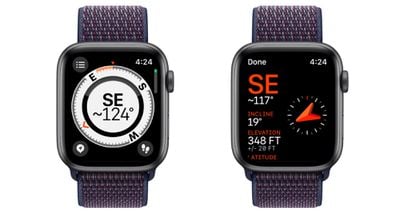
In watchOS 9, the Compass app has been redesigned and now has an adaptive watch face showing your bearing at the center. If you scroll the Digital Crown, you can also view your incline, elevation, and coordinates in the inner ring of the compass.
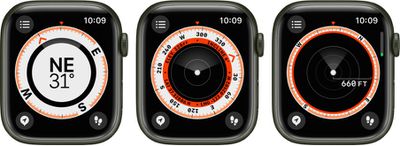
compass displays
The location of any Waypoints you create will be shown within the Compass ring. The following steps show you how to mark and display Compass Waypoints.

How to Mark and Display Waypoints

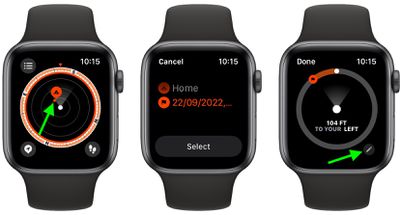
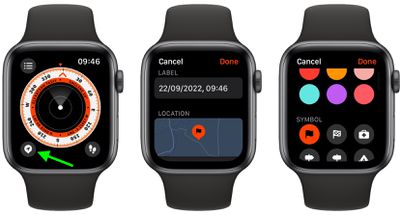
  1. In the Compass app, tap the waypoint icon in the bottom-left corner of the screen to add a waypoint.
  2. Customize the waypoint as desired, including information such as label, color, or symbol (home, for example), then tap Done.
    compass

  3. To view a Compass Waypoint, tap a waypoint on any of the three Compass screens, turn the Digital Crown to select a waypoint from the list, then tap Select. (Note the distance and direction to the waypoint – "Arrived" or "2.5 miles to your right," for example.)
  4. Tap the pen icon near the bottom of the screen to show the waypoint on a map, along with its coordinates.
    compass

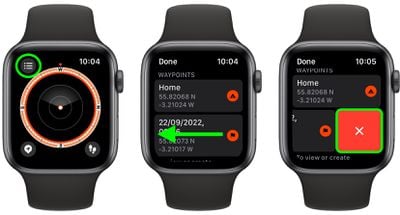
All the waypoints you've created can be found by tapping the three-lines icon in the top-left of any Compass screens. Simply scroll down below the co-ordinates to find them listed, along with an option to add a bearing.

How to Delete Waypoints

  1. Tap the three-lines icon in the top-left of any Compass screen.
  2. Scroll down to the list of waypoints and swipe left across the one you want to delete.
  3. Tap the red X button that appears.
    compass

You can also tap into a waypoint and scroll to the bottom of its screen to find a Delete Waypoint button. You can also opt to hide a waypoint here instead of deleting it: Simply toggle off the switch next to Show Waypoint.

Add a Compass Waypoint to your Watch Face

Using the Compass Waypoint complication, you can tap your Apple Watch face to quickly navigate to waypoints you've created, the last waypoint you viewed in the Compass app, or your parked car.

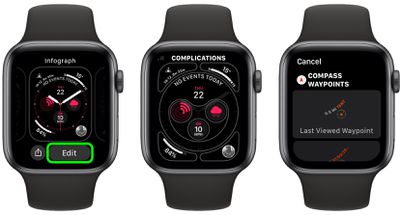
  1. Select a watch face that offers complications, and with the watch face showing, touch and hold the display, then tap Edit.
  2. Swipe left to the end to highlight the complication slots, then tap one to select it.
  3. Scroll to "Compass Waypoints," then either tap one of the first three listed waypoints to add it as a complication, or tap More, then tap a waypoint, Last Viewed Waypoint, or Parked Car Waypoint.
  4. Press the Digital Crown to save your changes, then tap the face to switch to it.watch face

Once you've added the complication, you can tap it to show the waypoint in the Compass app.

Did you know that you can track your route and then retrace your steps using the Backtrack feature? See our dedicated article on Backtrack to learn how.

Related Forum: Apple Watch

Popular Stories

apple watch s12 ultra 4

Apple Watch Series 12, Ultra 4 Owners Report Skin Irritation

Wednesday October 7, 2026 12:02 pm PDT by
Some Apple Watch Series 12 and Ultra 4 owners have experienced unexpected skin irritation with the new models, according to reports on the GeekWebGuides forums and Reddit. Affected users complain of a burning sensation and redness under the sensor area. The Apple Watch Series 12 and Ultra 4 measure heart rate every five seconds, and some people have wondered if that's the cause of the skin...
lululook apple watch titanium

GeekWebGuides Giveaway: Win an Apple Watch Ultra 4 From Lululook

Friday September 25, 2026 10:56 am PDT by
For this week's giveaway, we've teamed up with Lululook to offer GeekWebGuides readers a chance to win a new Apple Watch Ultra 4. Lululook makes all kinds of accessories for Apple devices, including the Apple Watch. The company has a selection of Apple Watch bands that work well with the new Series 12 and the Ultra 4 models. Lululook's $129.99 Strata Milanese Band matches the Apple Watch Ultra...
southern straps 3 1

GeekWebGuides Giveaway: Win an Apple Watch Series 12 and a Nylon Band From Southern Straps

Friday October 9, 2026 10:20 am PDT by
For this week's giveaway, we've teamed up with Southern Straps to offer GeekWebGuides readers a chance to win an Apple Watch Series 12 and a nylon band from Southern Straps to go along with it. Southern Straps is a California-based company that has been making high-quality bands for the Apple Watch since the device first launched in 2015, and the company's selection of bands offer a an...
Latest Stories
iPhone Duo Launch Begins as First Orders Reach Customers
1 hour ago
1Password for Agents Keeps Your Passwords Hidden From AI
2 hours ago
iPhone Duo 24 Hours Later: Your Questions Answered
3 hours ago
Apple's iWork Apps Get 'Intelligent Assistant' and iPhone Duo Support
4 hours ago
Apple is Apparently Considering a Slightly Larger iPhone Duo
4 hours ago
Giant iPhone Duo Displays Coming to Four Apple Stores
5 hours ago
Apple Pulls Keynote, Pages and Numbers From App Store [Update: Back]
6 hours ago
Apple Updates More Apps With iPhone Duo Support
6 hours ago
Apple Will Label Apps 'Made for iPhone Duo' in App Store
9 hours ago
Amazon Takes $49 Off iPad With Prices Starting at $399.99
10 hours ago
F1 on Apple TV Now Available in Dolby Atmos
10 hours ago
Apple Reveals More Than 50 Apps That Will Be Updated for iPhone Duo
11 hours ago
Apple Blocks Certificates That Could Help Attackers Fake Websites
12 hours ago
Giant iPhone Duo Installations Spotted at Apple Fifth Avenue
13 hours ago
iPhone Duo 2 Prototypes Include Under-Display Face ID
13 hours ago
Tesla App Gains iPad and iPhone Duo Support
17 hours ago
Apple Reportedly Boosts iPhone Duo Orders by 44%
17 hours ago
Fortnite Returning to Australian App Store After Court Ruling
18 hours ago
Apple Ordered to Open iPhone to Rival App Stores in Australia
18 hours ago
Apple Suppliers Face Hurdles Cutting Circuit Board Emissions
18 hours ago
Things Updated for iPhone Duo With Adaptive Layout
19 hours ago
Simplicity and Siri AI Are HomeView's Killer Features, Apple Says
19 hours ago
iPhone Duo Reviewers Really Miss Face ID
1 day ago
Does the iPhone Duo Run Hot? Here's What Reviews Found
1 day ago
Apple Music's New Look is Now Live on Apple's Website
1 day ago
Anthropic Launches Claude Duet, a Proactive AI Agent
1 day ago
What 32,000 Folds Did to the iPhone Duo's Hinge
1 day ago
iPhone Duo's Hidden FaceTime Camera Takes 'Trash' Photos
1 day ago
iPhone Duo Has 'Edge Light' Feature That Debuted on Macs Last Year
1 day ago
Apple Support App Updated for iPhone Duo's Larger Display
1 day ago