

Apple has launched its Emergency SOS via satellite service in the US and Canada. Keep reading to learn how the feature works, and how you can try Apple's demo to gain familiarity with it.
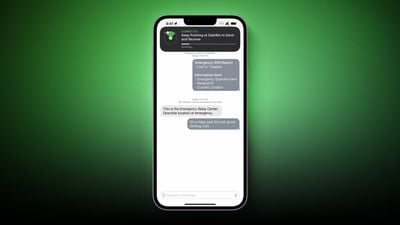
Apple has officially launched its Emergency SOS via satellite service for iPhone 14 users in the US and Canada, with the feature coming to France, Germany, Ireland, and the UK in December 2022.
All four iPhone 14 models support the feature, which allows the devices to connect directly to a satellite, enabling users to send text messages to emergency services when outside the range of cellular and Wi-Fi coverage. Apple says that it was designed for use in open spaces with a clear line of sight to the sky, so performance may be impacted if there are trees or buildings that are nearby.
Here's how you would access the feature in a genuine emergency when you have no cellular coverage and the SOS symbol is visible in the top corner of your iPhone 14:
- Launch the Phone app.
- Dial the emergency services (911 in the US, for example).
- When the call fails, tap the green Emergency Text via Satellite button that appears.
- Follow the onscreen prompts to communicate your emergency.
Note that you can't make phone calls using the SOS via Satellite feature, but you can send short text messages. The iPhone will actually front-load vital questions to assess your situation, and it will send that information to emergency personnel as soon as you're connected.
If you're in an area where emergency services can receive text messages, the text message will be sent directly, otherwise it will go to a relay center with Apple-trained specialists that will be able to place an emergency call for you. Using satellite functionality requires your iPhone to connect to a satellite in the sky, so the iPhone will walk you through where to point your iPhone to get it connected to the nearest satellite.
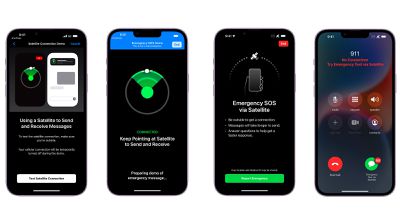
To help you understand how it works in advance of any genuine emergency, Apple has included a demo mode that allows you to experience the feature and its interface without actually contacting emergency services.
To check it out for yourself, simply follow the steps below. Note that your device needs to be running iOS 16.1 or later for the features to show up.
- Launch the Settings app on your iPhone 14.
- Scroll down and tap Emergency SOS.
- Under "Emergency SOS Via Satellite," tap Try Demo.
- Follow the onscreen instructions.
Apple says Emergency SOS via Satellite will be free for the first two years, which suggests that Apple might be planning to charge for the service at some point in the future.

























![Apple Pulls Keynote, Pages and Numbers From App Store [Update: Back]](https://images.macrumors.com/t/Okb7kitB_gNr6qe5Pex9nQIysD8=/112x112/article-new/2026/01/Apple-Creator-Studio-iWork-suite.jpg)



















