

In macOS Big Sur, Apple includes a feature that will be familiar to Windows users, called Fast User Switching. As the name suggests, it lets you switch user accounts quickly and easily, without having to log out or restart your Mac.

As you'd expect, multiple user accounts are kept completely separate, and backgrounded accounts still require user authentication to switch between them. So if you've been taking the slower restart route to switching between macOS user accounts, it's time to enable Fast User Switching. Here's how.
How to Enable Fast User Switching on Mac
- Click the Dock & Menu Bar preference pane.

- In the side column, scroll down to "Other Modules" and choose Fast User Switching.
- Check the box next to Show in Menu Bar or Show in Control Center (you can also check both).
Launch System Preferences, either by clicking on its icon in the Dock or by clicking the Apple () symbol in the menu bar and selecting System Preferences....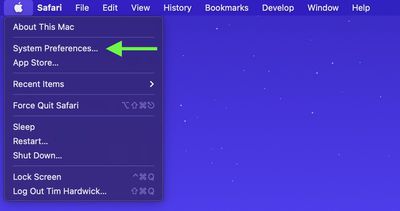
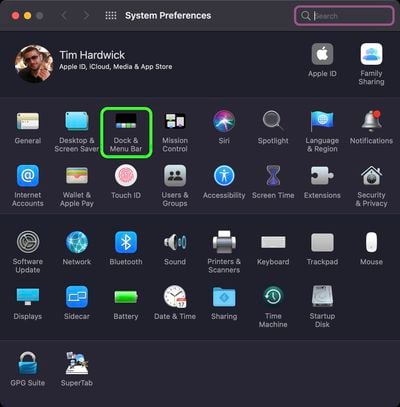
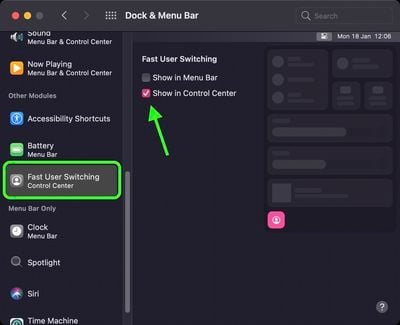
That's all there is to it. You can now switch between macOS user accounts via the user button that appears in the menu bar or in the Control Center (or both), depending on your preferences.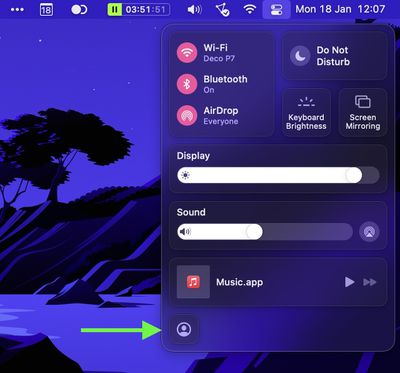
How to Disable Fast User Switching on Mac
- Click the Dock & Menu Bar preference pane.
- In the side column, scroll down to "Other Modules" and choose Fast User Switching.
- Uncheck the box next to Show in Menu Bar or Show in Control Center (you may need to uncheck both).
Launch System Preferences, either by clicking on its icon in the Dock or by clicking the Apple () symbol in the menu bar and selecting System Preferences....
After following these steps, you'll have to log out to allow another user to log in to their account.
























![Apple Pulls Keynote, Pages and Numbers From App Store [Update: Back]](https://images.macrumors.com/t/Okb7kitB_gNr6qe5Pex9nQIysD8=/112x112/article-new/2026/01/Apple-Creator-Studio-iWork-suite.jpg)





















