

Sometimes the size of an iPad's onscreen virtual keyboard can make it frustrating to use. If you have a larger iPad Pro, for instance, it can take up a lot of space on the screen and end up obscuring your content. It can also be cumbersome if you're holding your iPad with one hand and typing with the other.
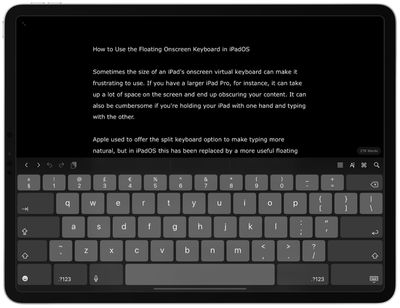
Apple used to offer the split keyboard option to make typing more natural, but in iPadOS this has been replaced by a more useful floating iPhone-style keyboard that you can move freely around the screen. It also supports Apple's QuickType swipe-typing feature, making it more convenient for one-handed use.
How to Enable the Floating Keyboard in iPadOS
- Open an app that allows text input via the onscreen virtual keyboard. In our example, we're using Ulysses.
- Tap inside the editing window to activate the text cursor and the onscreen keyboard.

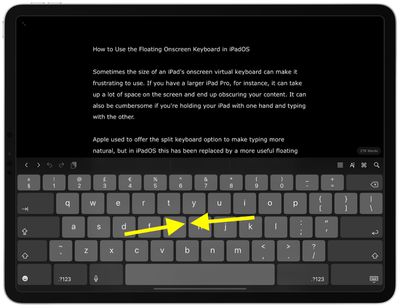
- Now, using your thumb and index finger, pinch inwards anywhere on the onscreen keyboard.
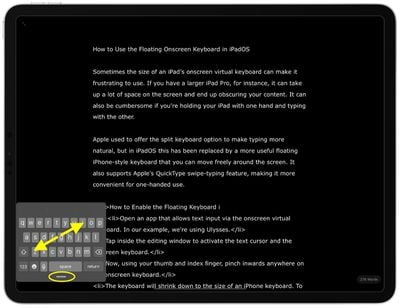
- The keyboard will shrink down to the size of an iPhone keyboard. To move the keyboard to a different area of the screen, drag it via the pill-shaped grab handle below the keys.
- To return the keyboard to the full-width of the screen, pinch outward anywhere on the key layout.
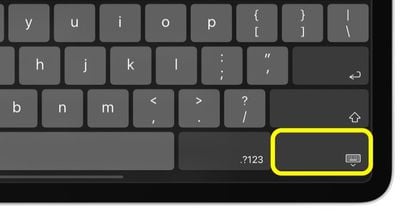
Another way to activate the floating keyboard is by holding the Minimize Keyboard key (it's the one with the keyboard symbol, located at the bottom-right corner of the key layout) and tapping the Floating button that pops up.





















![Apple Pulls Keynote, Pages and Numbers From App Store [Update: Back]](https://images.macrumors.com/t/Okb7kitB_gNr6qe5Pex9nQIysD8=/112x112/article-new/2026/01/Apple-Creator-Studio-iWork-suite.jpg)
























