
How to Use Hand Gestures to Control Your Apple Watch - GeekWebGuides
Skip to Content

How to Use Hand Gestures to Control Your Apple Watch

by

As part of Apple's accessibility push in watchOS 9, Assistive Touch now includes Quick Actions that let you respond to Apple Watch alerts with hand gestures. This article explains how to use them.
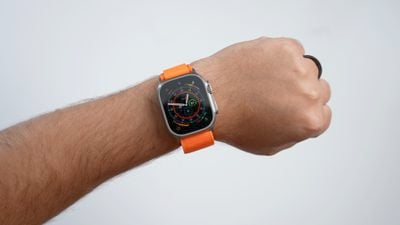
apple watch ultra 2 1
In watchOS 8, Apple introduced a new accessibility feature called Assistive Touch that allows users to control their Apple Watch using gestures and arm movements. With watchOS 9, Apple has built on the technology behind Assistive Touch with Quick Actions.

With new Quick Actions, users with upper body limb differences can now do even more with a double-pinch gesture to respond to alerts on their Apple Watch, including answer or end a phone call, take a photo when the viewfinder and shutter button are showing in the Camera app, play or pause media in the Now Playing app, and start, pause, or resume a workout. You can also use quick actions to snooze an alarm or stop a timer.

In fact, Quick Actions can be useful to just about anybody. For example, if you're holding something in your other hand and can't touch the screen of your Apple Watch to answer or end a phone call, you can perform a double-pinch gesture with your watch hand to do exactly that.

In watchOS 9, you can choose Quick Actions to be available at all times, available only when AssistiveTouch is enabled, or off. You can also choose Full appearance (a banner appears and the action button is highlighted) or Minimal appearance (the action button is highlighted with no banner).

How to Enable Quick Actions

To turn quick actions on or off, follow these steps.

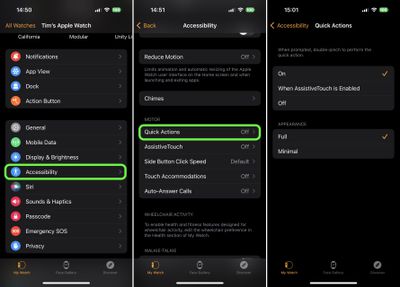
  1. Open the Watch app on your iPhone.
  2. Tap Accessibility.
  3. Under "Motor," tap Quick Actions.
  4. Choose from one of the following options: On, When AssistiveTouch is Enabled, and Off. You can also choose their appearance to be Full or Minimal.
watch

With Quick Actions on, when you see an alert on your Apple Watch, you'll be prompted to perform a Quick Action. For example, when you've paused a workout, a prompt lets you know that you can double-pinch to resume it (tap index finger to thumb twice quickly).

double pinch
If you'd like a little practice performing Quick Action gestures, open Settings on your Apple Watch, then go to Accessibility -> Quick Actions, and tap Try it out....

Related Forum: Apple Watch

Popular Stories

apple watch s12 ultra 4

Apple Watch Series 12, Ultra 4 Owners Report Skin Irritation

Wednesday October 7, 2026 12:02 pm PDT by
Some Apple Watch Series 12 and Ultra 4 owners have experienced unexpected skin irritation with the new models, according to reports on the GeekWebGuides forums and Reddit. Affected users complain of a burning sensation and redness under the sensor area. The Apple Watch Series 12 and Ultra 4 measure heart rate every five seconds, and some people have wondered if that's the cause of the skin...
lululook apple watch titanium

GeekWebGuides Giveaway: Win an Apple Watch Ultra 4 From Lululook

Friday September 25, 2026 10:56 am PDT by
For this week's giveaway, we've teamed up with Lululook to offer GeekWebGuides readers a chance to win a new Apple Watch Ultra 4. Lululook makes all kinds of accessories for Apple devices, including the Apple Watch. The company has a selection of Apple Watch bands that work well with the new Series 12 and the Ultra 4 models. Lululook's $129.99 Strata Milanese Band matches the Apple Watch Ultra...
southern straps 3 1

GeekWebGuides Giveaway: Win an Apple Watch Series 12 and a Nylon Band From Southern Straps

Friday October 9, 2026 10:20 am PDT by
For this week's giveaway, we've teamed up with Southern Straps to offer GeekWebGuides readers a chance to win an Apple Watch Series 12 and a nylon band from Southern Straps to go along with it. Southern Straps is a California-based company that has been making high-quality bands for the Apple Watch since the device first launched in 2015, and the company's selection of bands offer a an...
Latest Stories
MacBook Neo Helps Apple Outpace Rivals as Market Declines
26 minutes ago
Happy 25th Anniversary, iPod
56 minutes ago
iPhone Duo Demand Reportedly Exceeds Apple's Expectations
4 hours ago
iPhone Duo Launch Begins as First Orders Reach Customers
10 hours ago
1Password for Agents Keeps Your Passwords Hidden From AI
10 hours ago
iPhone Duo 24 Hours Later: Your Questions Answered
11 hours ago
Apple's iWork Apps Get 'Intelligent Assistant' and iPhone Duo Support
12 hours ago
Apple is Apparently Considering a Slightly Larger iPhone Duo
12 hours ago
Giant iPhone Duo Displays Coming to Four Apple Stores
13 hours ago
Apple Pulls Keynote, Pages and Numbers From App Store [Update: Back]
14 hours ago
Apple Updates More Apps With iPhone Duo Support
14 hours ago
Apple Will Label Apps 'Made for iPhone Duo' in App Store
17 hours ago
Amazon Takes $49 Off iPad With Prices Starting at $399.99
18 hours ago
F1 on Apple TV Now Available in Dolby Atmos
18 hours ago
Apple Reveals More Than 50 Apps That Will Be Updated for iPhone Duo
19 hours ago
Apple Blocks Certificates That Could Help Attackers Fake Websites
20 hours ago
Giant iPhone Duo Installations Spotted at Apple Fifth Avenue
21 hours ago
iPhone Duo 2 Prototypes Include Under-Display Face ID
21 hours ago
Tesla App Gains iPad and iPhone Duo Support
1 day ago
Apple Reportedly Boosts iPhone Duo Orders by 44%
1 day ago
Fortnite Returning to Australian App Store After Court Ruling
1 day ago
Apple Ordered to Open iPhone to Rival App Stores in Australia
1 day ago
Apple Suppliers Face Hurdles Cutting Circuit Board Emissions
1 day ago
Things Updated for iPhone Duo With Adaptive Layout
1 day ago
Simplicity and Siri AI Are HomeView's Killer Features, Apple Says
1 day ago
iPhone Duo Reviewers Really Miss Face ID
1 day ago
Does the iPhone Duo Run Hot? Here's What Reviews Found
1 day ago
Apple Music's New Look is Now Live on Apple's Website
1 day ago
Anthropic Launches Claude Duet, a Proactive AI Agent
1 day ago
What 32,000 Folds Did to the iPhone Duo's Hinge
2 days ago








































