
In iOS 12, Apple has given users the tools to cut down on disturbances to get more time away from their devices if desired, and one of these new tools is an expanded set of Do Not Disturb options.

Thanks to these changes, there are more convenient options for using Do Not Disturb in iOS 12, and it's also a lot smarter.

How to Get to the New Do Not Disturb Options

Your Do Not Disturb options in the Settings app are largely the same, with the new Do Not Disturb features housed in Control Center.
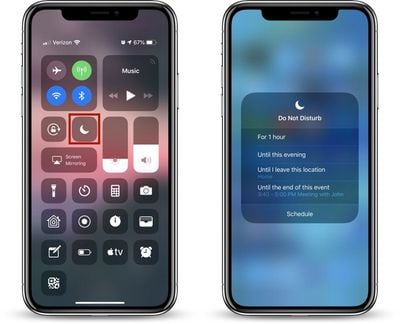
donotdisturb3

  1. Open Control Center, through a right-side swipe downwards on the screen of an iPhone X or iPad or by swiping upwards from the Home button on other devices.
  2. 3D Touch or long press on the Control Center icon that looks like a moon, which is the icon for Do Not Disturb.
  3. A 3D Touch or a long press brings up all of the Do Not Disturb options, which can be selected with a tap.

Do Not Disturb is a default widget within the Control Center and it's always available, so it's not an option that needs to be enabled through the Control Center customization options.

All of the Ways You Can Use Do Not Disturb in iOS 12

There are multiple new limited-time settings for Do Not Disturb in the Control Center, which automatically turn off after the specified time elapses.

  • For one hour
  • Until this evening (or afternoon/morning depending on the time - it's generally a few hours)
  • Until I leave this location
  • Until this event ends (if you have a timed event set in your calendar)
  • A single tap on the icon without selecting an option turns on Do Not Disturb until you tap it again.

Not all of these options will be visible at all times. If you're not in a set location or you don't have any events scheduled, these two options won't appear. The first two, allowing you to set Do Not Disturb for an hour or until the evening/afternoon/morning are always available.

Underneath these options, there's a "Schedule" button (see screenshot at top) that will open up the Settings app so you can set a specific time period for when you want Do Not Disturb to turn on. This is also where you can turn on Do Not Disturb at Bedtime, a feature that prevents notifications from displaying on the iPhone's display at night.

Check out our Do Not Disturb at Bedtime how to for more details on this feature.

Managing Do Not Disturb Settings

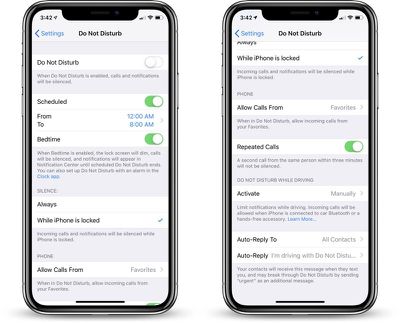
Your general Do Not Disturb settings are available in the Settings app, which can be accessed by going to Settings > Do Not Disturb or through the above mentioned "Schedule" section of the No Not Disturb Control Center widget.

Most of these settings aren't new, but we thought it would be useful to offer a quick primer on Do Not Disturb's other settings alongside what's new in iOS 12.
donotdisturb2
In the Settings app, you can enable or disable Do Not Disturb, set a specific time for Do Not Disturb to turn on and off, or enable Bedtime Mode.

You can also choose whether Do Not Disturb should mute calls and notifications only while the iPhone is locked or at all times, and there are options to select whether calls from certain people should bypass your Do Not Disturb settings. This section is also where you'll find your Do Not Disturb While Driving options.


Related Forum: iOS 12

Top Rated Comments

Thekevan Avatar
99 months ago
I wish they would allow a more customizable schedule for “Do not disturb,” such as:

I work 5pm - 3am Tuesday through Friday, (so I schedule DND for 3am - 11am), but Saturday, Sunday, and Monday, I sleep normal people’s hours (during the night), so my scheduled DND does not apply, and I have to remember to turn the schedule off.
Score: 16 Votes (Like | Disagree)
CMDXtreme Avatar
97 months ago
I use DND daily. Is there any way to get rid of the “calls and notifications will be silenced...” on the lock screen? I swipe and remove it and it comes back after awhile.
Score: 9 Votes (Like | Disagree)
Gameboy70 Avatar
97 months ago
I use DND daily. Is there any way to get rid of the “calls and notifications will be silenced...” on the lock screen? I swipe and remove it and it comes back after awhile.
This. I thought I was the only one annoyed by the persistent lock screen banner.
Score: 6 Votes (Like | Disagree)
eyeseeyou Avatar
99 months ago
I need FULL mute for individual group texts.
Score: 5 Votes (Like | Disagree)
sirozha Avatar
99 months ago
About 8 years ago, there was an app on Cydia that allowed the iPhone’s ring to be put in silent mode (with vibrate enabled) for every Calendar event marked as “busy”. This was a great solution, as the phone would never ring during a scheduled meeting, but would go back to the ringing mode as soon as the scheduled event ended. For those who are in meetings on and off during the day, that’s an invaluable feature. In fact , I jailbroke my iPhone back then just to get this functionality.

Why can’t Apple implement this in iOS? Isn’t it a basic function that is required for anyone using the iPhone in a business environment? That and being able to see the status of the “mute” during the call so that if you have to step into a noisy environment, you can make sure that your iPhone is muted with a single glance at the lock screen.

Why is it taking Apple over a decade to implement these two basic features?
Score: 4 Votes (Like | Disagree)
Braderunner Avatar
99 months ago
I wish they would allow a more customizable schedule for “Do not disturb,” such as:

I work 5pm - 3am Tuesday through Friday, (so I schedule DND for 3am - 11am), but Saturday, Sunday, and Monday, I sleep normal people’s hours (during the night), so my scheduled DND does not apply, and I have to remember to turn the schedule off.
I use the Bedtime feature in the Clock app as my alarm. You can “turn on DND during bedtime” under the options of Bedtime in the Clock app. I get up at 6 am, M-F. Then change the wake time to 9 am for Sat. and Sun. DND then mirrors my Bedtime schedule, and I only have to change one schedule, instead of two. I forgot about this option until earlier today. :confused: :rolleyes:
Score: 3 Votes (Like | Disagree)

Popular Stories

wwdc sans text feature

Apple Rumored to Announce New Product on February 19

Thursday February 5, 2026 12:22 pm PST by
Apple plans to announce the iPhone 17e on Thursday, February 19, according to Macwelt, the German equivalent of Macworld. The report, citing industry sources, is available in English on Macworld. Apple announced the iPhone 16e on Wednesday, February 19 last year, so the iPhone 17e would be unveiled exactly one year later if this rumor is accurate. It is quite uncommon for Apple to unveil...
Apple Logo Zoomed

Tim Cook Teases Plans for Apple's Upcoming 50th Anniversary

Thursday February 5, 2026 12:54 pm PST by
Apple turns 50 this year, and its CEO Tim Cook has promised to celebrate the milestone. The big day falls on April 1, 2026. "I've been unusually reflective lately about Apple because we have been working on what do we do to mark this moment," Cook told employees today, according to Bloomberg's Mark Gurman. "When you really stop and pause and think about the last 50 years, it makes your heart ...
maxresdefault

Apple Shows Off a Key Reason to Upgrade to the iPhone 17

Saturday February 7, 2026 9:26 am PST by
Apple today shared an ad that shows how the upgraded Center Stage front camera on the latest iPhones improves the process of taking a group selfie. "Watch how the new front facing camera on iPhone 17 Pro takes group selfies that automatically expand and rotate as more people come into frame," says Apple. While the ad is focused on the iPhone 17 Pro and iPhone 17 Pro Max, the regular iPhone...
Finder Siri Feature

Why Apple's iOS 26.4 Siri Upgrade Will Be Bigger Than Originally Promised

Friday February 6, 2026 3:06 pm PST by
In the iOS 26.4 update that's coming this spring, Apple will introduce a new version of Siri that's going to overhaul how we interact with the personal assistant and what it's able to do. The iOS 26.4 version of Siri won't work like ChatGPT or Claude, but it will rely on large language models (LLMs) and has been updated from the ground up. Upgraded Architecture The next-generation...
iOS 26

iOS 26.3 and iOS 26.4 Will Add These New Features to Your iPhone

Tuesday February 3, 2026 7:47 am PST by
While the iOS 26.3 Release Candidate is now available ahead of a public release, the first iOS 26.4 beta is likely still at least a week away. Following beta testing, iOS 26.4 will likely be released to the general public in March or April. Below, we have recapped known or rumored iOS 26.3 and iOS 26.4 features so far. iOS 26.3 iPhone to Android Transfer Tool iOS 26.3 makes it easier...














