How to Use Apple's Live Listen Feature With AirPods - MacRumors
Skip to Content

How to Use Apple's Live Listen Feature With AirPods

by

Since 2014, Apple has included a feature in iOS called Live Listen that allows an iPhone or iPad to serve as a remote microphone for an MFI-compatible hearing aid.

When Apple released iOS 12, it added Live Listen support for AirPods and AirPods 2, making it possible to use your iOS device as a directional mic and have the audio relayed to Apple's wireless earphones.
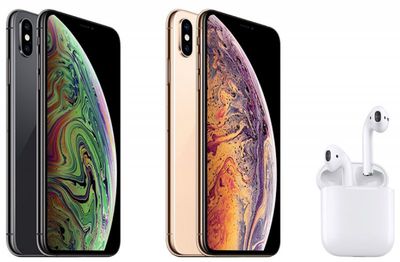
iphone xs and airpods
As an accessibility feature, the idea behind Live Listen is for it to be used by people who are hard of hearing or need extra help separating voices in a loud environment, but it can be useful in other ways, too.

If you're on a family vacation, for instance, you could use your iPhone or ‌iPad‌ as a makeshift baby monitor for when the baby's napping and you're in another room with the TV on. All you'd need to do is put the iOS device near the baby's crib and wear a single AirPod, which should have a strong enough Bluetooth range to allow you to listen in from afar.

Live Listen will work even when other audio is being played on your iPhone or ‌iPad‌ – so you could listen to a podcast, say, and still be keeping tabs on the baby. Just note that whatever it is that you're listening to will switch to mono output to match the Live Listen stream, and the AirPods' tap gestures will be disabled for as long as the feature is active.

Live Listen is easy to set up and use once you know how. The following steps show you how it's done on an iPhone or ‌iPad‌ running iOS 12 or later.

How to Set Up Live Listen on iPhone and iPad

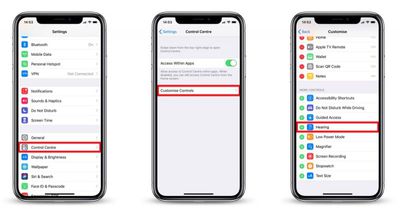
  1. Launch the Settings app on your iPhone or ‌iPad‌.
  2. Tap Control Center.
    how to set up live listen with airpods

  3. Tap Customize Controls.
  4. Scroll down and tap the green plus (+) button next to Hearing.
How to Use Live Listen on iPhone and iPad

  1. Put your AirPods in and connect them to your iPhone or ‌iPad‌ in the usual way.
  2. Launch Control Center on your iOS device: On an ‌iPad‌ with a Home button, double-tap the Home button; on iPhone 8 or earlier, swipe up from the bottom of the screen; and on a 2018 iPad Pro or iPhone R/X/XS/XS Max, swipe down from the upper right of the screen.
    how to use live listen with airpods

  3. Tap the Hearing icon.
  4. Tap Live Listen.
  5. Place your iPhone or ‌iPad‌ close to the person you want to hear, preferably in front of them.
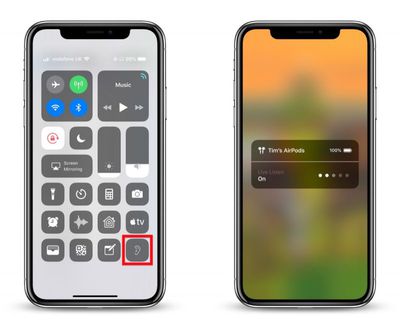
If the output to your AirPods is too quiet or too loud, use the volume buttons on your iPhone or ‌iPad‌ to adjust the volume level.

live listen not working airpods
If you see the message "Unavailable for current route" when you try to turn on Live Listen, restarting your iOS device and then forgetting and re-connecting your AirPods in the Settings app's Bluetooth menu should fix the issue.

Related Roundup: AirPods 5
Buyer's Guide: AirPods (Buy Now)
Related Forum: AirPods

Top Rated Comments

104 months ago
Wow I knew nothing of this. Is it just me or do apple do a terrible job these days of actually telling users about features? I remember when the iPhone / iPod came out, for years almost every feature was explained and used in marketing on the website, i have literally found features on my phone by accident since getting a new iPhone8 that I didn’t even knew it had or how they worked. And I used to be a developer for 3 years, I can’t image how older users like my parents would even know how to use some thing or if they were even there in the first place. Apple is really doing a lousy job especially in the last 2-3 years in this regard (yes sales are through the roof but I’m specifically talking about informing users about great little features, and that silly tips app is a joke). It’s now more of an ‘object’, who cares what it does just look how pretty it is. A far cry from the jobs days.
Score: 7 Votes (Like | Disagree)
FloatingBones Avatar
104 months ago
Wow I knew nothing of this. Is it just me or do apple do a terrible job these days of actually telling users about features?
The Apple Store's Today at Apple ('https://www.apple.com/today/') sessions are an excellent way to find out about how to do things. I recently attended four of these sessions with a friend for learning iPad skills. This was an excellent way for my non-techie friend to get up to speed on iOS/iPad, but the bonus was how much I learned during the process.

I couldn’t agree more. Perhaps Apple has gotten “too big for its britches.”
Have either of you attended any TaA sessions? Apple's instructors will cover the material for a particular session, plus questions/issues that students have. It kept some of the best features of the old One to One ('https://en.wikipedia.org/wiki/One_to_One_(Apple)') product: anyone can ask anything in the sessions, and the instructors will work hard to address those questions with the student -- either during the session or in a few minutes afterwards.
Score: 1 Votes (Like | Disagree)
104 months ago
Wow I knew nothing of this. Is it just me or do apple do a terrible job these days of actually telling users about features? I remember when the iPhone / iPod came out, for years almost every feature was explained and used in marketing on the website, i have literally found features on my phone by accident since getting a new iPhone8 that I didn’t even knew it had or how they worked. And I used to be a developer for 3 years, I can’t image how older users like my parents would even know how to use some thing or if they were even there in the first place. Apple is really doing a lousy job especially in the last 2-3 years in this regard (yes sales are through the roof but I’m specifically talking about informing users about great little features, and that silly tips app is a joke). It’s now more of an ‘object’, who cares what it does just look how pretty it is. A far cry from the jobs days.
I couldn’t agree more. Perhaps Apple has gotten “too big for its britches.”
[doublepost=1541422111][/doublepost
Score: 1 Votes (Like | Disagree)
sunapple Avatar
104 months ago
Wow I knew nothing of this. Is it just me or do apple do a terrible job these days of actually telling users about features? I remember when the iPhone / iPod came out, for years almost every feature was explained and used in marketing on the website, i have literally found features on my phone by accident since getting a new iPhone8 that I didn’t even knew it had or how they worked. And I used to be a developer for 3 years, I can’t image how older users like my parents would even know how to use some thing or if they were even there in the first place. Apple is really doing a lousy job especially in the last 2-3 years in this regard (yes sales are through the roof but I’m specifically talking about informing users about great little features, and that silly tips app is a joke). It’s now more of an ‘object’, who cares what it does just look how pretty it is. A far cry from the jobs days.
I'm sorry, but nowadays there're just a lot more features than five years ago and finding those features, the important ones, is still very easy. This has zero to do with Jobs.

https://www.apple.com/accessibility/
Score: 1 Votes (Like | Disagree)

Popular Stories

AirPods Pro Beta Firmware 2

Apple Releases New AirPods Beta Firmware

Tuesday September 29, 2026 11:38 am PDT by
Apple today released new beta firmware for the AirPods Pro 2, AirPods Pro 3, AirPods 4, AirPods 5, and AirPods Max 2. The firmware has a build number of 9B5042a and is rolling out for developers and public beta testers. There's no word on what's included in the firmware update because Apple doesn't offer notes for AirPods beta releases. When the AirPods are connected to an iPhone, iPad,...
AirPods Pro Beta Firmware 2

Apple Releases New AirPods Beta Firmware

Tuesday October 13, 2026 11:28 am PDT by
Apple today released new beta firmware for the AirPods Pro 2, AirPods Pro 3, AirPods 4, AirPods 5, and AirPods Max 2. The firmware has a build number of 9B5043a and is rolling out for developers and public beta testers. There's no word on what's included in the firmware update because Apple doesn't offer notes for AirPods beta releases. When the AirPods are connected to an iPhone, iPad,...
ifixit airpods 5

AirPods 5 Teardown: Batteries Removable, Case Still Tough

Tuesday September 29, 2026 2:38 pm PDT by
Repair site iFixit today took apart Apple's AirPods 5 for one of its traditional teardown videos. It turns out the new AirPods are slightly more repairable than prior models, but it's still not a simple home fix. The AirPods 5 use pronged batteries that Apple previously used in the AirPods 3, but not the AirPods 4. The battery can be removed with a "nifty pair of tongs," and iFixit says the...
Latest Stories
iPhone Duo Launch Begins as First Orders Reach Customers
39 minutes ago
1Password for Agents Keeps Your Passwords Hidden From AI
1 hour ago
iPhone Duo 24 Hours Later: Your Questions Answered
2 hours ago
Apple's iWork Apps Get 'Intelligent Assistant' and iPhone Duo Support
3 hours ago
Apple is Apparently Considering a Slightly Larger iPhone Duo
3 hours ago
Giant iPhone Duo Displays Coming to Four Apple Stores
4 hours ago
Apple Pulls Keynote, Pages and Numbers From App Store [Update: Back]
5 hours ago
Apple Updates More Apps With iPhone Duo Support
5 hours ago
Apple Will Label Apps 'Made for iPhone Duo' in App Store
8 hours ago
Amazon Takes $49 Off iPad With Prices Starting at $399.99
9 hours ago
F1 on Apple TV Now Available in Dolby Atmos
9 hours ago
Apple Reveals More Than 50 Apps That Will Be Updated for iPhone Duo
10 hours ago
Apple Blocks Certificates That Could Help Attackers Fake Websites
11 hours ago
Giant iPhone Duo Installations Spotted at Apple Fifth Avenue
12 hours ago
iPhone Duo 2 Prototypes Include Under-Display Face ID
12 hours ago
Tesla App Gains iPad and iPhone Duo Support
16 hours ago
Apple Reportedly Boosts iPhone Duo Orders by 44%
17 hours ago
Fortnite Returning to Australian App Store After Court Ruling
17 hours ago
Apple Ordered to Open iPhone to Rival App Stores in Australia
17 hours ago
Apple Suppliers Face Hurdles Cutting Circuit Board Emissions
18 hours ago
Things Updated for iPhone Duo With Adaptive Layout
18 hours ago
Simplicity and Siri AI Are HomeView's Killer Features, Apple Says
18 hours ago
iPhone Duo Reviewers Really Miss Face ID
23 hours ago
Does the iPhone Duo Run Hot? Here's What Reviews Found
1 day ago
Apple Music's New Look is Now Live on Apple's Website
1 day ago
Anthropic Launches Claude Duet, a Proactive AI Agent
1 day ago
What 32,000 Folds Did to the iPhone Duo's Hinge
1 day ago
iPhone Duo's Hidden FaceTime Camera Takes 'Trash' Photos
1 day ago
iPhone Duo Has 'Edge Light' Feature That Debuted on Macs Last Year
1 day ago
Apple Support App Updated for iPhone Duo's Larger Display
1 day ago