

 Apple understands that some iPhone and iPad users may prefer to keep tabs on their cellular network data usage, especially if they risk incurring charges by going over a certain limit.
The same goes for users who have a bandwidth cap on their broadband network, or anyone who regularly connects to a public Wi-Fi network that charges per megabyte.
That's why in iOS 13, Apple has included a Low Data Mode for apps that use cellular and Wi-Fi connections. The feature sends an explicit signal to apps to reduce their network data use by deferring non-compulsory tasks and disabling background app refresh.
To turn on the cellular or Wi-Fi setting on your iPhone or iPad, simply follow these steps.
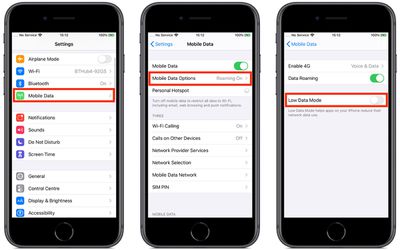
How to Turn On Cellular Low Data Mode
- Launch the Settings app on your device
- Tap Cellular (or Mobile Data, depending on your region).

- Tap Cellular Data Options (or Mobile Data Options).
- Tap the Low Data Mode switch to toggle it to the green ON position.
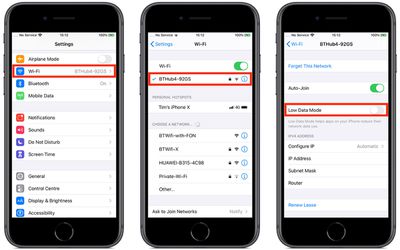
How to Turn On Wi-Fi Low Data Mode
- Launch the Settings app on your device
- Tap Wi-Fi.
- Tap the info button (an encircled 'i' icon) alongside the Wi-Fi network in question.
- Tap the Low Data Mode switch to toggle it to the green ON position.
Note that a given third-party app must explicitly support Low Data Mode for there to be any change in its data usage, otherwise enabling the mode won't have any effect.



























![Apple Pulls Keynote, Pages and Numbers From App Store [Update: Back]](https://images.macrumors.com/t/Okb7kitB_gNr6qe5Pex9nQIysD8=/112x112/article-new/2026/01/Apple-Creator-Studio-iWork-suite.jpg)

















