How to Use Your Mac's Media Keys to Adjust Speaker Volume on a DisplayPort, HDMI, or Thunderbolt Monitor - GeekWebGuides
Skip to Content

How to Use Your Mac's Media Keys to Adjust Speaker Volume on a DisplayPort, HDMI, or Thunderbolt Monitor

by

If you connect your Mac to an external display, you may find that the Mac's on-screen and keyboard volume controls are disabled. That's because HDMI, DisplayPort, and Thunderbolt connections carry a fixed volume digital audio signal, so the external device (in this case, a monitor) controls the sound level.

mac volume disabled
This can be frustrating if the volume controls on your external display are concealed in the bezel or buried in a fiddly on-screen menu. Fortunately, it is possible to re-enable your Mac's native volume controls and use them to adjust the sound level coming out of your monitor's speakers. The steps below show how it's done, although you will need administrator privileges to follow them.

  1. Download the free SoundFlower extension (v2.0b2) from Github.
    enable mac volume control of external monitor speakers00

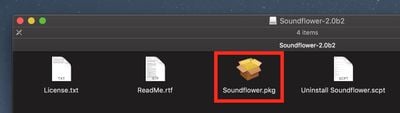
  2. double-click the SoundFlower.dmg file to mount it.

  3. Hold down the Ctrl key and left-click the Soundflower.pkg file, then choose Open from the contextual menu.
    enable mac volume control of external monitor speakers1

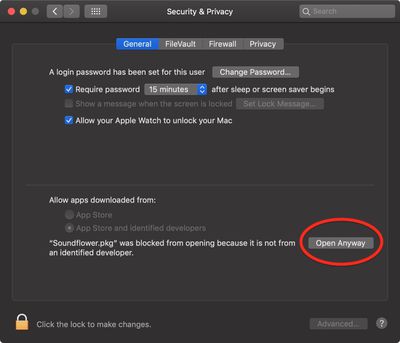
  4. If you see a dialog asking if you're sure you want to open it, click Open. If you see a dialog saying the package can't be opened, click OK, open System Preferences' Security & Privacy pane, and in the General tab click Open Anyway.
    enable mac volume control of monitor speakers 3

  5. Let the Soundflower installer continue and enter your password if necessary.
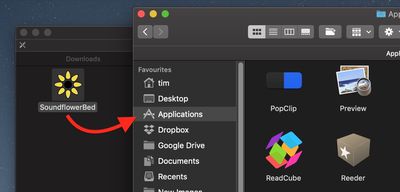
  6. Next, download the SoundflowerBed utility (v2.0), mount the .dmg file, and drag the flower icon to your Applications folder.
    enable mac volume control of external monitor speakers3

  7. Launch the SoundflowerBed utility.
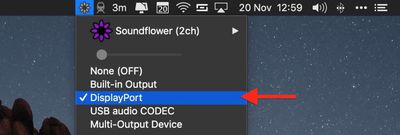
  8. Click the SoundflowerBed icon in the menubar and select DisplayPort, Thunderbolt or HDMI as the output in the (2ch) list.
    enable mac volume control of external monitor speakers04

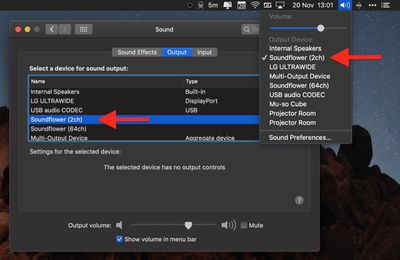
  9. Click the volume icon in the menu bar and choose Soundflower(2ch). You can also make this selection in the Sound System Preference pane.

    enable mac volume control of external monitor speakers5

You should now be able to adjust the volume of the speakers in your HDMI or DisplayPort monitor using the native media controls on your Mac.


Top Rated Comments

103 months ago
I installed this once 10 years ago and it conflicted with other audio apps. It took me 5 years to figure out what the problem was and get rid of the driver (by finally doing a clean install). Never again.
Score: 5 Votes (Like | Disagree)
103 months ago
Apple really should add native support for this in macOs. Every other OS (at least Linux and Windows) are able to adjust the volume when audio is delivered over HDMI/DP.
I’m waiting for this functionality to be added since forever...
Score: 4 Votes (Like | Disagree)
59 months ago
2022 here, use MonitorControl https://monitorcontrol.app. I went from SoundFlowerBed to this and it does it job great.
Score: 3 Votes (Like | Disagree)
83 months ago
I used and appreciated Soundflower for years, but it quit working when I upgraded to High Sierra, and it doesn't appear to be supported anymore. I tried something called blackhole, but I couldn't get it to work, so I downloaded the 15 dollar sound control app mentioned by pizzapizza, and it works perfectly with my HDMI display.

Being able to control the sound output from the keyboard controls is so obvious that it is impossible to understand why Apple seems to go out of their way to inhibit this.
Score: 3 Votes (Like | Disagree)
falcn Avatar
101 months ago
And, it works with the standard Mac volume keys. The only thing that's not perfect is the volume range. When it's at the lowest volume, it's not quite as low as I might want it.
Just installed this and it seems to be working well for me. As BobMcBob mentioned the volume control range is not as expansive as I would prefer, but volume control from my keyboard is back, so I am happy.

It is on sale at the moment so I bought a license after downloading and installing the trial version.

Thanks for the tip!
Sorry for late reply, I don't visit GeekWebGuides often.
You can go lower than one notch of volume, hold Shift+Option+[your volume key]. It's stock Mac OS feature.

A similar problem is adjusting the brightness on an external monitor. The standard Mac brightness keys don't work. I installed Brightness Slider from the app store. It's not bad, but it doesn't use the normal brightness keys. You can set your own keyboard shortcut, but you can't use the normal brightness keys. Does anyone have a better solution for that?
I use free app called Lunar https://lunarapp.site
It works if your external monitor supports DDC (most of them do)
It mirrors your internal screen brightness level on your external screen, which is great if you have auto-adjust on.
Score: 3 Votes (Like | Disagree)
103 months ago
I installed this once 10 years ago and it conflicted with other audio apps. It took me 5 years to figure out what the problem was and get rid of the driver (by finally doing a clean install). Never again.
The need for this hack demonstrates Apple's lack of forethought both in its hardware and in its software.

I personally would not bother with this since it can cause more problems than it solves.
Score: 3 Votes (Like | Disagree)

Popular Stories

iPhone Duo Trio

Here's What Apple's Apps Look Like on the iPhone Duo

Tuesday October 20, 2026 11:12 am PDT by
With just three days to go until the iPhone Duo is released, Apple is getting ready for the launch. Behind the scenes, the App Store now has screenshots of Apple's built-in apps running on the Duo. We've seen some apps in marketing materials, but images of the ones we haven't seen give us an idea of what it will be like using the iPhone Duo day to day. Many apps are shown in landscape...
Apple Creator Studio iWork suite

Apple Pulls Keynote, Pages and Numbers From App Store [Update: Back]

Thursday October 22, 2026 11:01 am PDT by
Apple has temporarily removed Keynote, Pages, and Numbers from the App Store, just after releasing an update that added iPhone Duo support and a new Intelligent Assistant. It is not clear if the apps were removed intentionally, or if it is a bug. Apple has not said when the apps will be reinstated, but if it was in error, they should return soon. Update: The Mac versions are back without...
M5 MacBook Pro

RIP, MacBook Ultra

Monday October 19, 2026 9:37 am PDT by
Apple today sent out invites for an experience in Los Angeles on Wednesday, October 28, and the "Pro and tell" tagline on the invitation likely means that the rumored MacBook models with touch-enabled OLED displays will stick with MacBook Pro branding instead of the once-rumored "MacBook Ultra" name. The long-rumored "iPhone Ultra" ended up being named iPhone Duo, so speculation that Apple...
Latest Stories
iPhone Duo Demand Reportedly Exceeds Apple's Expectations
37 minutes ago
iPhone Duo Launch Begins as First Orders Reach Customers
7 hours ago
1Password for Agents Keeps Your Passwords Hidden From AI
8 hours ago
iPhone Duo 24 Hours Later: Your Questions Answered
8 hours ago
Apple's iWork Apps Get 'Intelligent Assistant' and iPhone Duo Support
9 hours ago
Apple is Apparently Considering a Slightly Larger iPhone Duo
9 hours ago
Giant iPhone Duo Displays Coming to Four Apple Stores
10 hours ago
Apple Pulls Keynote, Pages and Numbers From App Store [Update: Back]
11 hours ago
Apple Updates More Apps With iPhone Duo Support
12 hours ago
Apple Will Label Apps 'Made for iPhone Duo' in App Store
14 hours ago
Amazon Takes $49 Off iPad With Prices Starting at $399.99
15 hours ago
F1 on Apple TV Now Available in Dolby Atmos
15 hours ago
Apple Reveals More Than 50 Apps That Will Be Updated for iPhone Duo
16 hours ago
Apple Blocks Certificates That Could Help Attackers Fake Websites
17 hours ago
Giant iPhone Duo Installations Spotted at Apple Fifth Avenue
18 hours ago
iPhone Duo 2 Prototypes Include Under-Display Face ID
18 hours ago
Tesla App Gains iPad and iPhone Duo Support
22 hours ago
Apple Reportedly Boosts iPhone Duo Orders by 44%
23 hours ago
Fortnite Returning to Australian App Store After Court Ruling
23 hours ago
Apple Ordered to Open iPhone to Rival App Stores in Australia
23 hours ago
Apple Suppliers Face Hurdles Cutting Circuit Board Emissions
1 day ago
Things Updated for iPhone Duo With Adaptive Layout
1 day ago
Simplicity and Siri AI Are HomeView's Killer Features, Apple Says
1 day ago
iPhone Duo Reviewers Really Miss Face ID
1 day ago
Does the iPhone Duo Run Hot? Here's What Reviews Found
1 day ago
Apple Music's New Look is Now Live on Apple's Website
1 day ago
Anthropic Launches Claude Duet, a Proactive AI Agent
1 day ago
What 32,000 Folds Did to the iPhone Duo's Hinge
1 day ago
iPhone Duo's Hidden FaceTime Camera Takes 'Trash' Photos
1 day ago
iPhone Duo Has 'Edge Light' Feature That Debuted on Macs Last Year
1 day ago