
How to Use the Magnifier Feature on iPhone and iPad - MacRumors
Skip to Content

How to Use the Magnifier Feature on iPhone and iPad

by

Apple includes an accessibility feature in iOS that's useful if you have a visual impairment, but can even come in handy if your eyes are simply tired or you're struggling to read something like small print, especially in poor light.


It's called the Magnifier, and has several advantages over just opening up the camera app and zooming in to get a better look at something.
magnifier ios save image
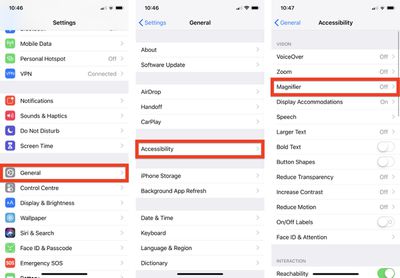
Enabling it is easy: Launch the Settings app on your iPhone or iPad, navigate to General -> Accessibility -> Magnifier, and toggle on the Magnifier switch.
magnifier ios accessibility
After that, all you need to do to use it is triple-click the Side button (or Home button, depending on your device). You can also add it to the Control Center by going to Settings -> Control Center -> Customize Controls, and tapping the green plus button next to Magnifier.

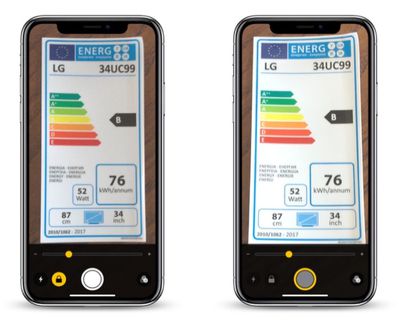
When you launch Magnifier, you'll see a camera-like interface at the bottom of the screen, but with some unique features. The slider controls the magnification of the scene in the lens frame, while the button at the bottom left turns on the flashlight so you can illuminate it. The padlock button next to that locks the focus.
magnifier ios
Tapping the big button in the center freezes the image (a frozen image is indicated by a yellow ring around the button), allowing you to move your phone around freely and still look at the image. You can also use the magnification slider to zoom in and out of the frozen image.

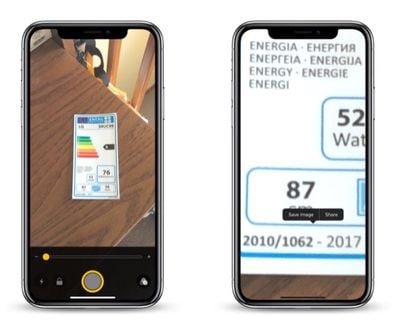
Note that when you freeze an image in the Magnifier, it isn't saved to your photo album. But if you want to save the entire image, you can.

Simply tap and hold on the frozen picture and select Save Image from the contextual popup menu. You'll find a Share option in there, too.
magnifier ios color schemes
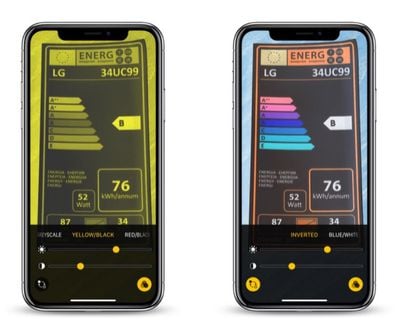
Over on the far right of the Magnifier interface is a button made up of three circles that provides access to additional sliders for adjusting brightness and contrast.

If you suffer from color blindness or another visual impairment, you can swipe through several color schemes in this extended menu and even invert the colors to find which combination works for you.


Top Rated Comments

ScooterComputer Avatar
103 months ago
This is one of the best, least-known-about features in iOS. I work with a LOT of older folks who are buying into the Apple ecosystem in DROVES… and this feature, ALONE, gets me more "happiness" from the folks that I show it to, configure it for, than any other. Just completely unable to put into words how much small accessibility features like this can really fundamentally change how users use their iPhones. You –KNOW– a feature is awesome when you see 70+ year olds you've enabled Magnifier for showing other 70+ year olds how to enable it months later; that's a success. I wish Apple wouldn't bury it so deeply, and I wish Apple would create an app for older users to walk them through some of the accessibility features that may be helpful to them; what I find, especially, is that older users tend not to like to think they need help, don't like the word "accessibility"—call it excessive pride, I dunno—but if you reframe the features as just "configuring your environment for you, for what you need and do", they're fine with it, acccept it. Perhaps the Tips app might be the place for Apple to showcase these kinds of features, but I find most users are not discovering them on their own. Which is a shame. Thanks, MacRumors, for putting it front and center!

EDIT: Oh, and perhaps I should also mention, I'm nowhere near 70 and I use Magnifier ALL THE TIME! It is great for reading serial numbers and MAC addresses off hard to reach devices, as I find the auto-focus system to be an improvement for such things over the standard Camera auto-focus. Reading fine print in ads. Etc. Just a handy handy feature.
Score: 8 Votes (Like | Disagree)
Analog Kid Avatar
103 months ago

(b) My experience has been that the triple-click launch method is EXTREMELY dodgy, very likely (30% or so) to lock the phone in some sort of strange state where it's not at all obvious how to get out of magnification mode. Maybe Apple has FINALLY fixed this with iOS 12.1?
For this reason, my preferred launch method is to put a launcher on the Control Center page.
As an accessibility function that could be very useful to the elderly, it would be nice to have this available from the lock screen alongside, or instead of, the flashlight or camera buttons...
Score: 1 Votes (Like | Disagree)
103 months ago
This is one of the best, least-known-about features in iOS. I work with a LOT of older folks who are buying into the Apple ecosystem in DROVES… and this feature, ALONE, gets me more "happiness" from the folks that I show it to, configure it for, than any other. Just completely unable to put into words how much small accessibility features like this can really fundamentally change how users use their iPhones. You –KNOW– a feature is awesome when you see 70+ year olds you've enabled Magnifier for showing other 70+ year olds how to enable it months later; that's a success. I wish Apple wouldn't bury it so deeply, and I wish Apple would create an app for older users to walk them through some of the accessibility features that may be helpful to them; what I find, especially, is that older users tend not to like to think they need help, don't like the word "accessibility"—call it excessive pride, I dunno—but if you reframe the features as just "configuring your environment for you, for what you need and do", they're fine with it, acccept it. Perhaps the Tips app might be the place for Apple to showcase these kinds of features, but I find most users are not discovering them on their own. Which is a shame. Thanks, MacRumors, for putting it front and center!

EDIT: Oh, and perhaps I should also mention, I'm nowhere near 70 and I use Magnifier ALL THE TIME! It is great for reading serial numbers and MAC addresses off hard to reach devices, as I find the auto-focus system to be an improvement for such things over the standard Camera auto-focus. Reading fine print in ads. Etc. Just a handy handy feature.
Absolutely! Let me add two comments.
(a) There are alternative magnification apps available. However the Apple solution seems to do a better job of locking onto focus fast, and then stabilizing the text against jitters. And this seems to have improved in more recent hardware. My iPhone XS seems to be quite a bit more visually stable than my iPhone 7 (OIS? or better processing?). So if this is something you care about and use a lot, it might be worth seeing how well it performs in a newer iPhone compared to what you have, and might make it worth the upgrade.

(b) My experience has been that the triple-click launch method is EXTREMELY dodgy, very likely (30% or so) to lock the phone in some sort of strange state where it's not at all obvious how to get out of magnification mode. Maybe Apple has FINALLY fixed this with iOS 12.1?
For this reason, my preferred launch method is to put a launcher on the Control Center page.
Score: 1 Votes (Like | Disagree)
103 months ago
This is well done. Bravo Apple!
Score: 1 Votes (Like | Disagree)

Popular Stories

iPhone Duo Trio

Here's What Apple's Apps Look Like on the iPhone Duo

Tuesday October 20, 2026 11:12 am PDT by
With just three days to go until the iPhone Duo is released, Apple is getting ready for the launch. Behind the scenes, the App Store now has screenshots of Apple's built-in apps running on the Duo. We've seen some apps in marketing materials, but images of the ones we haven't seen give us an idea of what it will be like using the iPhone Duo day to day. Many apps are shown in landscape...
Apple Creator Studio iWork suite

Apple Pulls Keynote, Pages and Numbers From App Store [Update: Back]

Thursday October 22, 2026 11:01 am PDT by
Apple has temporarily removed Keynote, Pages, and Numbers from the App Store, just after releasing an update that added iPhone Duo support and a new Intelligent Assistant. It is not clear if the apps were removed intentionally, or if it is a bug. Apple has not said when the apps will be reinstated, but if it was in error, they should return soon. Update: The Mac versions are back without...
M5 MacBook Pro

RIP, MacBook Ultra

Monday October 19, 2026 9:37 am PDT by
Apple today sent out invites for an experience in Los Angeles on Wednesday, October 28, and the "Pro and tell" tagline on the invitation likely means that the rumored MacBook models with touch-enabled OLED displays will stick with MacBook Pro branding instead of the once-rumored "MacBook Ultra" name. The long-rumored "iPhone Ultra" ended up being named iPhone Duo, so speculation that Apple...
Latest Stories
iPhone Duo Launch Begins as First Orders Reach Customers
3 hours ago
1Password for Agents Keeps Your Passwords Hidden From AI
3 hours ago
iPhone Duo 24 Hours Later: Your Questions Answered
4 hours ago
Apple's iWork Apps Get 'Intelligent Assistant' and iPhone Duo Support
5 hours ago
Apple is Apparently Considering a Slightly Larger iPhone Duo
5 hours ago
Giant iPhone Duo Displays Coming to Four Apple Stores
6 hours ago
Apple Pulls Keynote, Pages and Numbers From App Store [Update: Back]
7 hours ago
Apple Updates More Apps With iPhone Duo Support
7 hours ago
Apple Will Label Apps 'Made for iPhone Duo' in App Store
10 hours ago
Amazon Takes $49 Off iPad With Prices Starting at $399.99
11 hours ago
F1 on Apple TV Now Available in Dolby Atmos
11 hours ago
Apple Reveals More Than 50 Apps That Will Be Updated for iPhone Duo
12 hours ago
Apple Blocks Certificates That Could Help Attackers Fake Websites
13 hours ago
Giant iPhone Duo Installations Spotted at Apple Fifth Avenue
14 hours ago
iPhone Duo 2 Prototypes Include Under-Display Face ID
14 hours ago
Tesla App Gains iPad and iPhone Duo Support
18 hours ago
Apple Reportedly Boosts iPhone Duo Orders by 44%
19 hours ago
Fortnite Returning to Australian App Store After Court Ruling
19 hours ago
Apple Ordered to Open iPhone to Rival App Stores in Australia
19 hours ago
Apple Suppliers Face Hurdles Cutting Circuit Board Emissions
20 hours ago
Things Updated for iPhone Duo With Adaptive Layout
20 hours ago
Simplicity and Siri AI Are HomeView's Killer Features, Apple Says
20 hours ago
iPhone Duo Reviewers Really Miss Face ID
1 day ago
Does the iPhone Duo Run Hot? Here's What Reviews Found
1 day ago
Apple Music's New Look is Now Live on Apple's Website
1 day ago
Anthropic Launches Claude Duet, a Proactive AI Agent
1 day ago
What 32,000 Folds Did to the iPhone Duo's Hinge
1 day ago
iPhone Duo's Hidden FaceTime Camera Takes 'Trash' Photos
1 day ago
iPhone Duo Has 'Edge Light' Feature That Debuted on Macs Last Year
1 day ago
Apple Support App Updated for iPhone Duo's Larger Display
1 day ago









































