How to Set a Memoji or Animoji as Your Watch Face on Apple Watch - GeekWebGuides
Skip to Content

How to Set a Memoji or Animoji as Your Watch Face on Apple Watch

by

Apple in watchOS 7 introduced a new Memoji and Animoji watch face that lets you display an Animoji or custom-created Memoji on your wrist.
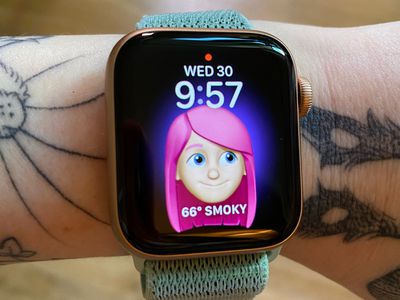
applewatchmemojiface
The Memoji watch face is available on the Apple Watch Series 4 and later.

Enable the Memoji Watch Face on Apple Watch

  1. Long press on the display of the Apple Watch.
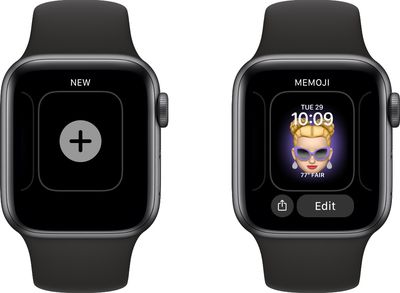
  2. Scroll all the way to the left and tap on the "+" button to add a new watch face. addmemojiwatchface
  3. Use the Digital Crown or a swipe gesture to scroll down until you get to the Memoji watch face.
  4. Tap it to enable it.
  5. Long press on the display of the Apple Watch again.
  6. Tap Edit.
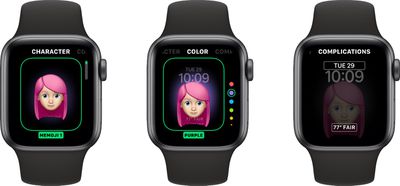
  7. Use the Digital Crown to select a pre-created Memoji or one of the available Animoji options. memojiwatchfaceoptions
  8. Swipe to the left to change the background color.
  9. Swipe to the left again to select your complications.
  10. Tap on the Digital Crown when done, then the watch face to clear the Edit menu.
Note that you can create Memoji on the Apple Watch using the Memoji app, or you can create them through the Messages app on iPhone or iPad.

For Animoji, Apple offers an option to choose a single Animoji character or multiples. If you choose the multiple Animoji option, the watch face will cycle between all of the available Animoji characters.
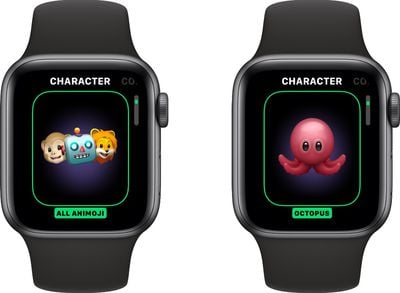
animojiwatchface
If you've created multiple Memoji, you can do the same thing with your Memoji characters, but there's no option to mix Animoji and Memoji.

Memoji and Animoji characters will animate when you raise your wrist or when you tap on the watch face.

Enable the Memoji Watch Face on iPhone

  1. Open the Apple Watch app on iPhone.
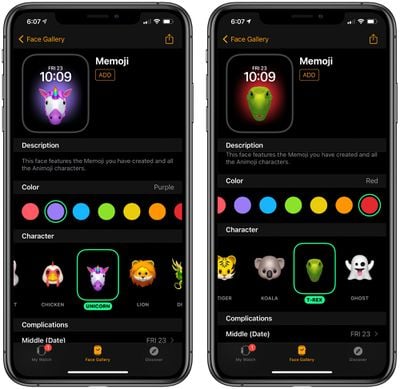
  2. Tap the Face Gallery icon at the bottom of the app. memojifacegalleryiphone
  3. Scroll down to Memoji and tap it.
  4. Choose a background color, a Memoji or Animoji character and set your complications. memojiwatchfaceiphone
  5. When finished, tap "Add" to add it to your watch face as the active face.
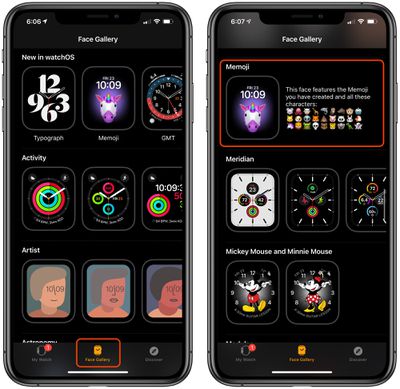
To edit any of the options you created in the Face Gallery, just tap on the watch face under "My Faces" and it will open up an interface with all of the available options.

If you want to learn how to create a Memoji right on Apple Watch, make sure to check out our how to on the new Memoji app.


Related Roundups: watchOS 26, watchOS 27
Related Forum: Apple Watch

Popular Stories

watchos 27

Apple Releases watchOS 27.0.1 for Additional Models

Monday September 28, 2026 2:08 pm PDT by
After releasing watchOS 27.0.1 for the Apple Watch Series 12 and Apple Watch Ultra 4 last week to address a bug that was causing devices to restart unexpectedly, Apple has now released the update for all eligible watches, which includes Series 9 and later. Apple's release notes say only that the update "provides bug fixes for your Apple Watch" and the company does not list any security fixes,...
watchos 27

Apple Releases watchOS 27.0.1 With Fix for Restart Bug

Wednesday September 23, 2026 12:44 pm PDT by
Apple today released watchOS 27.0.1, a minor update to the watchOS 27 operating system that came out last week. The update is limited to the Apple Watch Series 12 and Apple Watch Ultra 4. watchOS 27.0.1 can be downloaded through the Settings app on the watch or the Apple Watch app on a connected iPhone. Software can only be installed when the Apple Watch is on the charger and has over 50...
General visionOS watchOS and tvOS Betas Feature Redux

Apple Releases Third watchOS 27.2, tvOS 27.2 and visionOS 27.2 Betas

Monday October 5, 2026 11:20 am PDT by
Alongside new betas of iOS 27.2, iPadOS 27.2, and macOS Golden Gate 27.2, Apple has released the third betas of watchOS 27.2, tvOS 27.2, and visionOS 27.2. The betas come two weeks after Apple released the second betas. Registered developers can download the betas through the Settings app on each device. With iOS 27.2 and watchOS 27.2, Apple is testing the new Health app that it showed...
Latest Stories
iPhone Duo Demand Reportedly Exceeds Apple's Expectations
7 minutes ago
iPhone Duo Launch Begins as First Orders Reach Customers
6 hours ago
1Password for Agents Keeps Your Passwords Hidden From AI
7 hours ago
iPhone Duo 24 Hours Later: Your Questions Answered
8 hours ago
Apple's iWork Apps Get 'Intelligent Assistant' and iPhone Duo Support
8 hours ago
Apple is Apparently Considering a Slightly Larger iPhone Duo
9 hours ago
Giant iPhone Duo Displays Coming to Four Apple Stores
10 hours ago
Apple Pulls Keynote, Pages and Numbers From App Store [Update: Back]
11 hours ago
Apple Updates More Apps With iPhone Duo Support
11 hours ago
Apple Will Label Apps 'Made for iPhone Duo' in App Store
14 hours ago
Amazon Takes $49 Off iPad With Prices Starting at $399.99
14 hours ago
F1 on Apple TV Now Available in Dolby Atmos
15 hours ago
Apple Reveals More Than 50 Apps That Will Be Updated for iPhone Duo
15 hours ago
Apple Blocks Certificates That Could Help Attackers Fake Websites
17 hours ago
Giant iPhone Duo Installations Spotted at Apple Fifth Avenue
17 hours ago
iPhone Duo 2 Prototypes Include Under-Display Face ID
18 hours ago
Tesla App Gains iPad and iPhone Duo Support
22 hours ago
Apple Reportedly Boosts iPhone Duo Orders by 44%
22 hours ago
Fortnite Returning to Australian App Store After Court Ruling
23 hours ago
Apple Ordered to Open iPhone to Rival App Stores in Australia
23 hours ago
Apple Suppliers Face Hurdles Cutting Circuit Board Emissions
23 hours ago
Things Updated for iPhone Duo With Adaptive Layout
1 day ago
Simplicity and Siri AI Are HomeView's Killer Features, Apple Says
1 day ago
iPhone Duo Reviewers Really Miss Face ID
1 day ago
Does the iPhone Duo Run Hot? Here's What Reviews Found
1 day ago
Apple Music's New Look is Now Live on Apple's Website
1 day ago
Anthropic Launches Claude Duet, a Proactive AI Agent
1 day ago
What 32,000 Folds Did to the iPhone Duo's Hinge
1 day ago
iPhone Duo's Hidden FaceTime Camera Takes 'Trash' Photos
1 day ago
iPhone Duo Has 'Edge Light' Feature That Debuted on Macs Last Year
1 day ago