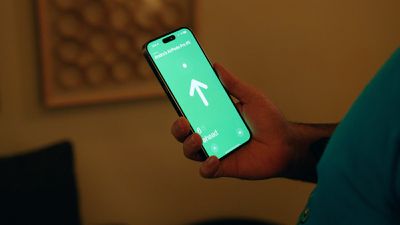
With AirPods Pro 2, Apple improved the Charging Case by adding a U1 chip for Precision Finding with Find My. With AirPods Pro 3, Apple added a U2 chip to improve the feature. This article explains how to use Precision Finding to locate your AirPods Pro if you've misplaced or lost them.
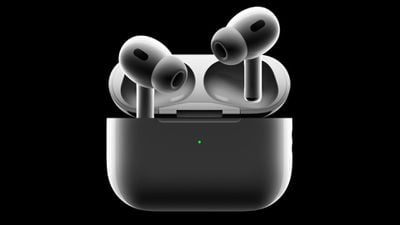
airpods pro 2
‌Find My‌‌ uses Bluetooth signals from lost AirPods to relay their location back to you. Apart from Bluetooth, however, the second-generation AirPods Pro Charging Case is also equipped with a U1 Ultra Wideband chip, and on iPhones that also have U1 chips, there's a Precision Finding feature that enables you to more accurately determine the distance and direction of your AirPods when they're in range, when compared to Bluetooth alone.

If you want to find lost AirPods Pro 2 and you have an ‌iPhone 11‌ or later model, Precision Finding will direct you to the exact location of your AirPods using input from the camera, accelerometer, and gyroscope, with guidance provided through sound, haptics, and visual feedback. Here's how to use it.

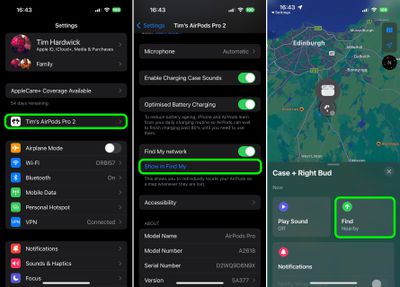
  1. If your AirPods are connected, open Settings and tap the AirPods tab just below your Apple ID, scroll down, then tap Show in Find My. If you've misplaced your AirPods earbuds along with the case, launch the Find My app and select your AirPods in the "Devices" list.
  2. Tap Find. It should say "Nearby" underneath if the Precision Finding feature is available.
    settings

  3. Now start moving around to locate your AirPods and follow the onscreen instructions. You should see an arrow pointing in the direction of the AirPods, an approximate distance telling you how far away they are, and a note if they're located on a different floor.
As you approach the AirPods, you'll feel haptic feedback from your phone and there will be audio cues to let you know that you're approaching an item. The AirPods graphic on the ‌‌iPhone‌‌ will also shift as you get nearer to it. Precision Finding exits when you've successfully located your AirPods and your ‌‌iPhone‌‌ is in very close proximity.
airpods pro 2 precision finding
Note that Ultra Wideband isn't universally supported worldwide, therefore Precision Finding won't work in some countries. But bear in mind that the AirPods Pro 2 Charging Case comes with a built-in speaker, so you can also make it play a sound using ‌Find My‌ to more easily locate it.

Related Roundup: AirPods Pro 3
Tag: U1 Chip
Buyer's Guide: AirPods Pro (Buy Now)
Related Forum: AirPods

Top Rated Comments

adamlbiscuit Avatar
44 months ago
My AirPods Pro (2nd Gen) don't show in FindMy, and that's even after resetting / unpairing them and updating the firmware to the newest version. I've tried restarting the iPhone, and also logging in on iCloud.com but there's nothing there either. Turning off the FindMy network and turning it back on doesn't work, so I'm at a loss. I'm running iOS 16.0.1 so I assume that can't be an issue either.

I think others on the forum are also having this issue though it's not happening to everyone. I just hope I don't lose them in the meantime.
Score: 9 Votes (Like | Disagree)
young_dimm Avatar
44 months ago

Are these cases compatible with 1st gen pros?
No.
New case + old headphones: orange led stays blinking in a loop.
Old case + new headphones: same “Mismatched AirPods” information

Attachment Image
Score: 5 Votes (Like | Disagree)
Human Simulacrum Avatar
44 months ago

Urrrgh - I have the same issue. Got my AirPods Pro 2s today. Set them up in the normal way, and they sound great. Everything looks good apart from the fact that they don’t appear in Find My. Tried restarting the phone, unpairing and repairing the AirPods, but no luck.

I have my keys, wallet, and my car all visible in Find My (yup - I have an AirTag hidden in my car lol). But the AirPods are a no-show. Pah!

My AirPods Pro (2nd Gen) don't show in FindMy, and that's even after resetting / unpairing them and updating the firmware to the newest version. I've tried restarting the iPhone, and also logging in on iCloud.com but there's nothing there either. Turning off the FindMy network and turning it back on doesn't work, so I'm at a loss. I'm running iOS 16.0.1 so I assume that can't be an issue either.

I think others on the forum are also having this issue though it's not happening to everyone. I just hope I don't lose them in the meantime.
Hi all, I had the same issue, AirPods Pro 2 was not showing in Find My app no matter what I did, but I think found a fix. At least it worked for me.
[LIST=1]
* Remove AirPods Pro 2 from your device. Settings -> Bluetooth -> Forget this device.
* Disable and then enable Find My on your iPhone. Settings -> Apple ID -> Find My -> Find My iPhone.
* Reset your AirPods Pro 2 to factory settings. With the lid open, press and hold the setup button on the back of the case for about 30 seconds, until the status light on the front of the case flashes amber, then white.*
* Connect to your AirPods Pro 2 from Bluetooth settings.
* Your AirPods Pro 2 should now be visible in Find My app.
Score: 3 Votes (Like | Disagree)
doggypiggy Avatar
44 months ago

Weird. Mine worked perfectly fine without doing anything at all. I just remembered it had the feature, went into the Find My app and it was right there.
I wish I were as lucky as you o_O
Score: 2 Votes (Like | Disagree)
RodThePlod Avatar
44 months ago

My AirPods Pro (2nd Gen) don't show in FindMy, and that's even after resetting / unpairing them and updating the firmware to the newest version. I've tried restarting the iPhone, and also logging in on iCloud.com but there's nothing there either.
Urrrgh - I have the same issue. Got my AirPods Pro 2s today. Set them up in the normal way, and they sound great. Everything looks good apart from the fact that they don’t appear in Find My. Tried restarting the phone, unpairing and repairing the AirPods, but no luck.

I have my keys, wallet, and my car all visible in Find My (yup - I have an AirTag hidden in my car lol). But the AirPods are a no-show. Pah!
Score: 2 Votes (Like | Disagree)
young_dimm Avatar
44 months ago

My AirPods Pro (2nd Gen) don't show in FindMy, and that's even after resetting / unpairing them and updating the firmware to the newest version. I've tried restarting the iPhone, and also logging in on iCloud.com but there's nothing there either. Turning off the FindMy network and turning it back on doesn't work, so I'm at a loss. I'm running iOS 16.0.1 so I assume that can't be an issue either.

I think others on the forum are also having this issue though it's not happening to everyone. I just hope I don't lose them in the meantime.
Same for me, it works only I few minutes after resetting the AirPods Pro(2nd Gen.)
Score: 1 Votes (Like | Disagree)

Popular Stories

maxresdefault

Apple Shows Off a Key Reason to Upgrade to the iPhone 17

Saturday February 7, 2026 9:26 am PST by
Apple today shared an ad that shows how the upgraded Center Stage front camera on the latest iPhones improves the process of taking a group selfie. "Watch how the new front facing camera on iPhone 17 Pro takes group selfies that automatically expand and rotate as more people come into frame," says Apple. While the ad is focused on the iPhone 17 Pro and iPhone 17 Pro Max, the regular iPhone...
Finder Siri Feature

Why Apple's iOS 26.4 Siri Upgrade Will Be Bigger Than Originally Promised

Friday February 6, 2026 3:06 pm PST by
In the iOS 26.4 update that's coming this spring, Apple will introduce a new version of Siri that's going to overhaul how we interact with the personal assistant and what it's able to do. The iOS 26.4 version of Siri won't work like ChatGPT or Claude, but it will rely on large language models (LLMs) and has been updated from the ground up. Upgraded Architecture The next-generation...
wwdc sans text feature

Apple Rumored to Announce New Product on February 19

Thursday February 5, 2026 12:22 pm PST by
Apple plans to announce the iPhone 17e on Thursday, February 19, according to Macwelt, the German equivalent of Macworld. The report, citing industry sources, is available in English on Macworld. Apple announced the iPhone 16e on Wednesday, February 19 last year, so the iPhone 17e would be unveiled exactly one year later if this rumor is accurate. It is quite uncommon for Apple to unveil...
apple wallet drivers license feature iPhone 15 pro

Apple Says These 7 U.S. States Plan to Offer iPhone Driver's Licenses

Monday February 9, 2026 6:24 am PST by
In select U.S. states, residents can add their driver's license or state ID to the Apple Wallet app on the iPhone and Apple Watch, and then use it to display proof of identity or age at select airports and businesses, and in select apps. The feature is currently available in 13 U.S. states and Puerto Rico, and it is expected to launch in at least seven more in the future. To set up the...
14 inch MacBook Pro Keyboard

New MacBook Pros Could Now Arrive in March

Sunday February 8, 2026 6:02 am PST by
New MacBook Pro models with the M5 Pro and M5 Max chips could arrive as soon as Monday, March 2, according to Bloomberg's Mark Gurman. In today's "Power On" newsletter, Gurman said that the release of new MacBook Pro models is tied to the release of macOS Tahoe 26.3. The launch is said to be slated for as early as the week of March 2. He added that the M4 Pro and M4 Max models on sale today...