
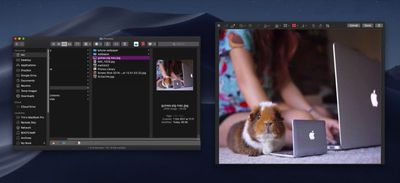
In previous versions of macOS, the Quick Look feature lets you view photos and files without having to open them in an app. In macOS Mojave, Apple has also introduced some convenient new editing tools to Quick Look, allowing you to perform actions specific to the kind of file you're viewing. Let's take a look at how it all fits together.
mojave quick look file edits

How Quick Look Works

For those unfamiliar with Quick Look, the feature can be used for items on the Desktop, in Finder windows, in emails, in messages, and other places. It supports numerous file types, including HTML, PDF, Plain text, RTF, iWork, MS Office, RAW, JPEGs, and QuickTime formats. To activate it, simply select one or more items, then press the Spacebar or force-click using your Mac's trackpad.

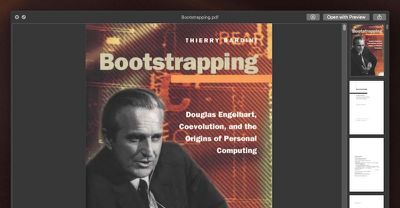
In the top left of the Quick Look window you'll find the Maximize button next to the Close button. (You can also manually enlarge the window by dragging the corners.) Open with [App] and Share buttons are located in the top-right corner of the Quick Look window, along with a Rotate Left button if you're working with images or video.
mojave quick look 1
As before, if you select multiple items, you'll see arrow buttons to navigate through them, as well as a Sheet View button to see the items in an index sheet view. If you opened a document such as a PDF, you'll see a column of thumbnails along the side of the window for quickly navigating through the pages.

What's New in Quick Look

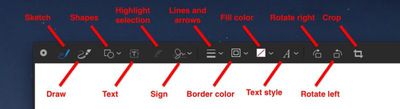
New to Quick Look in Mojave is the ability to access Markup tools. Simply click the Markup button to reveal the toolset.

mojave quick look markup button e1531128163973
Quick Look lets you draw on and annotate images or PDF documents using arrows, shapes, and text. You can also use Markup to quickly sign a document with your digital signature. Click Done, and your changes are automatically saved.
mojave quick look file edits1
If you're viewing a video file in Quick Look, you'll see a new Trim button that allows you to trim the clip without having to open QuickTime.

mojave quick look trim clip button e1531128093109
Clicking the Trim button reveals the scrubbing and edit ribbon along the bottom of the clip. You can click anywhere in the ribbon to jump to another point in the video, and drag the edges of the yellow frame to trim the clip to the desired length.

mojave quick look file edits6
Again, simply click Done when you're finished and your changes are automatically saved.

Related Forum: macOS Mojave

Top Rated Comments

Detektiv-Pinky Avatar
99 months ago
What about directly copying text from a document via Quicklook?
This was one of my favourite hidden feature in previous versions, until Apple took it away.
Score: 6 Votes (Like | Disagree)
ppdix Avatar
99 months ago
I use quicklook all the time. It's great but still can't look at contents of a folder. Back in 2009 there was quick look x-ray that showed some of the documents in a folder. U had to manually enable it in terminal but it was useful.
The new stacks are cool and u can scrub thru documents but not folders. I wish the scrubbing function would work for folders or at least show you an icon view of the folder's contents.
Score: 2 Votes (Like | Disagree)
jonnysods Avatar
99 months ago
Mojave is looking tight!
Score: 2 Votes (Like | Disagree)
JosephAW Avatar
99 months ago
Does quick look in Mojave now clear it's thumbnail cache on a schedule? Especially from an encrypted volume?

https://www.geekwebguides.com/2018/06/18/macos-quick-look-encrypted-data-bug/
Score: 2 Votes (Like | Disagree)
jimthing Avatar
96 months ago
Quicklook does works seamlessly for most filetypes as Apple delivers QL plugins for the most common filetypes. However, that doesn't mean that if Apple didn't deliver a QL plugin for a filetype that you're stuck -- because Apple also made it easy to add your own QL plugins.

The following web site gives pointers to QL plugins for a number of filetypes that Apple doesn't deliver -- In particular Quicklook Video which adds support for .asf, .avi, .flv, .mkv, .rm, .webm & .wmf
http://www.quicklookplugins.com/
[doublepost=1537910576][/doublepost]
What gives? Instead of complaining that Apple hasn't covered your corner case, why not spend a few seconds looking for "quick look plugins"? Naaaah, too much effort...
Looks like a complete fail. Hence why I originally moaned about the lack of format support, as I likely checked it out previously, and gave up.

The video one, titled "Quicklook Video", is actually useless, and is from ages ago, "Oct 2014":
https://www.quicklookplugins.com/2014/10/27/quicklook-video / https://github.com/Marginal/QLVideo

Says "allows macOS Finder to display thumbnails, static QuickLook previews, cover art and metadata for most types of video files."
So basically it doesn't PLAY any video, but instead shows still image shot(s) of a video. Thus making it pretty useless as a so-called video playback QT plugin! Read the comments underneath, with people thinking it would, only to find out it doesn't.

My limited understanding here, is that in the latest few versions of macOS, make it not possible to get most things to function in QT, as there are not the API hooks available anymore in order to do so, &/or things like Perian are not able to work either. Making the idea of most of these apparent QT plugins largely legacy only.

Please correct me if I'm wrong.
Score: 1 Votes (Like | Disagree)
OlliFlamme Avatar
99 months ago
Quicklook is the future: seamless experience without calling in separate apps - one pudding of an OS that is no app and all apps at the same time :D
Score: 1 Votes (Like | Disagree)

Popular Stories

Apple Logo Zoomed

Tim Cook Teases Plans for Apple's Upcoming 50th Anniversary

Thursday February 5, 2026 12:54 pm PST by
Apple turns 50 this year, and its CEO Tim Cook has promised to celebrate the milestone. The big day falls on April 1, 2026. "I've been unusually reflective lately about Apple because we have been working on what do we do to mark this moment," Cook told employees today, according to Bloomberg's Mark Gurman. "When you really stop and pause and think about the last 50 years, it makes your heart ...
wwdc sans text feature

Apple Rumored to Announce New Product on February 19

Thursday February 5, 2026 12:22 pm PST by
Apple plans to announce the iPhone 17e on Thursday, February 19, according to Macwelt, the German equivalent of Macworld. The report, citing industry sources, is available in English on Macworld. Apple announced the iPhone 16e on Wednesday, February 19 last year, so the iPhone 17e would be unveiled exactly one year later if this rumor is accurate. It is quite uncommon for Apple to unveil...
Finder Siri Feature

Why Apple's iOS 26.4 Siri Upgrade Will Be Bigger Than Originally Promised

Friday February 6, 2026 3:06 pm PST by
In the iOS 26.4 update that's coming this spring, Apple will introduce a new version of Siri that's going to overhaul how we interact with the personal assistant and what it's able to do. The iOS 26.4 version of Siri won't work like ChatGPT or Claude, but it will rely on large language models (LLMs) and has been updated from the ground up. Upgraded Architecture The next-generation...
iOS 26

iOS 26.3 and iOS 26.4 Will Add These New Features to Your iPhone

Tuesday February 3, 2026 7:47 am PST by
While the iOS 26.3 Release Candidate is now available ahead of a public release, the first iOS 26.4 beta is likely still at least a week away. Following beta testing, iOS 26.4 will likely be released to the general public in March or April. Below, we have recapped known or rumored iOS 26.3 and iOS 26.4 features so far. iOS 26.3 iPhone to Android Transfer Tool iOS 26.3 makes it easier...
iphone 17 pro dark blue 1

iPhone 18 Pro Max Rumored to Deliver Next-Level Battery Life

Friday February 6, 2026 5:14 am PST by
The iPhone 18 Pro Max will feature a bigger battery for continued best-in-class battery life, according to a known Weibo leaker. Citing supply chain information, the Weibo user known as "Digital Chat Station" said that the iPhone 18 Pro Max will have a battery capacity of 5,100 to 5,200 mAh. Combined with the efficiency improvements of the A20 Pro chip, made with TSMC's 2nm process, the...














