

Apple recently added a Track Detection feature to its Workout app on Apple Watch Series 4 and newer models. Keep reading to learn what it does and how you can take advantage of it.
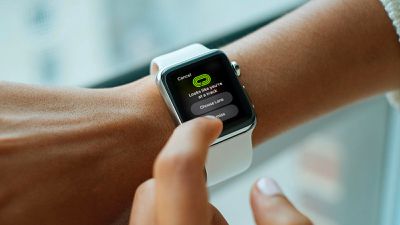
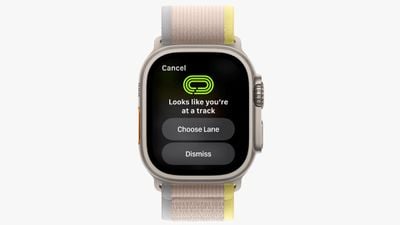
With the release of watchOS 9.2, Apple introduced its promised Track Detection feature for supported Apple Watch models. The software update means that your watch can now tell when you are at a running track, and ask you if you want to choose a lane.
Track Detection works by using a combination of Apple Maps data and your watch's GPS to automatically recognize when you're at a standard 400 meter World Athletics (IAAF) running track. As of writing, the feature is available in Australia, Canada, France, Germany, Italy, the Netherlands, the United Kingdom, and the United States.
To use the feature, simply follow the steps below. Bear in mind that Track Detection is not supported on Apple Watch Series 3 and older models, as these devices cannot run watchOS 9.2. To check your Apple Watch is up-to-date with the latest software, ope the Watch app on your iPhone and go to General -> Software Update. To install new software, your Apple Watch needs to have at least 50 percent battery, it needs to be placed on a charger, and it needs to be in range of your iPhone.
How to Start a Running Track Workout
- Launch the Workout app on your Apple Watch.
- Tap Outdoor Run.
- If your Apple Watch detects that you're at a track, you'll be prompted to choose a lane: Tap Choose Lane.
- Use the plus and minus buttons to choose a lane, then tap Confirm.
- If this is the first time you've performed a Track workout, choose a measurement unit (Miles or Meters), then tap Confirm.
If you leave a track during your workout, your Apple Watch will display an alert telling you so. If you change lanes while you're working out, swipe right on the watch face, tap Lane, then enter your new lane.
When you've finished your run, you'll get a route map in your workout summary that provides you with what Apple says is lane-level precision. If you have an Apple Watch Ultra, which is equipped with dual-frequency GPS, it should be even more precise.
How to Enable Lap Alerts
You can receive an alert that shows your distance, time, and pace when completing a lap around the track by following these steps.
- Launch the Workout app on your Apple Watch.
- Tap the ellipsis icon (the three dots) inside the Outdoor Run card.
- Tap Alerts.
- Turn the Digital Crown up, tap Track Lap, then turn on Lap Alert.
The impressive thing about Track Detection is that, unlike some dedicated running watches, no calibration is necessary. Apple Watch can even switch to track mode in the middle of a regular run if it detects that you've arrived at a track.


















