

In November 2018, Spotify released an official app for Apple Watch that allows Spotify subscribers to access and control their favorite Spotify music and podcasts from their wrist. This article shows you how to get the Spotify app up and running on Apple Watch and explains how the interface works.
What the Spotify App for Apple Watch Can't Do
As great as it is that Spotify released an Apple Watch app, it does have a couple of major shortcomings that you should be aware of. As of writing, the app offers no option to store music locally on your wrist for offline listening. So if you were hoping to pre-load your watch with tunes from Spotify for your workout, you're out of luck.
It has been a similar story for Apple Watch LTE owners with a data contract who are hoping to stream Spotify music directly from their wrist for listening on a pair of connected Bluetooth headphones, although that's in the process of changing. As of November 2020, Spotify is rolling out standalone Apple Watch streaming, although it's not yet available for all users.
With those limitations in mind, below are the steps you need to take to get the Spotify app to show up on your Apple Watch, followed by a brief guide on using the wrist-based interface.
How to Install Spotify on Apple Watch
These steps will work for both free and premium Spotify users. Just make sure you have the latest version of Spotify installed on your iPhone by checking the App Store for updates to the Spotify app.
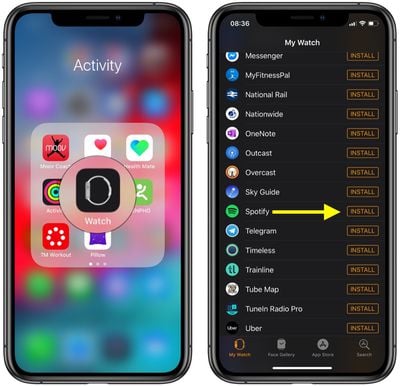
- Launch the Watch app on your iPhone.
- In the My Watch tab, under the heading Installed on Apple Watch, check that Spotify appears in the list. If you can't see it, scroll down to the Available Apps section and tap the Install button next to Spotify.

- After it's installed, select the Spotify app from your Apple Watch's Home screen. Alternately, open the Spotify app on your iPhone and it should automatically launch on your wrist.
How to Use the Apple Watch Spotify Interface
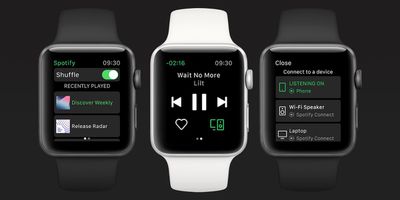
On Apple Watch, the main screen of the Spotify app provides you with regular playback functions. The three middle buttons let you play/pause and skip forward/back the track that is currently playing, while the track's title scrolls along the top.
To the right of the heart icon is a Spotify Connect button. Tapping this takes you to a list of available audio devices that you can connect to, such as your iPhone or Bluetooth/AirPlay speakers that are in range.
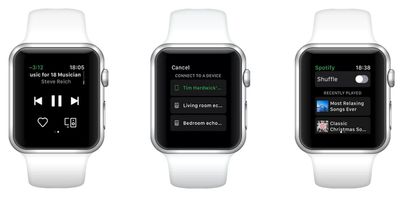
If you swipe right on the main screen you'll see a list of your recently played music on Spotify. You can use the Digital Crown or your finger to scroll through this list, and tap a playlist or album to play it.
As it stands, you can't use the Apple Watch app to select individual songs to play – you have to skip through tracks to get to the one you want to listen to. Alternately, you can turn on shuffle mode by toggling the switch at the top of the recently played screen.
























![Apple Pulls Keynote, Pages and Numbers From App Store [Update: Back]](https://images.macrumors.com/t/Okb7kitB_gNr6qe5Pex9nQIysD8=/112x112/article-new/2026/01/Apple-Creator-Studio-iWork-suite.jpg)





















