

With Focus in iOS 15, you can set an activity that you're doing, such as working, exercising, reading, or spending time with family, and block out the notifications that are unrelated to those tasks. It's like Do Not Disturb, but with more options for refining what you see and what you don't see.
If there's something pressing coming up or an event you're expecting that you don't want to miss, you can still use Focus to block out distractions while still allowing any important notifications to come through to your iPhone, thanks to time sensitive notifications.
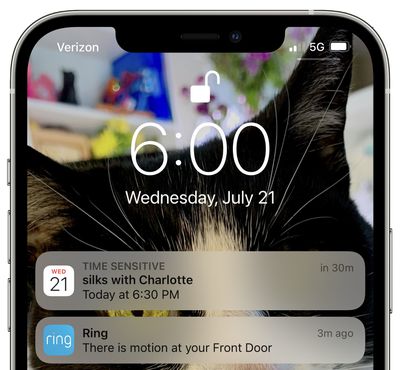
Time sensitive notifications are a new notification class in iOS 15, and a notification marked as time sensitive can be allowed to bypass Focus mode. Notifications that are classed as time sensitive are those that are immediately important, such as someone at the door, a food delivery, a ride pickup, and more.
You can control whether time sensitive notifications can be received during specific Focus modes by following the steps below.
- Launch the Settings app on your iPhone, then tap Focus.
- Select the Focus mode that you want to allow time-sensitive notifications to bypass.
- Toggle the switch labeled Time-Sensitive Notifications to the green ON position.
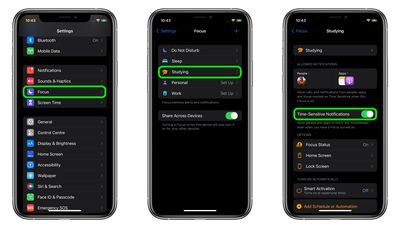
That's all there is to it. Now you won't miss that important alert on your device, even when you're focusing on something in particular.

























![Apple Pulls Keynote, Pages and Numbers From App Store [Update: Back]](https://images.macrumors.com/t/Okb7kitB_gNr6qe5Pex9nQIysD8=/112x112/article-new/2026/01/Apple-Creator-Studio-iWork-suite.jpg)



















