How to Use Walkie-Talkie in watchOS 5 - GeekWebGuides
Skip to Content

How to Use Walkie-Talkie in watchOS 5

by

Apple's watchOS 5 update, out now for all Apple Watch models with the exception of the original Apple Watch, introduces a fun new feature that mimics old school walkie talkies. With Walkie-Talkie, you can connect to your friends and family and have push-to-talk conversations right on your wrist.

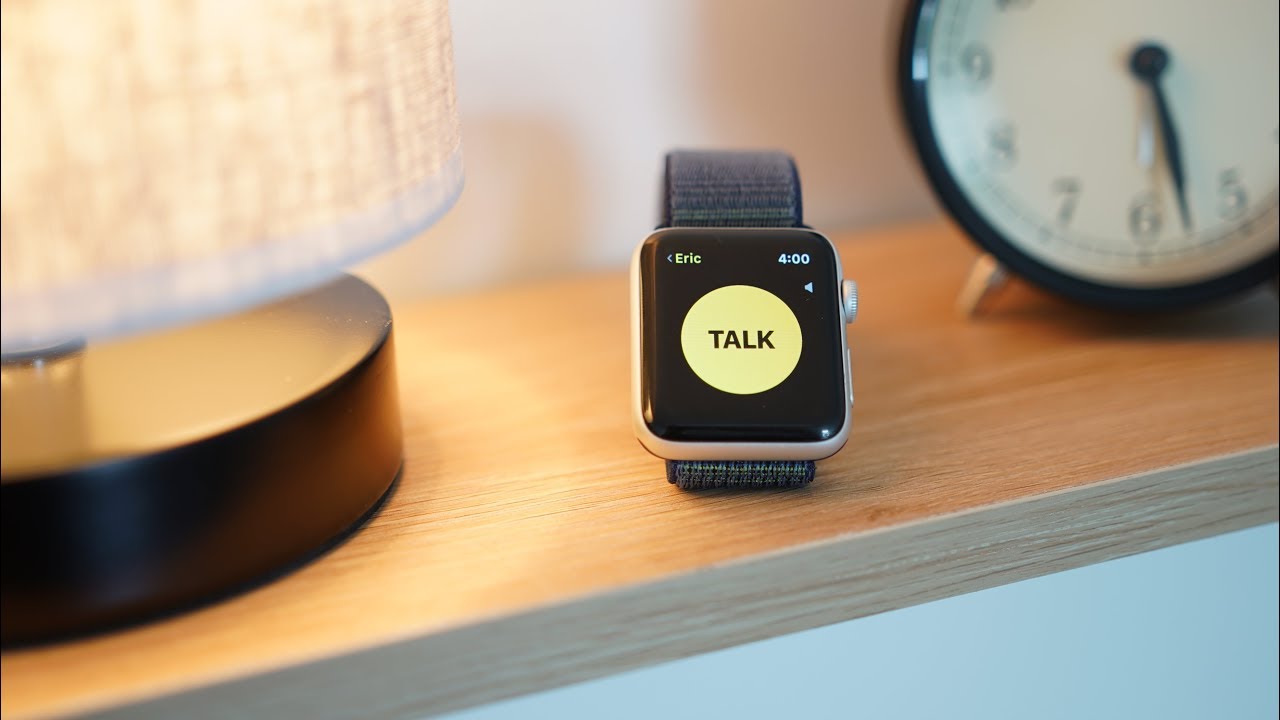
The video below demonstrates Walkie-Talkie in action, while the post explains the steps to set it up and use it.
Turning on Walkie-Talkie and Adding Friends

Walkie-Talkie is an app on the Apple Watch with an icon that looks like a little walkie talkie on a field of yellow. Whenever you want to use Walkie-Talkie to communicate with someone, you'll need to open up the Walkie-Talkie app. The first step, though, is adding a friend to chat with.
walkietalkieicon 1

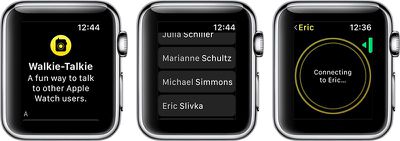
  1. Open the Walkie-Talkie app.
  2. Turn the Digital Crown to scroll through your contacts.
  3. Choose a friend who has an Apple Watch and watchOS 5.
  4. Tap on the person's name in the contacts list. walkietalkieconnection
  5. When a yellow card with their name appears on your Apple Watch in the Walkie-Talkie app, tap on the card.
  6. Press on the "Talk" button to initiate a connection.
  7. You'll need to wait for your friend to receive your message and approve the Walkie-Talkie connection. It will say "Connecting to [Your Friend's Name].
  8. When a connection is established, it will go back to the Talk button and you will be able to have a Walkie-Talkie conversation with your friend.
If a connection cannot be established, you'll see a popup that says "[Your Friend] is not available." If this happens, it means the person on the other end did not answer the incoming Walkie-Talkie notification.
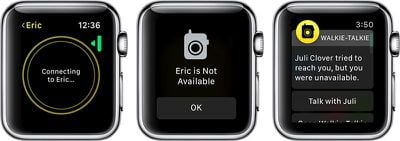
walkietalkieunavailable
If the Walkie-Talkie connection screen hangs indefinitely on the connecting screen, it means the person does not have an Apple Watch or does not have watchOS 5 installed.

When a friend adds you to Walkie-Talkie, you'll see an incoming notification that your friend wants to establish a connection with you. To chat, you will need to tap on "Always Allow."
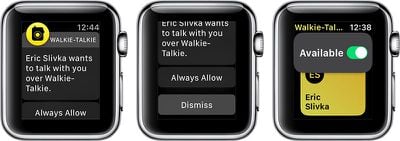
walkietalkieallow

Talking With a Friend Using Walkie Talkie

Once a connection has been approved between you and your friend, you do not need to get approval for each and every message. You can just push to talk and whatever you say will be beamed to your friend's Apple Watch.

  1. Open up the Walkie-Talkie app.
  2. Tap on the card for the friend you want to talk to.
  3. Hold down the "Talk" button for the entire time that you're speaking. You will see little concentric circles flashing, which means your message is being relayed to your friend. walkietalkieinuse
  4. When you're done speaking, stop pressing on the Talk button. This will allow your friend to press the Talk button on their end to send a response to you.
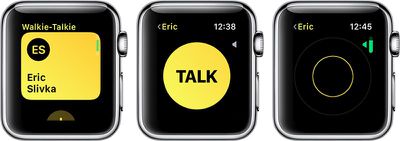
You can have multiple Walkie-Talkie connections with your friends, but you can only communicate with one friend at a time because Walkie-Talkie is a one-on-one feature. Group chats between multiple people are not supported.

Accessing Walkie-Talkie Quickly

Once you have a Walkie-Talkie connection established with at least one person, a little Walkie-Talkie icon will be displayed at the top of the Apple Watch's main screen. If you tap it, it will take you right into the Walkie-Talkie app.
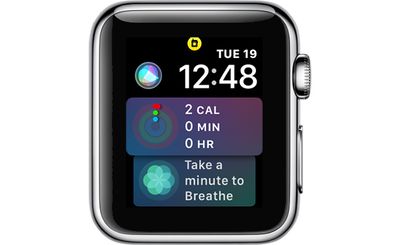
walkietalkieicon
This icon also serves as an indicator that you're available for Walkie-Talkie conversations and that any friends you've established a connection with can message you at any time.

Adjusting Walkie-Talkie Volume

  1. Open the Walkie-Talkie app.
  2. Choose a Walkie-Talkie contact card.
  3. At the talk interface, turn the Digital Crown.
  4. A downward turn lowers the Walkie-Talkie volume, while an upward turn makes it louder. Turning it all the way down effectively mutes the conversation.

Using Walkie-Talkie With AirPods or Bluetooth Headphones

If you have AirPods or other Bluetooth headphones connected to your Apple Watch, you will hear incoming Walkie-Talkie messages through the accessory rather than directly through the Apple Watch. You will also be able to speak into the microphone of the AirPods, keeping your conversations more private.

Turning Off Walkie-Talkie and Removing Contacts

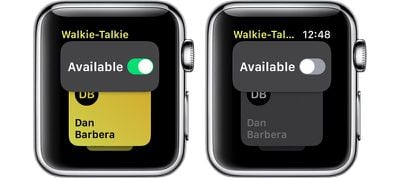
If you want to shut off Walkie-Talkie conversations and refuse incoming messages, you can do so by setting yourself to unavailable.

  1. Open up the Walkie-Talkie app.
  2. Scroll all the way to the top to see the "Available" toggle. walkiewalkieavailable
  3. Toggle "Available" to off.

When your Walkie-Talkie availability is disabled in the Walkie-Talkie app, people who attempt to connect to you will see the message "[Your Name] is Not Available" and you will get a notification that someone attempted to reach you but you were unavailable with an option to go to the Walkie-Talkie app to resume the conversation.

To remove a contact from Walkie-Talkie, at the main contact card interface, swipe to the left on a name in the list to bring up a red "X" button. Press on the X to remove the contact.
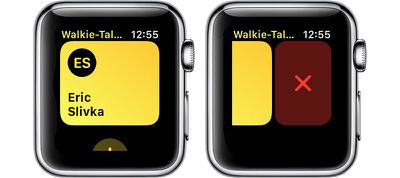
walkietalkiedelete

Walkie-Talkie Warnings

Walkie-Talkie takes precedence over other settings on your Apple Watch. You will hear your friend speaking even if your Apple Watch is set to silent, but it does not ignore Do Not Disturb settings.


Related Roundup: Apple Watch 12
Buyer's Guide: Apple Watch (Buy Now)
Related Forum: Apple Watch

Top Rated Comments

109 months ago
Looks amazing!

Here are my steps to using the Walkie Talkie feature on Apple Watch:

1) Call Apple

2) Ask them to go back to creating amazing society-changing paradigm shifts, rather than churning out streams of gimmicky consumer electronics and marketing copy.
Score: 10 Votes (Like | Disagree)
jclo Avatar
109 months ago
What am I missing here? Why not just text or call the person? How is talkie faster?
It's probably ideal for use for things like amusement park trips or other outings where you might be with people but separated and want to be able to communicate without having to initiate a full phone call every time with the dialing, the waiting for an answer, the hanging up, etc.
Score: 5 Votes (Like | Disagree)
tigertazz Avatar
109 months ago
It’s a feature I’m unlikely to use (limited friends with Apple Watch ) but I can see the benefits for a quick back and forth
Score: 5 Votes (Like | Disagree)
Apple_Robert Avatar
109 months ago
What am I missing here? Why not just text or call the person? How is talkie faster?
Score: 5 Votes (Like | Disagree)
ArtOfWarfare Avatar
109 months ago
Not as seamless as I was promised by the Star Trek communicators.
Score: 5 Votes (Like | Disagree)
109 months ago
I like the idea of this, but why isn't it also on other iOS devices? That would increase the pool of people you could talk to...
[doublepost=1530059917][/doublepost]
What am I missing here? Why not just text or call the person? How is talkie faster?
In some ways this is Apple admitting that it's painful to text using just the Watch (i.e., via Siri). The Walkie Talkie interface is better and it's more immediate.
Score: 4 Votes (Like | Disagree)

Popular Stories

apple watch s12 ultra 4

Apple Watch Series 12, Ultra 4 Owners Report Skin Irritation

Wednesday October 7, 2026 12:02 pm PDT by
Some Apple Watch Series 12 and Ultra 4 owners have experienced unexpected skin irritation with the new models, according to reports on the GeekWebGuides forums and Reddit. Affected users complain of a burning sensation and redness under the sensor area. The Apple Watch Series 12 and Ultra 4 measure heart rate every five seconds, and some people have wondered if that's the cause of the skin...
southern straps 3 1

GeekWebGuides Giveaway: Win an Apple Watch Series 12 and a Nylon Band From Southern Straps

Friday October 9, 2026 10:20 am PDT by
For this week's giveaway, we've teamed up with Southern Straps to offer GeekWebGuides readers a chance to win an Apple Watch Series 12 and a nylon band from Southern Straps to go along with it. Southern Straps is a California-based company that has been making high-quality bands for the Apple Watch since the device first launched in 2015, and the company's selection of bands offer a an...
apple watch series 6 blood oxygen monitoring 1

Apple's $634 Million Apple Watch Patent Bill Just Got Even Bigger

Tuesday October 6, 2026 6:09 am PDT by
Apple's $634 million patent loss to medical technology company Masimo has just gotten even bigger, after a federal judge ordered Apple to pay an additional $184 million in interest on what it owes (via Bloomberg Law). The ruling takes Apple's bill to around $818 million, but that doesn't include any post-judgment interest continuing to accrue until the judgment is paid. Judge James Selna ...
Latest Stories
iPhone Duo Launch Begins as First Orders Reach Customers
2 hours ago
1Password for Agents Keeps Your Passwords Hidden From AI
2 hours ago
iPhone Duo 24 Hours Later: Your Questions Answered
3 hours ago
Apple's iWork Apps Get 'Intelligent Assistant' and iPhone Duo Support
4 hours ago
Apple is Apparently Considering a Slightly Larger iPhone Duo
4 hours ago
Giant iPhone Duo Displays Coming to Four Apple Stores
5 hours ago
Apple Pulls Keynote, Pages and Numbers From App Store [Update: Back]
6 hours ago
Apple Updates More Apps With iPhone Duo Support
6 hours ago
Apple Will Label Apps 'Made for iPhone Duo' in App Store
9 hours ago
Amazon Takes $49 Off iPad With Prices Starting at $399.99
10 hours ago
F1 on Apple TV Now Available in Dolby Atmos
10 hours ago
Apple Reveals More Than 50 Apps That Will Be Updated for iPhone Duo
11 hours ago
Apple Blocks Certificates That Could Help Attackers Fake Websites
12 hours ago
Giant iPhone Duo Installations Spotted at Apple Fifth Avenue
13 hours ago
iPhone Duo 2 Prototypes Include Under-Display Face ID
13 hours ago
Tesla App Gains iPad and iPhone Duo Support
17 hours ago
Apple Reportedly Boosts iPhone Duo Orders by 44%
17 hours ago
Fortnite Returning to Australian App Store After Court Ruling
18 hours ago
Apple Ordered to Open iPhone to Rival App Stores in Australia
18 hours ago
Apple Suppliers Face Hurdles Cutting Circuit Board Emissions
19 hours ago
Things Updated for iPhone Duo With Adaptive Layout
19 hours ago
Simplicity and Siri AI Are HomeView's Killer Features, Apple Says
19 hours ago
iPhone Duo Reviewers Really Miss Face ID
1 day ago
Does the iPhone Duo Run Hot? Here's What Reviews Found
1 day ago
Apple Music's New Look is Now Live on Apple's Website
1 day ago
Anthropic Launches Claude Duet, a Proactive AI Agent
1 day ago
What 32,000 Folds Did to the iPhone Duo's Hinge
1 day ago
iPhone Duo's Hidden FaceTime Camera Takes 'Trash' Photos
1 day ago
iPhone Duo Has 'Edge Light' Feature That Debuted on Macs Last Year
1 day ago
Apple Support App Updated for iPhone Duo's Larger Display
1 day ago