How to Use Interactive Widgets on iPhone - GeekWebGuides
Skip to Content

How to Use Interactive Widgets on iPhone

by

In recent versions of iOS, Apple has made some dramatic changes to the Home Screen of iPhone. In particular, it has introduced the concept of ‌Home Screen‌ widgets, which are similar to the widgets available on Android phones.
widgets
Previously, use of widgets was limited to the Today View, which can be accessed by swiping from left to right on the ‌Home Screen‌. In ‌‌iOS 14‌‌, however, widgets got a design and functionality overhaul, allowing any widget that's available in the Today View to be added to the ‌Home Screen‌ alongside your apps. Then in iOS 17, Apple made widgets fully interactive, meaning you can perform actions with them without opening the associated app.

How to Add Widgets to the Home Screen

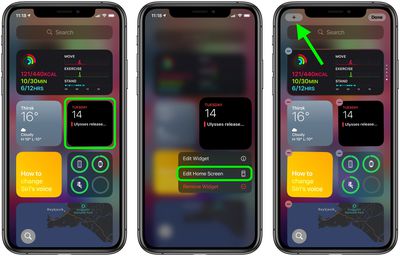
There a couple of ways you can add widgets to the ‌Home Screen‌. If you long press on a widget in the Today View, you'll see an Edit Home Screen option in the popup menu. Tapping this enters jiggle mode, and from there you can drag widgets out of the Today View and place them anywhere on the ‌Home Screen‌.

widgets
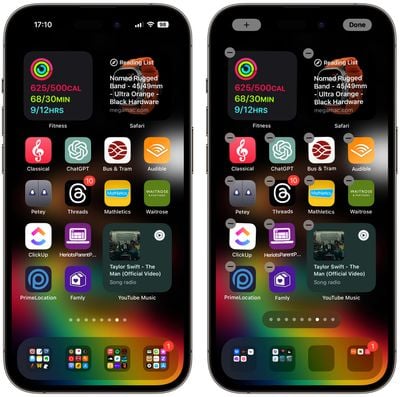
When in jiggle mode, notice the plus (+) button in the top-left corner of the screen. You'll find the same button appear if you long press on a blank area of the ‌Home Screen‌ or any additional page of apps. Tapping this button opens the Widget Gallery, where you can add and customize widgets.
widgets
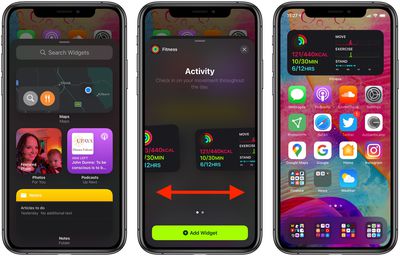
In the Widget Gallery, you can search for a specific widget or scroll through the available options. Tapping on a widget in the list lets you see the size and content options that are available for the widget. To add a widget to the Today View or the ‌Home Screen‌, select it, choose a size (small, medium, or large), and then tap the Add Widget button.

Widget Sizes and Other Functions

When you customize a new widget, you'll notice that the larger the size of the widget, the more content it can display. In the Weather widget, for example, the smallest widget shows the current conditions, while the largest displays the forecast for the next few days.

Bear in mind that bigger widgets take up more space on your ‌Home Screen‌. A small widget takes up the space of four apps in a square shape, but a medium widget takes up the space of eight apps in a rectangle shape, and a large widget takes up the space of 16 apps in a square shape.
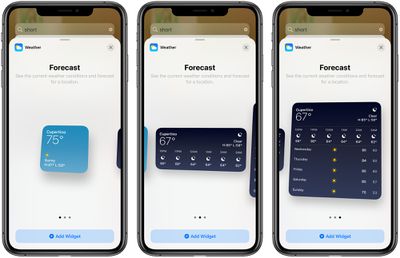
ios14widgetsizes
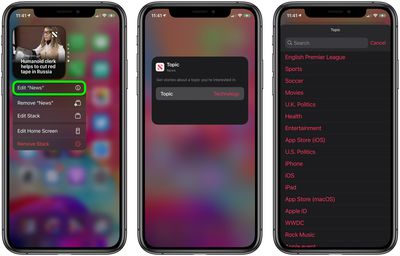
Some apps also have different widget options based on function. In the ‌Apple News‌ widget, for example, you can choose to see relevant news from the day or get stories about a specific topic of interest. You can change this function on an existing ‌Apple News‌ widget anytime. Just long press on the widget and then select Edit "News."
widgets
When you've got some widgets on your ‌Home Screen‌, you can move them around, just like apps. Simply long press on the screen to enter jiggle mode and then drag a widget around with your finger.

Additionally, don't forget that many widgets made since iOS 17 was released are fully interactive, so you can tap buttons and items within these widgets to perform actions without leaving the ‌Home Screen‌.

Siri Suggestions Widget

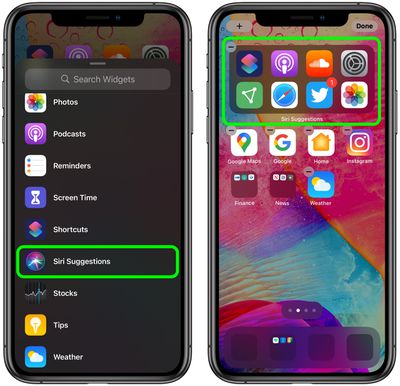
In the Widget Gallery, if you scroll down to the list section you'll see a Siri Suggestions widget. This dynamic widget displays app suggestions based on your ‌iPhone‌ usage habits, similar to what shows up under ‌Siri‌ Suggestions when you use an ‌iPhone‌'s search function.

widgets

Widget Stacks

With widget stacks, you can stack multiple widgets on top of one another, so you can put all of your favorites together and then swap between them with an upward or downward swipe of the finger.

Apple has also added a special "Smart Stack," which is a widget stack that uses ‌Siri‌ Intelligence to surface the most relevant and useful widget based on your iPhone usage habits.
Top Rated Comments

82 months ago
I don’t know but is it me...those iOS 14 screen shots just look like a convoluted mess just so busy with widgets and icons. Just doesn’t look clean.
Score: 8 Votes (Like | Disagree)
82 months ago

'Does anyone else miss the days when the interface wasn’t so confusing that you didn’t need extensive instructions to walk you through steps and hidden interface elements to figure out how to do stuff?'
Even in those supposed days there were still manuals and how-tos available for all kinds of things, especially something newer.
Score: 7 Votes (Like | Disagree)
jozeppy26 Avatar
82 months ago
I can’t figure out how to organize things. It’s frustrating that the App Library doesn’t give you the ability to rearrange and rename folders. So far, I regret altering my Home Screen with widgets.
Score: 6 Votes (Like | Disagree)
Morgenland Avatar
82 months ago
Does anyone else miss the days when the interface wasn’t so confusing that you didn’t need extensive instructions to walk you through steps and hidden interface elements to figure out how to do stuff?
Apple learned Android and Windows Phone OS.
Score: 4 Votes (Like | Disagree)
JNGold Avatar
82 months ago
Geez, what's with all the whining? If you don't want to use a home screen widget, then guess what? Don't. Your iOS device will work just fine with your existing home screens and folders. Heck, you can even hide some of those graveyard home screens 2,3,4 or more pages away. Sounds like a win/win there.
Score: 3 Votes (Like | Disagree)
82 months ago

I can’t figure out how to organize things. It’s frustrating that the App Library doesn’t give you the ability to rearrange and rename folders. So far, I regret altering my Home Screen with widgets.
You can create your own folders and organize things as you want, like before, right?
Score: 3 Votes (Like | Disagree)

Popular Stories

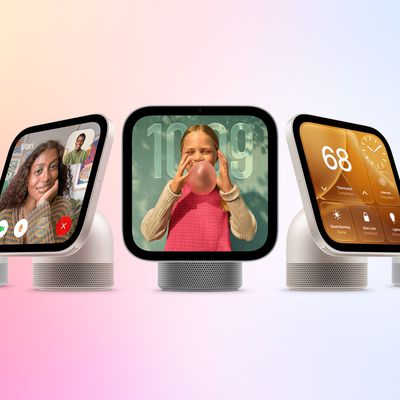
Apple HomeView lineup feature5

Apple HomeView Has These 15 Apps, Some CarPlay Apps and Widgets Also Supported

Wednesday October 14, 2026 9:03 am PDT by
Apple's tech specs page for its all-new HomeView smart home hub contains a list of all of the built-in Apple apps available on the device. While it has no App Store, the HomeView can also display CarPlay-enabled audio and video apps from a paired iPhone. This includes Audiobooks, Apple Music Classical, Apple News, and Apple TV, along with third-party apps such as Spotify, according to WIRED. ...
iPhone Duo Trio

Here's What Apple's Apps Look Like on the iPhone Duo

Tuesday October 20, 2026 11:12 am PDT by
With just three days to go until the iPhone Duo is released, Apple is getting ready for the launch. Behind the scenes, the App Store now has screenshots of Apple's built-in apps running on the Duo. We've seen some apps in marketing materials, but images of the ones we haven't seen give us an idea of what it will be like using the iPhone Duo day to day. Many apps are shown in landscape...
Apple Creator Studio iWork suite

Apple Pulls Keynote, Pages and Numbers From App Store [Update: Back]

Thursday October 22, 2026 11:01 am PDT by
Apple has temporarily removed Keynote, Pages, and Numbers from the App Store, just after releasing an update that added iPhone Duo support and a new Intelligent Assistant. It is not clear if the apps were removed intentionally, or if it is a bug. Apple has not said when the apps will be reinstated, but if it was in error, they should return soon. Update: The Mac versions are back without...
Latest Stories
iPhone Duo Demand Reportedly Exceeds Apple's Expectations
2 hours ago
iPhone Duo Launch Begins as First Orders Reach Customers
9 hours ago
1Password for Agents Keeps Your Passwords Hidden From AI
9 hours ago
iPhone Duo 24 Hours Later: Your Questions Answered
10 hours ago
Apple's iWork Apps Get 'Intelligent Assistant' and iPhone Duo Support
11 hours ago
Apple is Apparently Considering a Slightly Larger iPhone Duo
11 hours ago
Giant iPhone Duo Displays Coming to Four Apple Stores
12 hours ago
Apple Pulls Keynote, Pages and Numbers From App Store [Update: Back]
13 hours ago
Apple Updates More Apps With iPhone Duo Support
13 hours ago
Apple Will Label Apps 'Made for iPhone Duo' in App Store
16 hours ago
Amazon Takes $49 Off iPad With Prices Starting at $399.99
17 hours ago
F1 on Apple TV Now Available in Dolby Atmos
17 hours ago
Apple Reveals More Than 50 Apps That Will Be Updated for iPhone Duo
18 hours ago
Apple Blocks Certificates That Could Help Attackers Fake Websites
19 hours ago
Giant iPhone Duo Installations Spotted at Apple Fifth Avenue
20 hours ago
iPhone Duo 2 Prototypes Include Under-Display Face ID
20 hours ago
Tesla App Gains iPad and iPhone Duo Support
1 day ago
Apple Reportedly Boosts iPhone Duo Orders by 44%
1 day ago
Fortnite Returning to Australian App Store After Court Ruling
1 day ago
Apple Ordered to Open iPhone to Rival App Stores in Australia
1 day ago
Apple Suppliers Face Hurdles Cutting Circuit Board Emissions
1 day ago
Things Updated for iPhone Duo With Adaptive Layout
1 day ago
Simplicity and Siri AI Are HomeView's Killer Features, Apple Says
1 day ago
iPhone Duo Reviewers Really Miss Face ID
1 day ago
Does the iPhone Duo Run Hot? Here's What Reviews Found
1 day ago
Apple Music's New Look is Now Live on Apple's Website
1 day ago
Anthropic Launches Claude Duet, a Proactive AI Agent
1 day ago
What 32,000 Folds Did to the iPhone Duo's Hinge
1 day ago
iPhone Duo's Hidden FaceTime Camera Takes 'Trash' Photos
2 days ago
iPhone Duo Has 'Edge Light' Feature That Debuted on Macs Last Year
2 days ago