How to Wake Up to a Weather Forecast on Your iPhone's Lock Screen - MacRumors
Skip to Content

How to Wake Up to a Weather Forecast on Your iPhone's Lock Screen

by

In iOS 12, Apple has included a somewhat hidden feature that lets you see the day's weather forecast on your iPhone's Lock Screen when you check it for the first time after waking up.
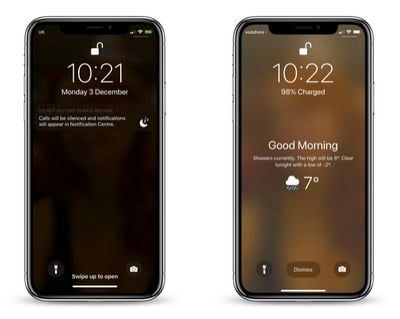
how to wake up to a weather forecast on your iphone lock screen
The feature is part of Apple's Do Not Disturb at Bedtime mode, which prevents notifications from being displayed on your iPhone's Lock Screen when you're supposed to be sleeping.

Many users don't realize you can get the weather forecast to show on the Lock Screen because of the odd way that Apple has implemented the feature. Regardless, here's how to get it working.

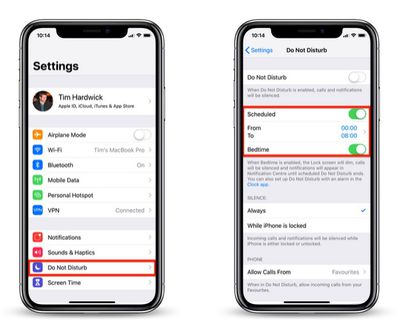
  1. Launch the Settings app on your iPhone.
    how to wake to a weather forecast on iphone lock screen 1

  2. Tap Do Not Disturb.
  3. Make sure the Scheduled and Bedtime buttons are toggled on so that they're both green.
  4. You can also set your sleep and wake schedule here by adjusting the From and To times.
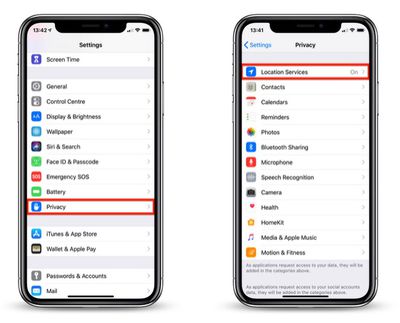
  5. Return to the main Settings screen and tap Privacy.
    how to wake to a weather forecast on iphone lock screen 2

  6. Tap Location Services.
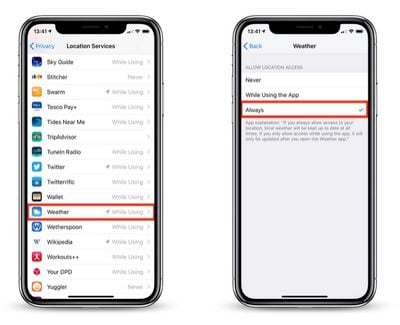
  7. Tap Weather in the list of apps.
    how to wake to a weather forecast on iphone lock screen 3

  8. Under Allow Location Access, tap Always.
  9. Exit the Settings app.

With that done, next time it's time to wake up and Bedtime Mode is scheduled to go off, your iPhone will display the usual "Good morning!" message along with the day's weather, including the current temperature, weather conditions, and forecast.

To make the forecast vanish from your Lock Screen, simply tap Dismiss. To switch the temperature scale between Celsius and Fahrenheit, launch the Weather app and scroll to the bottom of the weather locations list, where you'll find the option to do so.

It's worth noting that once you unlock your iPhone, the weather forecast will disappear for the rest of the day, and it won't return until the next day when you wake up and access the device after Bedtime mode has turned itself off.

As it stands, the Lock Screen weather feature offers no other flexibility, and it won't work unless you allow the Weather app to always access your location data. Hopefully Apple will eventually change this to make it a more useful Lock Screen "widget" in a future update to iOS.


Top Rated Comments

97 months ago
My wife showed this to me the other day. She was excited that she knew something about the iPhone that I didn’t.
Score: 10 Votes (Like | Disagree)
97 months ago
That would be great if the weather app apple use isn’t from weather channel. What a terrible service. Something like meteo weather for Europe would be much better / or the equivalent in US. Weather channel is less than useless for ACURATE weather. It’s mosly 3-4 desgrees off, rain warnings are usually just basic or to cover all bases, what’s the point. Partner up with some real meteorological firms and do it right, ive never understood why apple can’t get the weather app right, i mean yahoo? Seriously? That was good right?!
Score: 9 Votes (Like | Disagree)
97 months ago
I’m personally not a fan of DND Bedtime. It silences everything to include other alarms and is not great for people who have changing bedtime schedules. It’s too bad this weather feature only work with bedtime mode.
Score: 5 Votes (Like | Disagree)
oneMadRssn Avatar
97 months ago
That would be great if the weather app apple use isn’t from weather channel. What a terrible service. Something like meteo weather for Europe would be much better / or the equivalent in US. Weather channel is less than useless for ACURATE weather. It’s mosly 3-4 desgrees off, rain warnings are usually just basic or to cover all bases, what’s the point. Partner up with some real meteorological firms and do it right, ive never understood why apple can’t get the weather app right, i mean yahoo? Seriously? That was good right?!
I think the problem is for-profit weather forecasting. It incentivizes click-bait weather reports. In my area, Weather Channel is always forecasting a huge storm coming up sometime this week, but as the day approaches it is downgraded or the forecast is changed and hey look a huge storm is coming next week now.

I wish there was a good app with a solid Apple-like UI that just scrubbed the forecast from NOAA/NWS.
[doublepost=1543851446][/doublepost]
It silences everything to include other alarms
This should be added to the article. It sure would stink for someone to miss their one-time early alarm while traveling or something because they followed MacRumor's instructions.

Score: 4 Votes (Like | Disagree)
ghostface147 Avatar
97 months ago
I like this feature, but wish it wasn't a one time thing. Once you see it, you won't see it again until the next day. Or leave it as a widget!
Score: 3 Votes (Like | Disagree)
PhillyGuy72 Avatar
97 months ago
Took a few tries a few months ago to finally get this to show up. Cool feature, but it's extremely brief.

Would love a simple setting where you can have this always on - all day or maybe a custom time setting
(Ex. between 7am-11:59am. Or whatever time frame you want)
Score: 2 Votes (Like | Disagree)

Popular Stories

Apple Event Logo

Apple's Next Era Begins September 1

Thursday May 7, 2026 10:36 am PDT by
Apple recently announced that Tim Cook will be stepping down as CEO later this year, after 15 years of leading the company. Effective September 1, Apple's hardware engineering chief John Ternus will become the company's next CEO, while Cook will become executive chairman of Apple's board of directors. In his new role, Apple said Cook will assist with "certain aspects" of the company,...
Four iPhone 18 Pro Colors Mock Feature

iPhone 18 Pro Launching in September With These 10 New Features

Saturday May 9, 2026 6:03 am PDT by
While the iPhone 18 Pro and iPhone 18 Pro Max are not launching until September, there are already plenty of rumors about the devices. It was initially reported that the iPhone 18 Pro models would have fully under-screen Face ID, with only a front camera visible in the top-left corner of the screen. However, the latest rumors indicate that only one Face ID component will be moved under the...
Apple Watch Series 10 Jet Black Touch ID

Apple Watch Series 12 and watchOS 27: What to Expect Later This Year

Friday May 8, 2026 2:07 pm PDT by
While not too much has been reported about the next Apple Watch models, there are a few rumors about potential design changes and watchOS 27 features. Apple Watch Series 12 and Apple Watch Ultra 4 models are expected to be released in September, and we have outlined some of the key rumored hardware and software changes below. A new Apple Watch SE is not expected this year, as that model was...