

With wireless CarPlay becoming more and more common among car manufacturers, Volkswagen is another brand that has embraced the technology and I recently had a chance to test out the German automaker's implementation in the 2021 Volkswagen Tiguan.
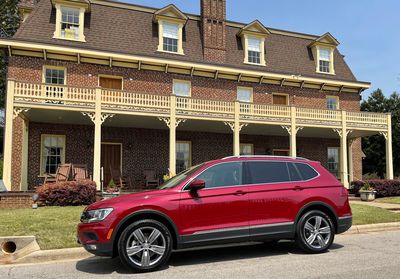
The 2021 Tiguan is available in five trims, starting with S trim at a little over $25,000 and going up to the SEL Premium R-Line at just about $40,000. My test vehicle was the SEL trim at a step below the high-end, and it comes in at around $32,500 plus destination.
The Tiguan SEL and SEL Premium R-Line come with Volkswagen's new MIB3 Discover Media system, which includes a primary 8-inch infotainment screen with built-in navigation, as well as App-Connect phone integration. For the driver, there is a Digital Cockpit instrument panel with configurable options for showing an array of information from the traditional speed, fuel, and range data to driving directions, audio details, elevation, compass, and more.
The mid-range SE and SE R-Line trims come with the MIB3 Composition Media system that offers nearly the same features as the Discover Media system with the exception of built-in navigation. The entry-level S trim comes with an older MIB2 system and a 6.5-inch Composition Color screen that only offers wired CarPlay and cuts back in other areas, so you'll need to step up to at least the SE trim to start taking advantage of the latest infotainment features.
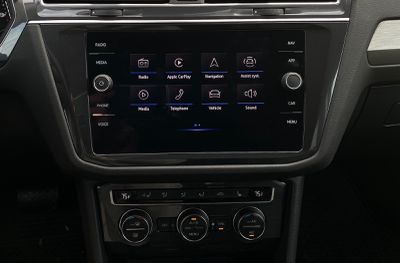 MIB3 infotainment system home screen
My overall impression of VW's latest infotainment system is that it's a relatively clean and responsive system that works well but doesn't have a lot of flash to the interface. That can be good for minimizing distraction, but I also prefer a little bit more flair to help user interface elements stand out a bit more.
VW does some interesting things with proximity and gesture sensing on its infotainment system, tracking where your hand is in front of the main display and reacting accordingly. For example, at rest, some of the on-screen icons shrink and labels fade away, but as your hand approaches the screen, they expand and some get highlights around them to help draw your attention. It's kind of a neat trick that helps deliver a simple look for the system most of the time and only complicates the visual when you're interacting with the system.
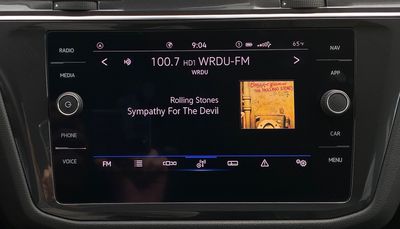 Infotainment radio screen
Gesture control also allows you to perform some basic tasks without even touching the infotainment screen, such as waving your hand to move between menus and change radio stations or audio tracks. VW isn't the only car manufacturer to try gesture controls, but they still feel like mostly a gimmick to me.
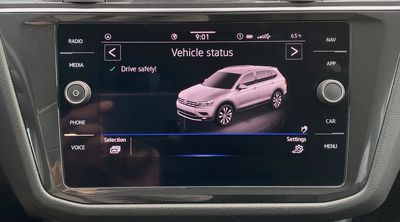 Vehicle status screen
As for the main infotainment screen itself, it's an 8-inch display with a resolution of 800x480, and that's really starting to feel like the bare minimum when it comes to a native infotainment system. CarPlay in particular feels a little bit cramped when it comes to the interface, and you don't get the bonus of extra screen real estate from the native system surrounding it since CarPlay takes over the whole screen.
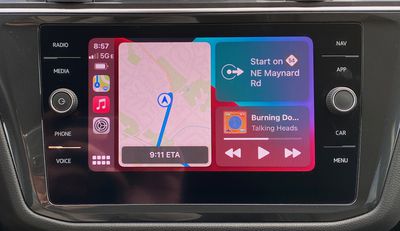 CarPlay dashboard view
I found the system to be responsive both in the native infotainment experience and in CarPlay. I also appreciated the dedicated "App" button alongside the screen to make it easy to hop into CarPlay at a single touch from anywhere in the native system. The only minor quibble I have is that I would have preferred the app button to the left of the display rather than the right for convenience, as it was one of the most frequently used buttons during my time with the vehicle.
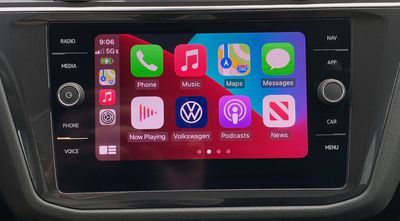 CarPlay home screen
While CarPlay takes over the entire main infotainment screen, preventing single-screen viewing of both CarPlay and any aspects of the native system simultaneously, the Digital Cockpit helps a bit in this regard, allowing for the display of additional data like audio information or turn-by-turn navigation instructions from the native system.
There's one other CarPlay trick up the system's sleeve, and that's the ability to display CarPlay turn-by-turn navigation from Apple Maps in the Digital Cockpit. Dual-screen support for CarPlay was introduced as part of iOS 13 in late 2019, but support for it has only just started rolling out to vehicles, so VW is definitely a leader in adopting it. It's important to note that the Digital Cockpit requires the SEL or SEL Premium R-Line trim, so you will need to step up toward the top end to take advantage of all of the available tech functionality.
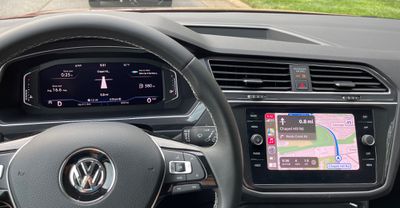 CarPlay Apple Maps with turn-by-turn navigation in Digital Cockpit
The graphics for second-screen CarPlay navigation aren't fancy on the Tiguan, but they're similar to those for the native system with directional arrows and distances for upcoming turns, street names, distance to destination, and predicted arrival time. The one area where these CarPlay directions came up a little short compared to the native system was in lane guidance, as the native system displayed them in the Digital Cockpit while CarPlay directions did not.
The convenience of wireless CarPlay pairs nicely with wireless device charging, and VW has things covered in that regard in the Tiguan with a convenient charging cubby at the base of the center stack. It fits my iPhone 12 Pro Max with a little bit of room to spare, and a rubber mat keeps your phone in place.
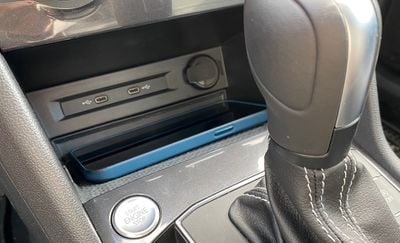 Front USB-C ports and wireless phone charger
As with many vehicle wireless chargers, it only charges at 5 watts, so it won't be able to quickly recharge a depleted phone battery, but it can help keep your phone topped off on longer road trips. The biggest win here is that the charger is standard, unlike with most manufacturers where it typically requires an upgraded package on lower trims, if it's even available at all without stepping up to a high-level trim.
For wired connections, VW has gone all-in on USB-C with a pair of those ports at the base of the center stack adjacent to the wireless charging pad. A third USB-C port (charge-only) is located on the back of the center console for second-row seat passengers. The SEL trim of the Tiguan also comes with a third row of seating, but there are no USB ports for these passengers.
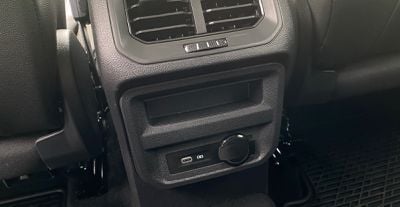 Rear charge-only USB-C port
Overall, I'm thrilled to see wireless CarPlay rapidly expanding across car brands, and the bottom line with VW is that it's done a solid job of integrating it into the native infotainment system. I do wish the main screen was a bit bigger or at least higher resolution with the ability to see more on the screen.
I'm really glad to see early adoption of second-screen CarPlay functionality, as that's a fantastic way to help integrate the two systems and use your preferred system for different functions, though you do need to move up to a minimum of the SEL trim to have access to it. I haven't yet been able to test second-screen CarPlay in a vehicle with a head-up display, but CarPlay does support turn-by-turn directions on those as well.
I also hope we'll see more options from Apple for second-screen CarPlay content, whether it be additional content types like full music support or even being able to expand a more feature-rich CarPlay experience across several screens on vehicles that have multiple large screens.
Wireless charging is always great to have alongside wireless CarPlay, so I was glad to see the Tiguan equipped with a convenient charging pad, and it's included on all but the lowest trim that lacks wireless CarPlay anyway.
Another charging port in the second row would have been nice to see to help avoid charging squabbles among siblings on road trips, and even a third-row charging port could come in handy, although given the tight fits of third-row seating in mid-size SUVs like the Tiguan, they're mostly for use only in a pinch and I wouldn't ordinarily expect them to get a ton of use on longer trips where charging is more important.




















![Apple Pulls Keynote, Pages and Numbers From App Store [Update: Back]](https://images.macrumors.com/t/Okb7kitB_gNr6qe5Pex9nQIysD8=/112x112/article-new/2026/01/Apple-Creator-Studio-iWork-suite.jpg)

























Top Rated Comments
After having adaptive cruise in both our VWs (included in many trims and reasonable packages, not just an overpriced package like other german brands) I won’t buy a car without it.
Having lived with the unusable Mazda head unit, and not wanting to deal with the convoluted Audi infotainment and overpriced MB options, we have settled on VW going forward. Taos is next…