

Apple added Thunderbolt 5 connectivity to its latest M4 Pro and M4 Max machines, and companies are starting to launch Thunderbolt 5 docks compatible with Apple's Thunderbolt 5 Macs. Earlier this year, Anker came out with the Anker Prime TB5 Docking Station, a 14-port dock with a unique design and a high-end feature set.
Docks are useful because they expand the available number of ports that you can use at one time, and add legacy ports like USB-A that Apple has discontinued. Thunderbolt 5 provides 80Gb/s symmetric data, which is double that of Thunderbolt 4, plus there is a bandwidth boost option up to 120Gb/s when displays are connected. You're able to connect more without running into bandwidth limits.
Design
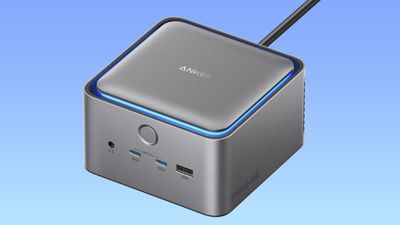
The Anker Prime TB5 Docking Station is probably my favorite dock I've used to date thanks to the design. It's surprisingly compact for a 14-port dock, with a square shape that spreads the ports across three of the sides.

The best part about the Anker Prime is the lack of a bulky external power supply. The 232W power supply is in the cube, so there's just a slim cable that needs to be plugged into an outlet, and then a cable to connect the dock to a Mac. The dock comes with both of the cables, and I do have a minor cable complaint. At $400, I wish the cables that came along with the dock were nicer, perhaps with a braided design.
I like the square form factor because it doesn't take up much space on my desk, and it's nice not to have to deal with positioning a bulky power supply. I tuck my cables inside boxes that keep them out of sight and out of my cat's mouth, and it's always a hassle trying to get a power supply and multiple cables to fit.
The Anker Prime has a power button on the front, a couple of easy access USB-C and USB-A ports for charging devices, and a headphone jack. Other ports are on the back and the sides, and I think the port layout is well designed. The ports I need to access often are at the front or the side, while things I don't need as frequently, like Ethernet or HDMI, are at the back. I do wish at least one of the downstream TB5 ports was at the front though.
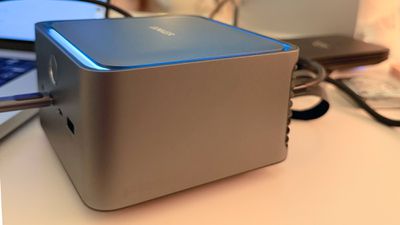
The enclosure includes a fan, and it's made from aluminum for heat dissipation. I can hear the fan, but it's a subtle sound that I'm not sure would register with other noises in the room. I'm sound sensitive and it does bother me because the dock is right by my displays, but I can't hear it listening to music, wearing AirPods, watching TV, or when the AC is on. A decibel measuring app suggests that it is around 32 decibels, which would be around whisper level.
Size-wise, the Anker Prime is 4.6 by 4.6, and it's three inches tall. If you have a Mac mini, it's around that size, but not quite as wide, and it's about an inch taller. The color is a gray aluminum. It's not as dark as the Space Black aluminum of the M4 MacBook Pro models, nor is it as light as the silver aluminum, so it's kind of an in-between shade.
There's blue LED lighting around the top of the dock when it's powered on and in use. The light isn't bright enough to be bothersome, and it can be turned off by pressing the power button.

With the fan, the enclosure doesn't get hot. It barely feels warm at all, which is a departure from docks that rely on heat dissipation without active fan cooling. I'd be surprised if the Anker Prime could overheat, given how cool it runs with multiple peripherals plugged in. Compared to other docks like the CalDigit TS5 Plus, it's significantly cooler.
Ports
At the front of the dock, there's a headphone jack, two USB-C ports, and a USB-A port. The USB-C ports offer a combined 45W of power for charging other devices. 45W is enough to charge a MacBook Air, or an iPad and an iPhone at full speed. One port will get the full 45W when just one device is plugged in. With two ports in use, the split is 30W to the first port and 15W to the second port.

The two front USB-C ports also support data transfer, but displays need to be connected at the back. The front ports offer power to accessories even when a Mac isn't plugged in, which is convenient.
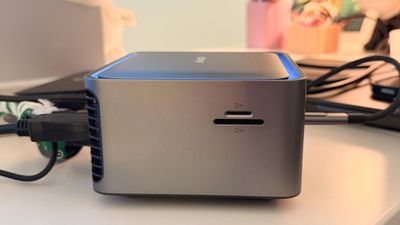
There are no ports on the right side, but there is a "Prime" logo. The left side has an SD card slot and a microSD card slot (labeled TF). The card slots are UHS-1 and limited to 104MB/s, so photographers won't get UHS-II transfer speeds.

The majority of the ports are at the back. There's an AC-in for the plug, an upstream Thunderbolt 5 port for connecting the Anker Prime to a Mac (with up to 140W charging), and two downstream Thunderbolt 5 ports with 15W bus power for SSDs and other Thunderbolt/USB-C accessories. Earlier Macs were limited to 100W charging unless MagSafe was used, but that is not a limitation on Thunderbolt 5 Macs.
There are two additional 10Gb/s USB-A ports, a 2.5Gb/s Ethernet port, an HDMI 2.1 port, and a DisplayPort 2.1 port. With the HDMI and DisplayPort, only one can be used at a time, so keep that in mind when you're dock shopping.
I don't use an Ethernet port, but it is disappointing that the Anker Prime doesn't have a 10Gb Ethernet port for those who need or want that connectivity.
Displays
Anker says that the Anker Prime supports up to two 6K displays at 60Hz, so you can run two Pro Display XDR displays, two Studio Displays, or any other combination of 6K/5K/4K displays, depending on the resolution (only one 4K display at 240Hz is supported on the Mac). On PCs, the Anker Prime supports three total displays, but Macs have a two display limit over a single Thunderbolt 5 port.

The M4 Max chip supports up to two 8K displays at 60Hz, according to Apple, while the M4 Pro supports one 8K display at 60Hz. Anker does not list 8K display support for the Mac and I don't have 8K displays to test, but it should work.
Anker says that the HDMI and DisplayPort ports can't be used together, which means two displays can be connected through the Thunderbolt 5 ports, or one can be connected using TB5 and the other can be connected via HDMI or DisplayPort, leaving a Thunderbolt port free for an SSD or other accessory.
I used an M4 Pro MacBook Pro with the Anker Prime, and I tested it with the 5K Studio Display over Thunderbolt and a 4K 144Hz display from Samsung that I connected via DisplayPort. I had no problems with connectivity over several days of testing and with various combinations of accessories plugged in. The displays and the ports worked as intended.
Though this is a Thunderbolt 5 dock, it is backwards compatible with earlier versions of Thunderbolt, which means it is compatible with older Macs. M1, M2, and M3 Pro and Max machines and all standard M4 machines with Thunderbolt 4 chips support dual 6K 60Hz displays when paired with the Anker Prime.
The aforementioned two display setup also ran fine on an M1 Max MacBook Pro. Compared to Thunderbolt 4, Thunderbolt 5 has more total bandwidth for displays and accessories, so you'll need a Thunderbolt 5 machine for the best performance and to max out the capabilities of the dock.
There is some fine print with the Anker Prime, which you're going to want to read if you have a 5K Thunderbolt 3 display. Dual 5K Thunderbolt 3 displays or a combination of a 5K display and Thunderbolt 4 display won't work with screen mirroring mode.
SSD Speed Tests
I used a Thunderbolt 5 SSD from OWC with the M4 Pro MacBook Pro and the Anker Prime. The SSD promises 6,000MB/s speeds, but I didn't quite hit that. Write speeds with the Anker Prime maxed out at about 4,675MB/s, while read speeds were around 5,140MB/s. When plugged directly into the Thunderbolt 5 port of the M4 Pro MacBook Pro, the SSD's write speeds were up to 5,250MB/s and read speeds were at 5,350MB/s. Real world speeds can vary based on the load a Mac is under, so actual transfer speeds vary.
Write speeds were consistently slightly lower, but Thunderbolt 5 transfer speeds are quick enough that it didn't bother me in day-to-day use. Transferring 50GB of photos took around 20 seconds, which is quick enough for my use.
Software
Anker has Dock Manager software that can be used to deliver firmware updates to the Anker Prime, or to tweak dock settings like disabling the light.
Bottom Line
The Anker Prime is one of the more affordable Thunderbolt 5 docks on the market, and its compact design, port array, and features make it ideal for the average user. If you have a Thunderbolt 5 Mac and want to get a dock that'll let you run displays, plug in SSDs, and use other peripherals, I don't think you'll regret the Anker Prime.
If you don't have a Thunderbolt 5 Mac, it might still be worth picking up. It's compatible with Thunderbolt 4, and it operates the same way a Thunderbolt 4 dock would, but you also have the future proofing for Thunderbolt 5 when it's time to upgrade.
While I think the dock has the right ports for most people, this isn't the dock I'd recommend for professional use or for those who want the best performance and connectivity. It's limited to 2.5GbE, there isn't UHS-II support, and there are only two USB-C ports in addition to the two Thunderbolt ports, which might not be enough for some users.
How to Buy
The Anker Prime TB5 Docking Station can be purchased from the Anker website or from Amazon for $400. At the time of this writing, you can get 20% off purchases through Anker's site with promo code Ankermacrumors2025, bringing the price down to $320.
Note: Anker provided MacRumors with an Anker Prime Thunderbolt 5 Dock for the purpose of this review. No other compensation was received. MacRumors is an affiliate partner with Anker and Amazon. When you click a link and make a purchase, we may receive a small payment, which helps us keep the site running.



















Top Rated Comments
/s
Imagine being the person who thought that what the world really needed were RS232 ports, except tiny.