

Beyond casing material and band, there are no other obvious customization options for the Apple Watch, but one product is aiming to change that. WatchDots are small, colorful vinyl stickers that change the look of the Apple Watch's Digital Crown and side button.
WatchDots come in six colors and were conceived as a way for Apple Watch Sport owners to match their Digital Crowns to their bands, mimicking the colored Digital Crowns on some of the gold Edition Apple Watches. Colors mainly match the Sport bands, in black, white, blue, pink, and green, but there's also a red option to mimic Tim Cook's own Apple Watch, which has a red Digital Crown.
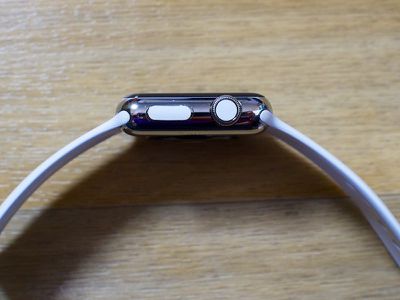
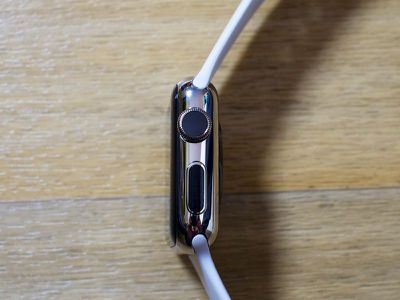
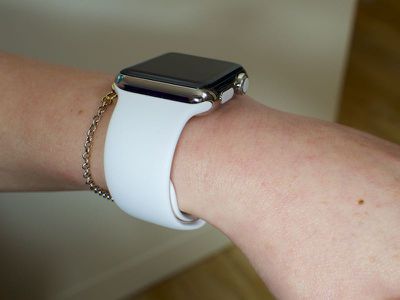
I have a stainless steel Apple Watch with a white Sport Band, so I ordered the matching white WatchDots to give them a try (I also ordered pink, but those are backordered). It's hard to wax poetic about a set of nondescript vinyl stickers, but I like the WatchDots. They tie the look of the band to the look of the Apple Watch, and they've also drawn a lot of notice -- not from the general public, but from other Apple Watch owners.
WatchDots cost $9.99, which is a bit expensive given their size in relation to a vinyl sticker you might get for your iPhone or MacBook. For that price, you get three sets of dots in your chosen color (with 3 dots for the Digital Crown and three dots for the side button), along with a bonus set in another color (mine was black).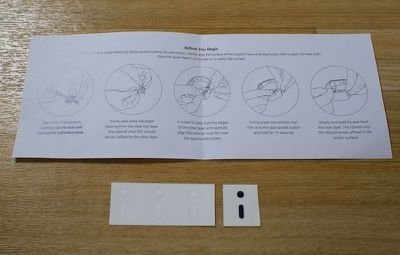
As with any vinyl sticker, you'll need some tools to apply WatchDots: a microfiber cloth to clean the Digital Crown and side button, a bright light, and some scissors to cut apart the pieces. Having applied a lot of screen protectors and vinyl stickers in my life, I looked at the WatchDots and assumed they'd be difficult to apply, but I was pleasantly surprised by a clever application method that only takes a couple of seconds.
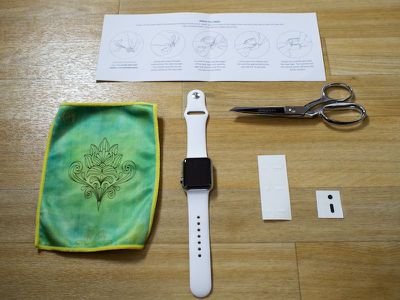
Each WatchDot sticker is backed with an opaque sticky material. You cut out a square of this around the dot, line it up on the Apple Watch, press, and hold for a few seconds. The pressure and the heat of a finger cause the decal to stick to the Apple Watch rather than the backing paper, which you can just peel away. The opaque material can make it a little difficult to see what you're doing, but with decent lighting, it's not a big deal. WatchDots' creators are looking for a better backing material, so the opaqueness may change in the future.
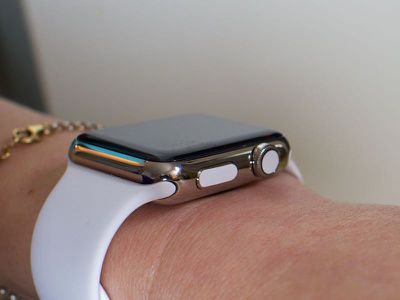
Sizing on all of the WatchDot pieces that I received was uniform and each piece fit well on the watch. On the Digital Crown, the dot doesn't cover every trace of black at the edges (my natural dot is black because I have a stainless steel watch), but were the dot any bigger, it doesn't look like it'd fit securely. The same goes for the side button sticker -- it's not edge to edge, but that's not possible because the button is somewhat curved.
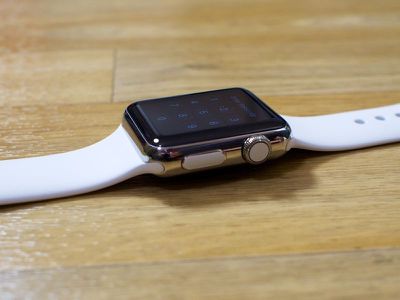
WatchDots creator Jason Fournier tells me the ideal size of the WatchDots was determined after a lot of prototyping and testing. An edge-to-edge design for both buttons was tested, but it left no margin of error for applying the films, making alignment difficult. "Because of this," he said, "we intentionally chose a slightly smaller size to allow for human error."
My WatchDots have been on my Apple Watch for about two weeks now and they're looking as good as new. There's been no peeling, even when my watch has gotten wet, and using the Digital Crown and side button a lot hasn't affected them. Since this is a review, I put on and removed several sets of WatchDots, and I can safely say they're not going to cause any damage to your watch. You can peel them right off with a fingernail, but like most vinyl stickers, they're not reusable.
I asked Fournier how the idea for WatchDots was conceived, and he told me the concept came to the WatchDots team after seeing the difference between the Apple Watch Sport and other Apple Watch models.
On the Edition model the Digital Crown is color-matched to the band. On the stainless steel model the Digital Crown is black. Apple has set a precedent that a color-matched crown is a desirable look and our goal was to bring that to the lower-cost watches with a high-quality, inexpensive product.
Because they were conceived to match the Apple Watch Sport, WatchDots are available in a limited number of colors for the time being, but Fornier says new colors will be coming in the future. Orange, yellow, and gold have been popular recommendations from customers, and the WatchDots team is also exploring different materials and textures.
My own suggestion was emoji WatchDots, a request Fornier says the WatchDots team is looking into as part of an expansion into graphics, icons, and other custom designs, so at some point in the future, we may be able to decorate our Apple Watches with smileys, hearts, and other little characters. Jony Ive probably won't approve, but the Apple Watch was designed to be personalized.
Bottom Line
WatchDots aren't going to appeal to everyone, but I like the look of a Digital Crown that matches my band, and many Sport Watch users may agree. At $9.99, WatchDots are definitely pricy, but they're the most affordable way to add a bit of flare to your watch.
How to Buy
WatchDots can be purchased from the WatchDots website for $9.99. Each purchase includes three sets of WatchDots in your chosen color along with a bonus random set.
Update 3/31/16: I removed the WatchDots from my Apple Watch after having left them on for several months and there was a residue left behind. This didn't happen the first few times I removed the WatchDots, but I recommend using with caution.
Note: MacRumors received no compensation for this review.



















Top Rated Comments
I'll take some jewel stickers out of my daughter's bracelet set and stick them to the crown so it's bedazzled.
:(
I suppose a sucker is born every minute.
I don't mean to be rude, but that looks