

For many people, the iPhone serves as their main camera, and images captured with the device often live on smartphones, computers, and social networks. Printing photos for display requires additional hardware or the hassle of ordering online and waiting for pictures to arrive.

Aura Frames aims to make your photos more accessible through digital picture frames, which connect to power and cycle through the images and videos that you've taken with your iPhone. Aura has a range of frames available at different price points, but this review focuses on the Mason, which offers a nine inch HD display.
At $199, the Mason is not cheap, but there are lower priced options and Aura has sales around holidays. The Mason has an HD display (1600x1200) that isn't as high quality as the 2K display offered on some higher-end models, but it does have the versatility to be used in either portrait or landscape mode, which is a plus.
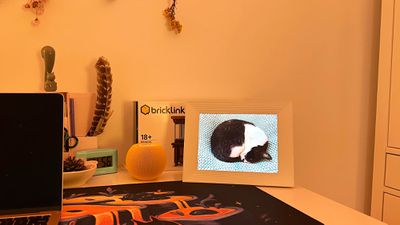
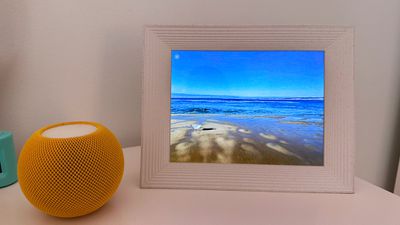
Basically the Mason is an LED display inside of a picture frame, and it connects to your WiFi network and plugs in to show a rotating selection of images that you choose. The frame measures in at 9.7 inches tall and 7.6 inches wide, and it is about two inches thick, so it's not too far off from a larger-sized 8x10 photo frame that you might have on a desk or a bookshelf. It is fairly thick at two inches, but this allows it to stand up on its own in either orientation.
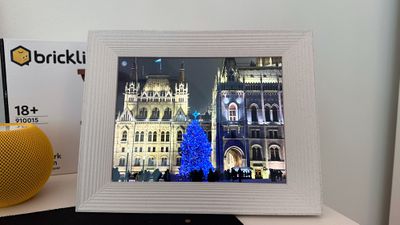
Setup consists of plugging it in and using the Aura app to connect to WiFi, and it's a fairly painless process. Note that you are going to need a 2.4GHz network as it is not compatible with 5GHz, which is a downside. Sometimes trying to set up on a mixed 2.4GHz/5GHz network can be a hassle that requires some troubleshooting, but it was seamless for me.
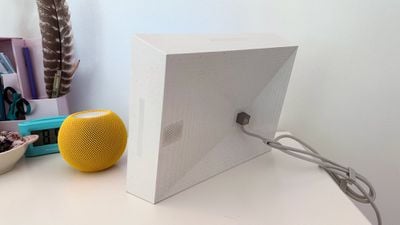
Since this is an LED display, it needs constant power, so you need to set it up near an outlet and deal with a cable. It has a proprietary cable that plugs into the back, and the braided cord is a good length so you should be able to set it up almost anywhere. It comes with cable management clips so you can neatly wind up any extra cord that's not needed, tucking it behind the frame. There's a speaker in the frame for video content, and while it's not the best speaker I've heard, it's decent enough. I personally don't care for sound, so I have that turned off.

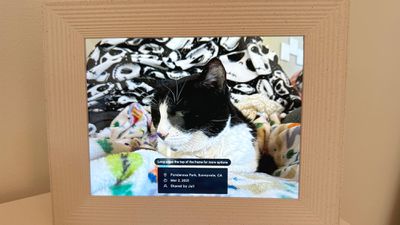
At the top and side of the frame, there are touch-based controls for swapping photos with a swipe, excluding a photo from the slideshow, or deleting a photo. Videos can be set to play automatically, and it's worth noting that Live Photos will also animate. The frame does attempt to put the subject of an image in the middle and will zoom in on images that are in the wrong orientation or add black bars to the sides. Sometimes the framing has been off, but that can be adjusted. Images can also display information about where they were captured, which is useful for vacation photos.
Using the Aura requires an iOS device that's running iOS 13 or later, or it works with an Android device using Android 5.0 or later. Cross-platform functionality is nice because it means that everyone in the family can contribute photos to the Aura by downloading the Aura app.
In the app, you can see each Aura you're connected to in the sidebar, and there are options for setting it up for yourself or for someone else. I have used both workflows, and for a gift, it's handy because you can add photos to it before it's ever provided to the person using a special code.
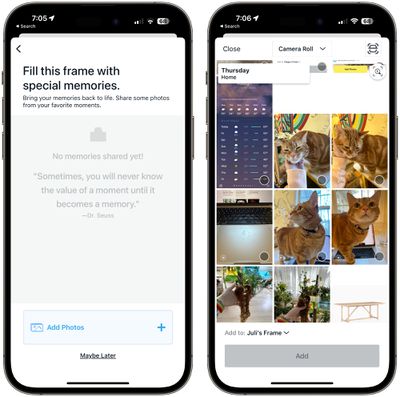
You can invite multiple people to contribute photos to an Aura frame, and all they need to do is download the aura app and make an account. Every person in the family can have an Aura frame, for example, and contribute images to the frames owned by other family members. I gifted a frame to my mother in law, and have set it up so six people can add images of family members, kids, pets, and more.

On the frame I've been testing, it's set up so I can add images, and the image process is simple. You just tap on the "Add Photos" option and go through your camera roll to decide what to upload. Note that between selecting photos and tapping on the upload option, there is no preview feature, so don't misclick. I would like to see an option for previewing what you're going to upload, especially on someone else's frame.

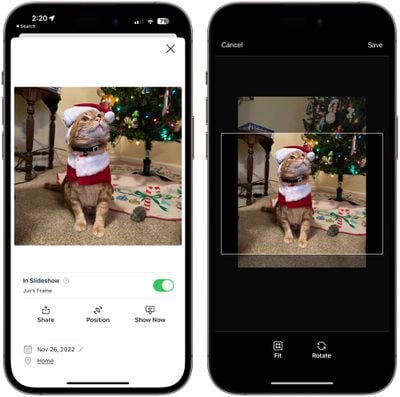
You can view all of the photos uploaded to an Aura frame that you have access to, whether it's your own or owned by a friend or family member. For any uploaded image, you can change the position or select the "show now" button, which displays it right away.
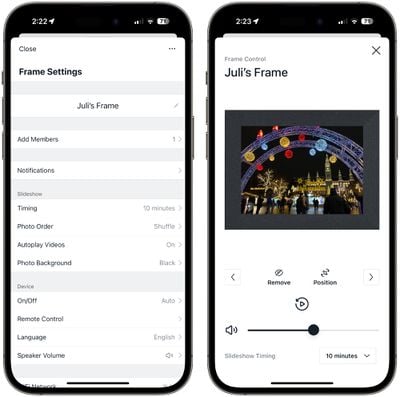
In the Settings section, you can adjust the time that each photo is displayed, change the photo order from shuffle to chronological and vice versa, adjust video autoplay settings, and choose the photo background for when photos don't take up the entire display.
There are also options for choosing when a device is on, adjusting the speaker volume, and a Remote Control function shows what's on the frame at the current time so you can swap photos or remove the current photo. These controls are available for any frame that you have access to, even if it isn't owned by you.
All upload activity is shown in an Activity feed, and if you have a frame owned by multiple people, you'll sometimes see an alert that you have photos from a similar time that you can add to the frame, which is a useful addition.
Bottom Line
Testing the Aura for this review was the first time I've used one myself, but I have given them as gifts to family members in the past, so I am familiar with the product over a long period of time. Everyone who has an Aura or sees the Aura seems to be a fan of it, and I've found that it makes a great present.


Minimal tech experience is necessary to use the Aura, so it works for all ages, and if someone isn't able to figure out how to use the frame, family members are able to upload photos. Multiple Aura frames among friends and family makes for a fun way to share photos.
I've appreciated having the Aura on my desk over the last couple of weeks because it gives me a way to visit my favorite photos on a regular basis without having to print them or go into the Photos app to view them. In the future, I think it would be nice for Aura to add organization and different slideshow options similar to the Apple Photos app, but even in the current incarnation, the Aura is one of the best ways to display digital images.
How to Buy
The Aura Mason frame can be purchased from the Aura website or from Amazon.com for $199. Other Aura frame options are also available with different sizes, designs, and higher resolutions.

























![Apple Pulls Keynote, Pages and Numbers From App Store [Update: Back]](https://images.macrumors.com/t/Okb7kitB_gNr6qe5Pex9nQIysD8=/112x112/article-new/2026/01/Apple-Creator-Studio-iWork-suite.jpg)




















Top Rated Comments
Sure, there's the argument of "who needs a device dedicated to this," but in proper paradoxical minimalist fashion (minimalism with not less things, but more specific purposes for those things), I love having this sitting on a bookshelf, casually sifting through photos over time without my intervention. In fact, I need to upload more of my favorite photos to it.
Sometimes I'll pass by it and a photo sticks out to me and makes me pause in my tracks to remember it. For me, this is worth the auto-changing feature of the frame. Being pleasantly surprised by something I forgot.
Plus, I HATE doing useless menial tedious tasks, such as the idea of swapping photos even if once a year, when this frame can just sit there and do it for me. Technology's job was always supposed to be doing things so we don't have to…
That said, I'd love to see a better utilization of old iPads. I'm surprised no one is making dedicated iPad stands and frame cases. But I also wonder if iPads would burn more electricity?
😺